
SvetaG
2 years agoOccasional Contributor
Dynamic Object
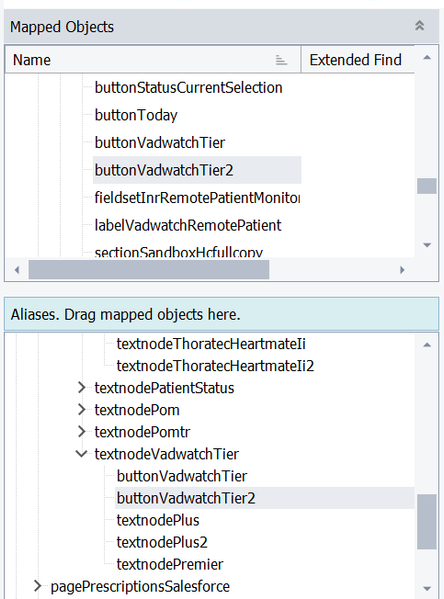
Hi All! HELP!!! How exactly can I update Dynamic Mapped Object, if after each run - numbers on the end changed for the same field? Thanks!

I am guessing you would like to use the same mapped object all the time for this one UI element. Is that correct? if so, you will need to change the properties associated with the mapped object. It might help to show us a screenshot of the attributes (ie: properties) associated with the mapped object (I'm talking about the area to the right of the 'Mapped objects' and 'Aliases' frame).
See the below image. You are going to have to do similar to what I did below. The TestComplete NameMapper is naming the object something different every time because the attribute you are using the identify the object is changing every time. Look at the picture below. the 'WndClass' and 'WndCaption' and 'ClassName' are all attributes (ie: properties) of the UI object which I use to identify and grab a particular UI object.
There are two ways to fix this issue ...
Solution 1: You could choose different attributes (properties) to identify (grab) this UI object. To do this ... (1) right click anywhere in the white area (like shown below) and (2) select 'Edit'. (3) you will see a dialog pop up with a list of attributes for this UI object; chose attributes (properties) which you think would be better at grabbing (identifying) this particular UI element.
note the problem with this is that you might not know what would be good attributes (properties) or not good attributes (properties) to use.
Solution 2: An alternative (and the solution i would choose) would be to modify the value of some of the attributes. See, it is not the name mapping which is actually giving your problems ... it is the attribute (property) used to grab and identify that UI object which is giving you problems. If you want to use the attributes (properties) TestComplete has already selected (TC is usually pretty good at picking properties to use as UI object grabbers, so this is what i would do), but want to use only one Mapped Object for this one UI object (which seems to be your goal), then do the following: (1) double click on the property with random numbers in it (as shown below). (3) Anywhere there are random numbers in the value, delete the random number part and reaplce these with an '*' (like I did below) and click 'OK' when done. (4) delete all the other junk aliases and Junk mapped objects (for you, deete buttonVadwatchTier2) you have created to clean up your mappings (5) look through your keyword tests and script tests and remove any reference to the junk aliases and junk mapped object which you deleted in step 4 (in other words, look through all your tests and delete any step that uses 'buttonVadwatchTier2').
Now when you click on this particular UI object while recording, it will always use this Name-Mapped object within your keyword tests and script tests.

Hi torus! Thank you for the answer! I am trying to follow your steps, but I don't have any 'WndClass' and 'WndCaption' and 'ClassName' instead of those I have xpath and css. Any idea how to switch to different view? Thank you!
Okay, you are working with a web application (browser based application). The name mapping in mine was for a desktop application.
I wish you would have shown a screenshot of buttonVadwatchTier2. We need to see the properties for both to see what is changing.
Also, delete (or uncheck) the row that says 'css: Add selector'. That is a junk row that might be confusing TC.
Since i can't see what differs between buttonVadwatchTier attribute values and buttonVadwatchTier2 attribute values, I am going to guess at a possible solution.
Try changing the xpath to:
//button[contains(@id,'None')]It will help a ton in the future when dealing with xpaths and css selectors (UI object grabbers) to memorize how to create good xpath and css values. Nowaday you can use Chat-GPT to figure out what the xpath/css selector should be :)
Thank you so much torus for the quick response! Adding some screenshots for buttonVadwatchTier and also more with the same problem ( I have the same issue almost for all fields)
Here is the data for dropdown menu with the same issue and every time xpath is different.
Thank you!