We are building a new experience for our SmartBear Community.
This site is now read-only. You can still browse and search as usual. Learn More
This site is now read-only. You can still browse and search as usual. Learn More


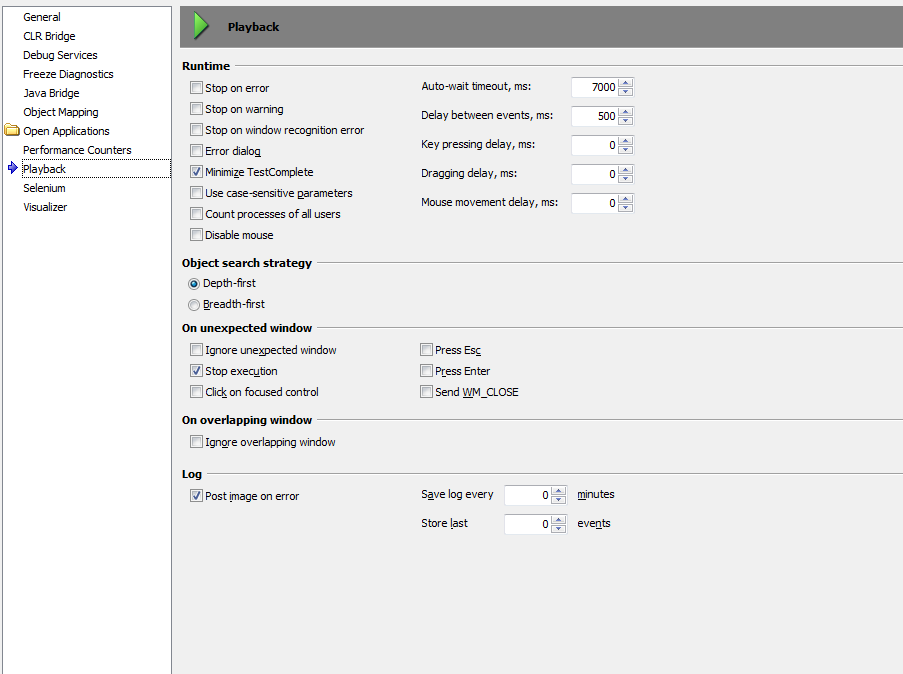
You have the "stop execution" flag checked on the On Unexpected Window portion of your engine setup. Turn that off.
That is still processed on an unexpected window. The event handler executes first when the event is triggered. Then, after the handler does it's thing, it will continue with what's indicated. If you don't want the test run to halt, just turn off that flag.
You have the "stop execution" flag checked on the On Unexpected Window portion of your engine setup. Turn that off.
That is still processed on an unexpected window. The event handler executes first when the event is triggered. Then, after the handler does it's thing, it will continue with what's indicated. If you don't want the test run to halt, just turn off that flag.

That fixed the problem! Thanks!