PUT /v2/testcycles/{key} ignores folderId field and removes folder assignment
SMARTBEAR ZEPHYR SCALE BUG REPORT ================================== TITLE: PUT /v2/testcycles/{key} ignores folderId field and removes folder assignment PRODUCT: Zephyr Scale Cloud API VERSION: v2 (REST API) DESCRIPTION: When updating a Test Cycle using the PUT endpoint /v2/testcycles/{key}, the API completely ignores the folderId field in the request body. Additionally, as a side effect of any PUT operation, the cycle's folder assignment is removed (set to null), even when explicitly including the original folderId in the request. STEPS TO REPRODUCE: 1. Create a Test Cycle with a folder assignment: POST /v2/testcycles Content-Type: application/json { "name": "Test Cycle Example", "projectKey": "PROJ", "folderId": 55869097, "description": "Test cycle in folder" } Response: Cycle created successfully with folder assignment (OK) 2. Verify the cycle has folder assigned: GET /v2/testcycles/PROJ-R50 Response includes: "folder": {"id": 55869097} (OK) 3. Update the cycle status while preserving folder: PUT /v2/testcycles/PROJ-R50 Content-Type: application/json { "id": 112825457, "key": "PROJ-R50", "name": "Test Cycle Example", "project": {"id": 723549}, "status": {"id": 13932952}, "folderId": 55869097, "customFields": {"Comment": "Updated via API"} } Response: HTTP 200 OK 4. Verify the cycle folder after PUT: GET /v2/testcycles/PROJ-R50 Response includes: "folder": null (FAILED - folder was removed!) EXPECTED BEHAVIOR: - The PUT endpoint should accept and process the folderId field in the request body - The PUT endpoint should preserve the existing folder assignment if folderId is not provided - The PUT endpoint should allow moving cycles between folders by specifying a different folderId ACTUAL BEHAVIOR: - The folderId field is completely ignored in PUT requests - Any PUT operation removes the folder assignment (sets to null) - There is no workaround to update cycle fields while preserving folder - A second PUT attempt to restore the folder also fails ATTEMPTED WORKAROUNDS (all failed): Attempt 1: Send folder as object Request: {"status": {...}, "folder": {"id": 55869097}} Result: folder = null Attempt 2: Send folderId as number Request: {"status": {...}, "folderId": 55869097} Result: folder = null Attempt 3: Minimal body with status only Request: {"status": {...}} Result: Error - missing required fields (id, key, name, project, customFields) Attempt 4: Full body with all required fields + folderId Request: Complete body with id, key, name, project, status, folderId, customFields Result: folder = null Attempt 5: Second PUT to restore folder after status update Result: folder still null IMPACT: - Severity: High - Workaround: None that preserves both status and folder - Current mitigation: Skip status updates to preserve folder organization This breaks CI/CD integrations that need to update cycle status after test execution while maintaining folder organization. ENVIRONMENT: - Zephyr Scale Cloud - API v2 - Project ID: 723549 - Folder IDs tested: 55869097, 55647404 ADDITIONAL INFORMATION: - POST /v2/testcycles correctly accepts and uses folderId (OK) - GET /v2/testcycles/{key} correctly returns folder object (OK) - PUT /v2/testcycles/{key} ignores folderId and clears folder (BUG) - No documented endpoint exists for /testcycles/{key}/folder to move cycles between folders27Views0likes0Comments
Can I fetch Zephyr Test Execution Status value Directly with API
I am using the Zephyr Scale API to fetch the test execution from test cycle using endpoint "/v2/testexecutions/nextgen" https://support.smartbear.com/zephyr-scale-cloud/api-docs/#tag/Test-Executions/operation/listTestExecutionsNextgen In response I am getting execution like below format "testExecutionStatus": { "id": 9635655, "self": "https://api.zephyrscale.smartbear.com/v2/statuses/9635655" }, So, To fetch the execution status value I need to make another API call endpoint "v2/statuses/9635655" that return the response with value of status "name": "Not Executed", instead of making multiple call for statuses can I fetch the status of test execution with single call?65Views0likes1Comment
504 Gateway Timeout (CloudFront) on /automations/executions/custom with ~1000 executions
I'm using the Zephyr Scale Cloud custom automation format endpoint (POST /automations/executions/custom) to import test execution results in bulk via a zip file containing a JSON results file. The zip file is small (~4.3KB compressed, ~133KB uncompressed) and contains 1027 test execution records in the standard custom format: { "version": 1, "environment": "...", "executions": [ { "result": "Pass", "testCase": { "key": "PROJ-T12345" } }, ... ] } Request details: Endpoint: POST /automations/executions/custom?projectKey=PROJ&autoCreateTestCases=false Body: multipart/form-data with `file` (zip) and `testCycle` (JSON) fields Auth: Bearer token, confirmed valid (a deliberately malformed request returns a fast 400 Bad Request, confirming auth/routing work correctly) The issue: When submitting the full 1027-execution zip, the request consistently times out at ~60-61 seconds with a 504 Gateway Timeout returned by CloudFront (not by the Zephyr application itself): HTTP/1.1 504 Gateway Timeout X-Cache: Error from cloudfront Via: 1.1 ....cloudfront.net (CloudFront) I reproduced this twice independently using curl directly against api.zephyrscale.smartbear.com, both times timing out right at the ~60s mark, which matches CloudFront's default origin response timeout. This suggests the backend is taking longer than 60 seconds to process the full batch of executions, and CloudFront is terminating the connection before a response can be returned. Questions: Is there a documented or recommended maximum number of executions per request for this endpoint? Is there a way to increase the origin timeout for this endpoint, or does it support asynchronous processing (e.g., a 202 Accepted + polling pattern) for larger imports? Is there a better-supported way to bulk-import ~1000 executions into a single test cycle in one request? Or should I accept that I need to split this into multiple requests against the same test cycle to stay under the timeout? Any guidance on the practical limits of this endpoint would be appreciated.100Views0likes0Comments
API for report generation
Hello, I would like to know if there is any API available for Zephyr reports. As we are able to download the reports, for example, Test execution summary.pdf from Zephyr cloud. I want to download/generate them automatically using an API call and upload or publish them in a different location. Could someone please help me with the same? Kind Regards, SK133Views0likes1CommentPOST - create test script: step by step issue
Hello, I am using Zephyr Scale Cloud and encountering an issue when editing test steps. I am successfully able to: Create a new test case using POST /v2/testcases with the following JSON: { "projectKey": "DZIA", "name": "Login Test" } Edit steps for plain text scripts using: POST /v2/testcases/DZIA-T176/testscript { "type": "plain", "text": "e.g. Attempt to login to the application" } However, I am unable to update test steps one by one (step-by-step) as described in the documentation. The documentation states: To define your own test steps, use the POST /testcases/{testCaseKey}/teststeps endpoint after creation using OVERWRITE mode AND For Plain Text scripts, we support HTML fragments. To create a step-by-step test script, you should use the POST /testcases/{testCaseKey}/teststeps endpoint. POST /v2/testcases/{testCaseKey}/teststeps?mode=OVERWRITE with a JSON body: [ { "description": "Your step description", "expectedResult": "What you expect after the step" }, { "description": "Next step description", "expectedResult": "Next expected result" } ] …but this request does not work. Response: { "errorCode": 400, "message": "Invalid Payload" } Questions: Is the provided JSON structure correct for importing step-by-step instructions? Could you provide an explicit example (expected JSON payload) for step-by-step test steps? Thank you guys!126Views0likes1Comment
Why are test steps or BDD scripts not visible in Zephyr Scale UI when created via API?
Hello Zephyr Community, I am automating test case creation in Zephyr Scale Cloud using the REST API. My workflow generates test cases with either “Step by Step” steps or BDD-Gherkin scripts (using testScript.type = "GHERKIN" and a “text” field). The API call succeeds and the test case is created, but in the Zephyr UI, the “Test Script” section either shows as “Step by Step” with no steps, or as “BDD-Gherkin” with no script visible. If I manually set the script type and paste the steps or Gherkin scenario in the UI, everything displays as expected. Questions: Is there a known limitation or required configuration for making test steps or BDD scripts visible in the UI when creating/updating test cases via API? Are there any required fields or payload formats to ensure the UI displays the steps or Gherkin script? Is there a workaround to automate this fully, or is manual intervention always required after API creation?103Views0likes0CommentsZephyr scale advanced search option limitation
Hello All, We have recently moved from zephyr squad to scale and with this change, all our jira dashboards stopped working as Scale does not support jql anymore. Infact, Zephyr scale does not have any advanced search option like zql to write query that gives flexibility and same can be reuse in creating gadgets. We use labels in Jira and Zephr scale and the problem is here, for a multiple value field filtering works in 'OR' case and there is no provision to use the same field in 'AND' condition. We are stuck in deriving certain KPIs like automation coverage, Automated cases as we manage those using labels. If anyone figure out solutions for this search limitation, please let me know.89Views1like0CommentsNeed help with Zypher gadget /Graph for Test execution
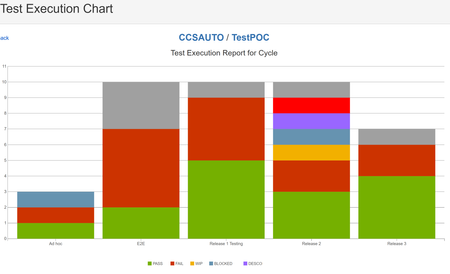
Hi , I am using Zephyr Squad - Test Management for JIRA 16308 Users: COMMERCIAL License. I am trying to get Total test cases for all cycles as overall and its % completion and % execution in gadget as count or as matrix table. The Zephyr graph below shows testcases but its grouped by cycle or components. I want to show overall % for test execution and test completion (for single version TestPOC) Is there a way to show total sum on column wise or row wise and also % completion and % execution based on formula .... Thanks in advance for your help and support!!105Views0likes0Comments