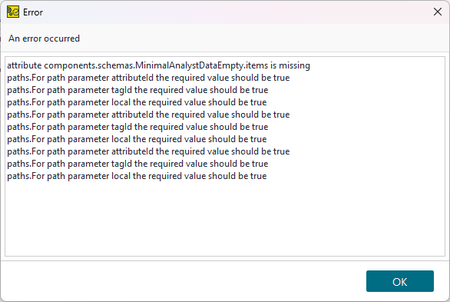
Errors trying to import API definition
All, I am really new to ReadyAPI and from what I've read, the first step to test an API is to upload the definition. When I try to accomplish this, I get errors. Being new I have no experience in troubleshooting this type of problem so I thought I'd ask the experts here for help. The API is for an application called MISP owned by CIRCL. The API comes from the CIRCL company and is freely distributed from what I can tell. When I try to load the yaml into ReadyAPI I get this: Any help in trying to figure out what's going on will be appreciated. ~Ed249Views0likes2Comments
Best Practices for Testing HTTP/2 Steps
Hi everyone, I’m working on a project that involves testing steps using the HTTP/2 protocol. I need some guidance on how to approach this effectively. What tools and methods do you recommend for testing HTTP/2? Any advice on setting up the testing environment and avoiding common pitfalls would be greatly appreciated. Thanks for your help!89Views0likes0Comments
ReadyAPI project password need to reset .
I recently created a password for my project, but it has stopped working, and I'm unable to load the encrypted properties. The password is visible in my settings.xml, but when I try to load the project, it fails with an error message. Can anyone suggest how to resolve this issue? --- ReadyAPI205Views0likes2Comments
event handler target to exclude a specific test suite
Hi all, in my current test project, I want an event (TestRunListener.beforeRun) to be run before each test case except of the test cases of one certain test suite. Example: Testsuite 1 - TestcaseA, Testcase B Testsuite 2 - Testcase C Testsuite Utils - Testcase Utils A, Testcase UtilsB The event should only be executed for all Testcases except UtilsA and Utlis B. I tried some Regexes in the target field, which resulted in the event not being executed at all. How can this Regex be built for my purpose? Thanks112Views0likes1CommentHow to connect to Azure blob storage in Ready API
How to connect to Azure blob storage Ready API if i have container-sas-url: https://test.window.net/container-name?tx=XXXX container-name: test container credential: client-id: XXXXXXXXXX client-secret: XXXXXXXXXXXXXXXXXXXXXX profile: tenant-id: XXXXXXXXXXXXXXXXXXXXXXXXX62Views1like0Comments
How do you reuse your ReadyAPI Groovy scripts if you want to run tests in a pipeline?
"Create custom Groovy classes, embed your reusable Groovy scripts into their methods, save them as separate files with the .groovy extension and voila - your Script Library is ready. You just need to point ReadyAPI where to find it (Preferences > ReadyAPI > Script library). If you change anything in those external classes, ReadyAPI will detect this and reload the classes automatically." Does this work if you're running the tests in a pipeline or from a commandline on your local machine? How would you point your commandline run script to the groovy script library? And where would you recommend keeping this library if it is being used in multiple projects? We have multiple projects but kept within the same repo (not using git's integration with readyapi, as this doesn't allow for multiple projects in the same repo). Ideally what I want is for someone to pull down the tests from git and then just open up readyApi and be able to run the tests. I don't want them to have to do lots of configuration to be able to run the tests.410Views0likes2CommentsTestEngine external JAR files - error - unable to resolve class
Background - We have test engine hosted on some linux server and we execute tests suing CURL cmd or POSTMAN. Given some external JARs When we add external JARs in /bin/ext folder of test engine server and re-start the test engine And run the tests using curl command from locally or using POSTMAN Then it throws error for groovy script test step saying unable to resolve class <className present in external JARs> on import statement itself. We have also configured .vmoptions of test engine server to read ext JARs but still it throws error. Locally, In ReadyAPI, we are placing those JARs in /bin/ext/ folder and it works perfectly fine. Any solution to this problem?391Views1like2Comments
how to change test step name when save test results
Hi, I'm trying to save test result into a file with following scripts. def pName = context.currentStep.testCase.testSuite.project.name //get project name def pDate = new Date().format( 'yyyyMMdd' )//get current date def sDate = pDate.toString()//convert date to string def pTestSuite = context.currentStep.testCase.testSuite.name//get TestSuite name def pTestCase = context.currentStep.testCase.name//get TestCase name def filePath = 'E:/Data/Dean Ding/CRD files/CRD_results_test/'+pName+'_'+sDate+'/'+pTestSuite+'/'+pTestCase+'/'//compose the folder path File file = new File(filePath) if (!file.exists()) file.mkdirs()//create the destination folder fos = new FileOutputStream(filePath+ testStepResult.testStep.label + '.txt', true) pw = new PrintWriter( fos ) testStepResult.writeTo( pw ) pw.close() fos.close() but as my test step name contains symbols like : , " such special symbols which not accepted when create txt file due to naming convention, as there are more than 1000 cases it will take such long time to change my test step name,I found script to replace those symbols but don't know how to make it change when use above script to save test results. It will be much appreciated if anyone can provide the scripts.373Views0likes2CommentsRunning api tests in parallel
I am used to creating api tests using nunit and specflow. With this setup, the tests can run in parallel. Tests can be grouped so that, although you are running your tests in parallel, the tests in the group still run in series. For example, lets say one of your tests is to create an object ... well after you create the object, you might want to delete the object (clean up) ... so you would want to run these test in series because there is a dependency.Solved595Views0likes1Comment