How to define both fixed and dynamic fields in request body (visible in Swagger/Mintlify UI)?
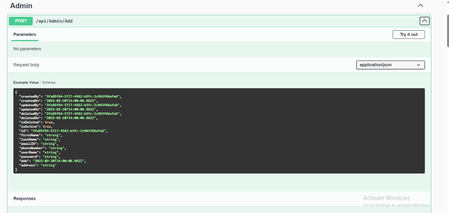
I'm working on an OpenAPI 3.0 specification and I need to define a request body schema that includes: Two static fields: title (string) and description (string), both required Additional dynamic/custom fields with unknown names and values that can be complex (objects, arrays, strings, etc.) I have tried using additionalProperties like this: { "type": "object", "properties": { "title": { "type": "string" }, "description": { "type": "string" } }, "required": ["title", "description"], "additionalProperties": true }
Info object is ignored in swagger ui
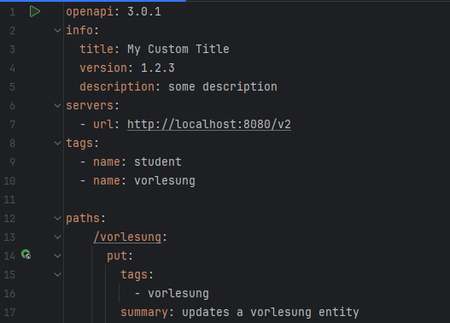
When I view the REST api of my spring boot application in swagger-ui, the info object (title, version and description) of my yaml definition is ignored and only default values ("OpenAPI definition", "v0", no description) are shown. Why could that be? yaml: swagger-ui:Regarding Invalid Client on jackhenry DMZ loan Vantage Postman Collection to get access token
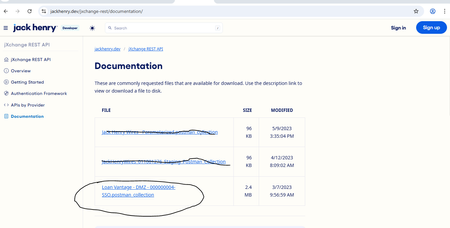
I am getting error invalid client as you can see in the attached screenshot, despite after entering the Client_id and Client_secret I should be able to get the access token but getting again and again :- { "error": "invalid client" } does anybody have an idea of this error, because without the access token I won't be able to proceed further so if anyone has any idea or has consumed this, suggest me it would be very helpful For more information I am attaching the Url:- https://jackhenry.dev/jxchange-rest/providers/loanvantage/api-reference/#/Document/DocumentCreate Also I am attaching the screenshot of the documentation of LoanVantage DMZ that I have imported in postman as per the guidelines in the documentation.Managing Multiple Auth Methods in Swagger UI
Hello everyone, I'm currently working on a Laravel project and facing a challenge with defining multiple authentication types in L5-Swagger. My app uses both HTTP Bearer Token (token) and Laravel Passport (passport). I want passport to act as a fallback only when the token isn't defined. (Purpose of the fallback authentication is protecting our endpoints from unwanted calls with predefined credencials.) I want to instruct Swagger UI to correctly select the preferred token in the request headers. This would ensure that users testing the API through Swagger UI use the appropriate authentication scheme (token) by default unless it’s unavailable, in which case passport should be used. Based on OpenAPI logic, security schemes can be combined using logical OR and AND. Here are my desired rules: Primary: Prefer token for authentication. Fallback: Use passport only if token isn't defined. User-Specific Endpoints: Certain endpoints strictly require the token and, due to mutual exclusivity, will not allow passport. Flexible Endpoints: Other endpoints can accept either token or passport. According to OpenAPI docs, I can structure the security configuration as follows: 'security' => [ [ 'token' => [], ], [ 'passport' => [], ], ], My Questions: Is this the correct way to prioritize token over passport in L5-Swagger? Are there better practices to structure authentication hierarchies in Swagger docs for Laravel applications? Any help or suggestions would be greatly appreciated! Thanks in advance! :) Star
Modify base URL
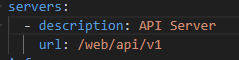
How can I modify the base URL in Swagger UI that is used to concatenate with the service endpoints? For example, we use this URL to access Swagger in our project: https://mydomain.com/AR900115//apidoc/catalogo.html, and in the .yaml configuration file, we only have the following defined in the servers section: This causes an issue because every time we try to test an API in Swagger, we get a 400 error since it constructs the URL incorrectly, like this: https://mydomain.com/web/api/v1/jerarquiaMkt/?CodScan=1010, Instead, it should be: https://mydomain.com/AR900115/web/api/v1/jerarquiaMkt/?CodScan=1010 (In this example, the API being tested is jerarquiaMkt)
Swagger UI rendering issues
Hi Our team faced following issue https://github.com/springdoc/springdoc-openapi/discussions/2868 after updating to the latest version. For now we are using workaround provided in answers of this thread and related issue. But, it would be nice to have Swagger UI rendering correction for OpenAPI 3.1. Thank you
Swagger UI - Documentation for end user?
Is there any general documentation on navigating Swagger UI for end users? We've written our own, but I would like to also link to any existing guide that gives an overview of the Swagger UI. I'm hoping SmartBear has something out there like this, but a bit more detailed. Topics might include: An overview of the page layout. Example Value vs. Schema (under the Responses area), how to navigate them. What GET vs. POST vs. PUT vs. DELETE buttons do, generally speaking. The Schemas area at the bottom, why it's useful, and how to navigate it. Thanks!