Status": "TH99401: Invalid Client Certificate
Hello Team , We have recently bought an SSL certificate and implemented it in our AWS environment. We can observe that the SSL certificate is already been imported successfully "https://decoder.link/sslchecker/athos-api-uat.happy-tech.in/443". Our main purpose to buy the certificate was to make 2-way handshaking with one of our partners however when we do it we get failure. Steps we did:- -Configured certificate into our Aws Load balancer. -Checked "https://decoder.link/sslchecker/" and our https works fine -Hit the API from our server to our partner with body and got the below error. HTTP/1.1 401 Unauthorized Content-Type: application/json;charset=UTF-8 Content-Length: 276 Date: Fri, 16 Oct 2020 11:30:16 GMT Server: myServer { "RequestEncryptedValue": "", "RequestDigitalSignatureValue": "", "SessionEncryptedValue": "", "SessionDigitalSignatureValue": "", "Source": "Happy_Lead", "TransactionId": "2018-10-11T15:04:14.900+05:30", "Status": "TH99401: Invalid Client Certificate" } - Just to narrow down our problem, we installed SOAP UI and tried to hit the API with Keystore(our private key in .p12 format) and trust store (our partner's public key). - We got the same error, so to further narrow down, we generated a self-signed SSL certificate and tried with that, and it got a success . What can we check next?Solved2.8KViews0likes4Comments
How to set Property Value of Sub Node of XML file in SOAP UI?
Hi Team, Thank you very much in advance. I have xml in the below structure and i need to update values to sub nodes using Groovy script to automate the TestScripts. <soap:Envelope xmlns:soap="http://www.w3.org/2003/05/soap-envelope" xmlns:inb="http://sap.com/xi/FI-Processing"> <soap:Header/> <soap:Body> <inb:OrderItemMessageBulk> <MessageHeader> <CreationDateTime></CreationDateTime> </MessageHeader> <OrderItems> <MessageHeader> <CreationDateTime></CreationDateTime> </MessageHeader> <OrderItem> <DocumentItemID DocumentItemTypeCode="" SendingComponentID="" LogicalSystemID=""> </DocumentItemID> </OrderItems> </inb:OrderItemMessageBulk> </soap:Body> </soap:Envelope> How can i set Value of node DocumentItemTypeCode, SendingComponentID and LogicalSystemID in the above XML structure. Kindly guide me to solve the issue. Regards, Ramana.3.2KViews0likes9CommentsError: SoapUI MockServices Log for project
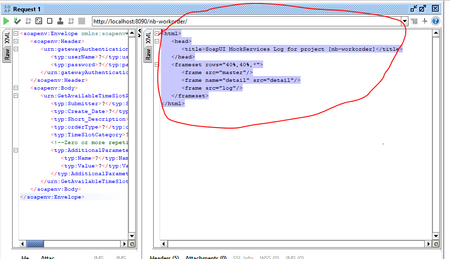
Followed below steps before deployment: https://www.soapui.org/soap-mocking/working-with-mockservices/ https://www.soapui.org/soap-mocking/deploying-mock-services-as-war-files/ I was using soap UI for mock service and war file generations. I'm able to generate a war file but after deployment in tomcat. when my service is running successfully in tomcat, I used soap UI to test the service. During which I'm getting below error/ <html> <head> <title>SoapUI MockServices Log for project [nb-workorder]</title> </head> <frameset rows="40%,40%,*"> <frame src="master"/> <frame name="detail" src="detail"/> <frame src="log"/> </frameset> </html> Can you please assist me. Thank You Dattathreya636Views0likes0Comments
SOAP UI - Set Proxy Settings Using -t in CMD Execution
Also posted here: https://stackoverflow.com/questions/59102194/soap-ui-set-proxy-settings-using-t-in-cmd-execution I am getting nowhere with the documentation on this topic. So far, I know the execution command is "-t" for setting the proxy settings, BUT, I cannot get the proxy settings to actually be set. In other words, the command line query looks like this: "cmd /C CD C:\Program Files\SmartBear\SoapUI-5.2.1\bin & testrunner.bat -c""TestCase"" ""SOAP_QUERY.XML"" -S -P""UserName=UsernameTest"" -P""Password=PasswordTest"" -t""autoProxy_TrueOrFalse=False"" -t""activateProxy_TrueOrFalse=True"" -t""proxy_Host=ProxyAddress"" -t""proxy_Port=ProxyPort"" -t""proxy_Username=ProxyUsername"" -t""proxy_Username=ProxyPassword"" -P""OutPutDumpFileLocation=OutPut.XML"" -e ""https://EndPoint"" -r > ""ExecutionLog.Txt" Obviously, the values I provided are not those text values - I put the actual details in there. Example, ProxyPort could be 8080. I know the XML for the settings of the proxy looks like this: <con:soapui-settings xmlns:con="http://eviware.com/soapui/config"> <con:setting id="ProxySettings@autoProxy">XYZ</con:setting> <con:setting id="ProxySettings@enableProxy">XYZ</con:setting> <con:setting id="ProxySettings@host">XYZ</con:setting> <con:setting id="ProxySettings@port">XYZ</con:setting> <con:setting id="ProxySettings@username">XYZ</con:setting> <con:setting id="ProxySettings@password">XYZ</con:setting> </con:soapui-settings> BUT, I don't know if this goes into the query OR directly in the settings file and then you can parametrize it like this: <con:soapui-settings xmlns:con="http://eviware.com/soapui/config"> <con:setting id="ProxySettings@autoProxy">${#Project#autoProxy_TrueOrFalse}</con:setting> <con:setting id="ProxySettings@enableProxy">${#Project#activateProxy_TrueOrFalse}</con:setting> <con:setting id="ProxySettings@host">${#Project#proxy_Host}</con:setting> <con:setting id="ProxySettings@port">${#Project#proxy_Port}</con:setting> <con:setting id="ProxySettings@username">${#Project#proxy_Username}</con:setting> <con:setting id="ProxySettings@password">${#Project#proxy_Password}</con:setting> </con:soapui-settings> I even tried to modify the command line query like: "cmd /C CD C:\Program Files\SmartBear\SoapUI-5.2.1\bin & testrunner.bat -c""TestCase"" ""SOAP_QUERY.XML"" -S -P""UserName=UsernameTest"" -P""Password=PasswordTest"" -t""ProxySettings@autoProxy=False"" -t""ProxySettings@enableProxy=True"" -t""ProxySettings@host=ProxyAddress"" -t""ProxySettings@port=ProxyPort"" -t""ProxySettings@username=ProxyUsername"" -t""ProxySettings@password=ProxyPassword"" -P""OutPutDumpFileLocation=OutPut.XML"" -e ""https://EndPoint"" -r > ""ExecutionLog.Txt" Please if anyone has experience in creating this command line execution PLEASE HELP ME.1.3KViews0likes0CommentsInspect element or page souce of SOAP UI Browser window
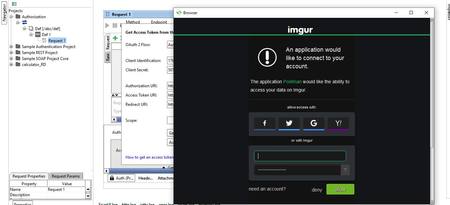
I am validating the OAuth functionality within SOAP UI tool and I need to know if we can change the default browser or if not how do we view the page source just like we do it in any other browser ? ( right click isn't an option here ) Image reference below532Views0likes0Comments
How to get 'reports from Soapui' using Groovy
I am new to groovy and i am trying to create framework for my company.i have added code where i am passing the request using excel from soapui and the response received will get add in excel itself.I want the report as pass or Fail. I have the code for reporting but i am not able to connect both the code . I am trying to generate the report where the data running from excel and soapui matches and add in report fail or pass import com.eviware.soapui.support.XmlHolder import java.io.File; import java.io.IOException; import jxl.*; import jxl.read.biff.BiffException; import jxl.write.*; log.info("Service Testing Started") def reqOperationName = "Div_Insert"; def inputDataFileName = "C:/Users/xxxxxx/xxxx.xls" def inputDataSheetName = "Division insertion"; Workbook workbook = Workbook.getWorkbook(new File(inputDataFileName)); WritableWorkbook copy = Workbook.createWorkbook(new File(inputDataFileName),workbook); WritableSheet sheet1 = copy.getSheet(inputDataSheetName); def groovyUtils = new com.eviware.soapui.support.GroovyUtils(context) def reqholder = groovyUtils.getXmlHolder(reqOperationName+"#Request") try{ rowcount = sheet1.getRows(); colcount = sheet1.getColumns(); for(Row in 1..rowcount-1){ for(Col in 2..colcount-1){ String reqTagName = sheet1.getCell(Col,0).getContents() def TagCount = reqholder["count(//*:"+reqTagName+")"] if(TagCount!=0){ String reqTagValue = sheet1.getCell(Col,Row).getContents() reqholder.setNodeValue("//*:"+reqTagName, reqTagValue) reqholder.updateProperty() } } testRunner.runTestStepByName(reqOperationName) def resholder = groovyUtils.getXmlHolder(reqOperationName+"#Response") resTagValue1 = resholder.getNodeValue("//*:sys_id") resTagValue2 = resholder.getNodeValue("//*:table") resTagValue3 = resholder.getNodeValue("//*:display_name") resTagValue4 = resholder.getNodeValue("//*:display_value") resTagValue5 = resholder.getNodeValue("//*:status") resTagValue6 = resholder.getNodeValue("//*:status_message") resTagValue7 = resholder.getNodeValue("//*:error_message") resTagValue8 = resholder.getNodeValue("//*:map") Label resValue1 = new Label(6,Row,resTagValue1); sheet1.addCell(resValue1); Label resValue2 = new Label(7,Row,resTagValue2); sheet1.addCell(resValue2); Label resValue3 = new Label(8,Row,resTagValue3); sheet1.addCell(resValue3); Label resValue4 = new Label(9,Row,resTagValue4); sheet1.addCell(resValue4); Label resValue5 = new Label(10,Row,resTagValue5); sheet1.addCell(resValue5); Label resValue6 = new Label(11,Row,resTagValue6); sheet1.addCell(resValue6); Label resValue7 = new Label(12,Row,resTagValue7); sheet1.addCell(resValue7); Label resValue8 = new Label(13,Row,resTagValue8); sheet1.addCell(resValue8); } }catch (Exception e) {log.info(e) } finally{ copy.write(); copy.close(); workbook.close(); } log.info("Service Testing Finished") Reporting code: try {r def projectPath = new com.eviware.soapui.support.GroovyUtils(context).projectPath String folderPath = projectPath + "/SoapUIResults"; def resultFolder = new File(folderPath); if(!resultFolder.exists()) { resultFolder.mkdirs(); } Date d = new Date(); def executionDate = d.format("dd-MMM-yyyy HH_mm"); String subfolderPath1 = folderPath+ "/Request-Response_"+executionDate; new File(subfolderPath1).mkdirs(); String subfolderPath2 = folderPath+ "/CSV Reports"; new File(subfolderPath2).mkdirs(); def reportFile = new File(subfolderPath2, "Report_"+executionDate+".csv"); if(!reportFile.exists()) { reportFile.createNewFile(); reportFile.write('"Test Suite","Test Case","Test Step","Step Type","Step Status",'+'"Result message","Execution Date"'); } for(stepResult in testRunner.getResults()) { def testSuite = testRunner.testCase.testSuite.name; def testCase = testRunner.testCase.name; def testStep = stepResult.getTestStep(); def testStepName = testStep.name def type = testStep.config.type def status = stepResult.getStatus() reportFile.append('\n'); reportFile.append('"' + testSuite + '",'); reportFile.append('"' + testCase + '",'); reportFile.append('"' + testStepName + '",'); reportFile.append('"' + type + '",'); reportFile.append('"' + status + '",'); reportFile.append('"'); for(resMessage in stepResult.getMessages()) { reportFile.append('Message:' + resMessage + '\n'); } reportFile.append('",'); reportFile.append('"' + executionDate + '",'); if((type=="request").or(type=="restrequest")) { def extRequest = testStep.properties["Request"].value; def requestFile=subfolderPath1+"/request_"+testSuite+"_"+testCase+"_"+testStepName+".txt"; def rqfile = new File(requestFile); rqfile.write(extRequest, "UTF-8"); def extResponse = stepResult.getResponseContent(); def responseFile=subfolderPath1+"/response_"+testSuite+"_"+testCase+"_"+testStepName+".txt"; def rsfile = new File(responseFile); rsfile.write(extResponse, "UTF-8"); } } } catch(exc) { log.error("Exception happened: " + exc.toString()); } The file is getting corrupted when the code is run.897Views0likes1Comment
Creating New Composite Project On Git/Bitbucket: Error
I want to create a new project inside a repository which already exist, something line this: https://bitbucket.org/xxxxxxx/soapuitest Now i am trying to create a new composite project inside this repository from SOAP UI. But when i try to go via option 'Save and Share project' and give repository url and username/pass, this is not working. It gives me error saving not a git repository but that too its trying to search .git inside the project which i want to create new and this will never happen when i dont have any project... Mon Jan 22 23:40:42 CET 2018:ERROR:java.lang.IllegalStateException: No git repo exist in: C:\shared\Test-Project\soapuitest\Project-1-readyapi-project java.lang.IllegalStateException: No git repo exist in: C:\shared\Test-Project\soapuitest\Project-1-readyapi-project at com.smartbear.readyapi.plugin.git.GitCommandHelper.createGitObject(GitCommandHelper.java:164) at com.smartbear.readyapi.plugin.git.ReadyApiGitIntegration.getLocalRepositoryUpdates(ReadyApiGitIntegration.java:84) at com.eviware.soapui.plugins.vcs.dialogs.VcsChangesDialog.a(VcsChangesDialog.java:80) So should we have 1 repository for 1 project, if not then please let me know how can i create multiple project from soap ui in same repo.1KViews0likes0Comments
How to increase SOAP UI performace to push more SOAP request in a second.
As part of a process, we need to generate a load of 2.77 SOAP requests per second. I am using Groovy script to run the load with multiple threads and accessing multiple excel files for different data for each unique data. In any way, i am not able to reach transaction rate of 1.7 and above. Inspite of all recommended memory management, my SOAP UI takes minimum 3 seconds for a request. In case of my load, i am not needed to wait for the response, So can Soap ui just submit request and don't wait for a response, thus increase the speed of per second transaction rate. Any help will be greatly appreciated.2.9KViews0likes7Comments