Add a new Test Cases into Newly created Test Cycle via API
Hello all, I would like to know how should I add a new test cases into created Test Cycle. In short I already created a test cycle through API, now I want to add a new test cases into the cycle. Note that the whole project is new so no test are present. This is what I want to do. I have several API tests in my Java project. Before the run I create the test cycle (which is working fine), after the creation I execute those API tests and after that I would like to create the text case into the previously created test cycle and send the status (pass or fail). I am getting the API endpoints from the following site: https://zfjcloud.docs.apiary.io/#reference/execution/add-tests-to-folder/create-execution Is it possible in that way? Is there an option to do that? How can I create these test cases in the test cycle? PS: I use Postman for now Thanks for the tips1.1KViews0likes2Comments
Why can I no longer see the JIRA project option to bulk upload Zephyr Test Cases?
Do I need the upgrade from Zephyr Squad to Zephyr Essentials? The new Atlassian navigation changes in JIRA seem to have removed the Zephyr bulk upload option to a particular project. Why is this?92Views0likes0Comments
Is there any way to import/upload test plan/test execution?
I am wondering if there are a way to upload not only Tests but to set thought upload in which Release/Test Cycle/Folder to place Tests for execution? We have ~300 TCs which are planned for execution for ~7 releases that have multiple cycles and folders. It's really time consuming to create all test plan tree and put cases there manually. How it can be optimized?594Views1like1Comment
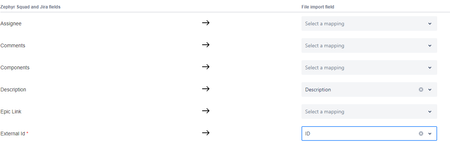
Problem with "External Id" field when importing test cases to Jira using Zephyr Squad
I'm trying to import test cases from Excel to Jira cloud using Zephyr Squad, in the import process I Mhave a required field "External Id" and I mapped it to the ID column in my excel file (ex:TB-1). I want to use this field to reference the old ID of the testcase and maintain a compatibility with previous doc. My config .json file (it seems "External id"=id) : The import is successful except that I can't see the field "External Id" anywhere and the value mapped to this field isn't visible anywhere. Can anyone plz help me figure out what is going on?341Views0likes2CommentsImport to Zephyr Squad - Jira Cloud
Hello everyone! I'm trying to import test cases from Excel into our Zephyr Squad version in Jira Cloud. However, I'm already failing to find the point where I can start the importer. I just can't seem to find anything about it. Unfortunately, the documentation for Zephyr Squad for Jira Cloud doesn't provide the right clues. There's a sentence there: "Open the project you want to import the test cases into, then click Tests > Ellipses > Import from File." (the sentence is exactly as it appears). I can't find an entry named "Tests" anywhere in our project. I've searched through everything, be it the "normal" Jira or the Zephyr Squad app in Jira. Can anyone help me figure out how to get the point where I can import an Excel file (CSV)? Thank you very much! Best regards, Chris591Views1like1CommentHow to import Jira cascade field values using Zephyr Test Importer
Hello, I am looking for suggestion on how to prepare the Excel file for Jira cascade field values when using the Zephyr Test Importer. For example, I have a Jira custom cascade field "Test Type". Option 1 = UAT Test. Option 2 = Master In Jira csv import, I would prepare the data as "UAT Test -> Master" for the custom cascade field. But in Zephyr test importer, this format didn't work. Only Option 1 was imported successfully. Option 2 was blank. Thanks, Sara676Views0likes1CommentIs there a way to update tests with importer?
I would like to use importer to update tests in Zephyr? Is this possible or does the importer always create new tests? Like if there is new description in some tests, and some new tests and some old tests, how could I link excel rows to existing tests in zephyr. Somehow with key? in what field and in what format should it be.72Views1like0Commentsis it possible to automate on creation test cycles and folder under Tests>Execute Tests.
I have a requirement that in our project where we need to create folders Under Tests>Execute test>Test cycles/Folders section.Every time I need to create some set of folders and Add test cases individually.Is there a way this can be automated and reduce manual work.All I need is to create few folders and add more than 50 test cases Via search filter for each folder.382Views0likes1Comment
Canot import test cases from Excel to Zepyrl
I'm trying to import test cases from excel spreadhseet to Zyphyr Squad with 4 fields mapped 'Test case name', 'Description' , 'Channel' and 'Use case'. When i import its failing with this error. Please advice. Master Row : 3, Sheet Name : Sheet1, Error Message : Error while creating issue : {"customfield_10177":"Specify a valid value for Channel","customfield_10176":"Specify a valid value for UseCase"} Master Row : 2, Sheet Name : Sheet1, Error Message : Error while creating issue : {"customfield_10177":"Specify a valid value for Channel","customfield_10176":"Specify a valid value for UseCase"} the values of these two fields are as below. Channel Use Case Desktop-External AIA485Views0likes0Comments