Why can I no longer see the JIRA project option to bulk upload Zephyr Test Cases?
Do I need the upgrade from Zephyr Squad to Zephyr Essentials? The new Atlassian navigation changes in JIRA seem to have removed the Zephyr bulk upload option to a particular project. Why is this?89Views0likes0Comments
Problem with "External Id" field when importing test cases to Jira using Zephyr Squad
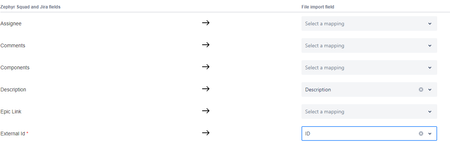
I'm trying to import test cases from Excel to Jira cloud using Zephyr Squad, in the import process I Mhave a required field "External Id" and I mapped it to the ID column in my excel file (ex:TB-1). I want to use this field to reference the old ID of the testcase and maintain a compatibility with previous doc. My config .json file (it seems "External id"=id) : The import is successful except that I can't see the field "External Id" anywhere and the value mapped to this field isn't visible anywhere. Can anyone plz help me figure out what is going on?327Views0likes2Comments
Import to Zephyr Squad - Jira Cloud
Hello everyone! I'm trying to import test cases from Excel into our Zephyr Squad version in Jira Cloud. However, I'm already failing to find the point where I can start the importer. I just can't seem to find anything about it. Unfortunately, the documentation for Zephyr Squad for Jira Cloud doesn't provide the right clues. There's a sentence there: "Open the project you want to import the test cases into, then click Tests > Ellipses > Import from File." (the sentence is exactly as it appears). I can't find an entry named "Tests" anywhere in our project. I've searched through everything, be it the "normal" Jira or the Zephyr Squad app in Jira. Can anyone help me figure out how to get the point where I can import an Excel file (CSV)? Thank you very much! Best regards, Chris569Views1like1Comment
Is there a way to update tests with importer?
I would like to use importer to update tests in Zephyr? Is this possible or does the importer always create new tests? Like if there is new description in some tests, and some new tests and some old tests, how could I link excel rows to existing tests in zephyr. Somehow with key? in what field and in what format should it be.71Views1like0Comments
Canot import test cases from Excel to Zepyrl
I'm trying to import test cases from excel spreadhseet to Zyphyr Squad with 4 fields mapped 'Test case name', 'Description' , 'Channel' and 'Use case'. When i import its failing with this error. Please advice. Master Row : 3, Sheet Name : Sheet1, Error Message : Error while creating issue : {"customfield_10177":"Specify a valid value for Channel","customfield_10176":"Specify a valid value for UseCase"} Master Row : 2, Sheet Name : Sheet1, Error Message : Error while creating issue : {"customfield_10177":"Specify a valid value for Channel","customfield_10176":"Specify a valid value for UseCase"} the values of these two fields are as below. Channel Use Case Desktop-External AIA482Views0likes0CommentsZephyr Squad: Import Tests error "Issue does not exist or you do not have permission to see it."
Have a very simple Excel file: External ID, Description, Comments, Name, Issue Key, Step, Results, Test Data. After much fooling around I was able to get imports working, where had multiple test cases. Then I came to my next two files and both are unable to import. Validation is successful, but fails after begin import due to error "Issue does not exist or you do not have permission to see it." I have changed the file to have only 1 tab (Inbound), 1 scenario included and still fails. I then removed all rows and in row 1 have the headers, row 2 simple test data: External ID: TEST-01 Description: TEST DESCRIPTION Comments: TEST COMMENT Name: TEST-01 Issue Key: 1 Step: TEST STEP Result: TEST RESULT Test Data: TEST DATA Using JSon file below the same results, it validates, but fails on import for the same error message Full Error Message:Master Row : 1, Sheet Name : Inbound, Error Message : Error while creating issue : ["Issue does not exist or you do not have permission to see it."] Json file used as configuration file: { "fieldMappingDetails": { "selectedRows": [], "fieldMaps": { "comments": "Comments", "description": "Description", "id": "External ID", "issueKey": "Issue Key", "summary": "Name", "stepExpectedResults": "Result", "stepAction": "Step", "stepData": "Test Data" }, "updatedColumnValue": {} }, "importSettings": { "startingRowNumber": 2, "discriminator": "BY_ID_CHANGE", "selectedSheets": "Inbound", "radioValue": "selectedSheets" } }509Views0likes0CommentsTest Steps Comment in the Test Execution
Hello, I am looking for details on getting comments from the Test Execition's Test Steps via API for Zephyr Squad. Is this even possible? Help would be greatly appreciated as this is for our tool to migrate from Squad to Scale. Kind regards, MB285Views0likes1CommentZephyr Utility Importer Issue
Hello Team, Following the upgrade of Jira from version 8.20.10 to 9.7.2, and the update of Zephyr Squad from 6.8.2 to 9.4.1 (Zephyr Squad SEN number - 17725835), I have run into an issue while trying to connect to the Zephyr importer utility tool. Although the connection to the Jira server proceeded without any errors, I faced a 404 error while attempting to fetch a Jira Project. Could you kindly provide guidance on any essential changes that need to be implemented on the Jira server? Your prompt assistance would be highly appreciated. Best regards212Views0likes0CommentsInconsistent Behavior between JIRA Test Automation UI and Zephyr Squad's Test Automation API
Hello, I am attempting to use the Zephyr Squad Test Automation API to upload test executions to the appropriate test cycles. Unfortunately, I have seen some pretty finicky behavior from the API itself. To clarify, we are using the Zephyr JIRA integration - Zephyr Squad. To begin, I sanity checked that my test result files were compliant with formatting standards by uploading them manually via the Test Automation UI in JIRA. Plenty of test automation tasks were executed successfully, but with some specific workflows needing to be met. For cucumber formatted JSONs, it was necessary to use the Create and Execute button to get these test results to upload successfully - in a single step. Uploading test execution results would fail If I wanted to break up the creation and execution of the Test Automation task into two steps. For example, I was able to create the automation task with the same file from the previous workflow by first choosing the Create option, but when I chose to Execute the task, the task would hang with In Progress status. I'd like to point out that none of the test result files or Task configurations had changed between these two workflows. With JUNIT xml formatted test results, the issues above were not encountered. So I thought, "hmmm, perhaps it is better to use the JUNIT xml format to upload test results." After deciding that we can move forward with JUNIT xml formatted test reports, I attempted to try out the Zephyr Squad Test Automation API via Postman. I was able to successfully create Test Automation Tasks via this API endpoint : https://prod-vortexapi.zephyr4jiracloud.com/api/v1/automation/job/create. However, I was unable to successfully execute the newly created Test Automation Task via this endpoint: https://prod-vortexapi.zephyr4jiracloud.com/api/v1/automation/job/execute. When hitting the latter endpoint with the appropriate jobId, I receive an Internal Server Error. However, if I provide a non-existent jobId with the payload, I do receive a response, indicating that the payload contains the correct contents and that the endpoint is indeed hit. I then attempted to execute the newly created Test Automation job via the JIRA UI instead - to see if I had any luck. Weirdly enough, the Test Automation job that was created (not executed) through the API was not able to execute and instead gave me this unexpected error: Considering I was unable to successfully execute the job via the API call in the first place (see Internal Server Error), I should not be encountering this error message. Additionally, the status for this job remains as UNEXECUTED. Can you please point me to what the root cause of these issues may be? This is pretty inconsistent behavior. Thanks432Views0likes1Commentis it possible to automate on creation test cycles and folder under Tests>Execute Tests.
I have a requirement that in our project where we need to create folders Under Tests>Execute test>Test cycles/Folders section.Every time I need to create some set of folders and Add test cases individually.Is there a way this can be automated and reduce manual work.All I need is to create few folders and add more than 50 test cases Via search filter for each folder.379Views0likes1Comment