SabihaOccasional ContributorJoined 4 years ago16 Posts4 LikesLikes received2 SolutionsView All Badges
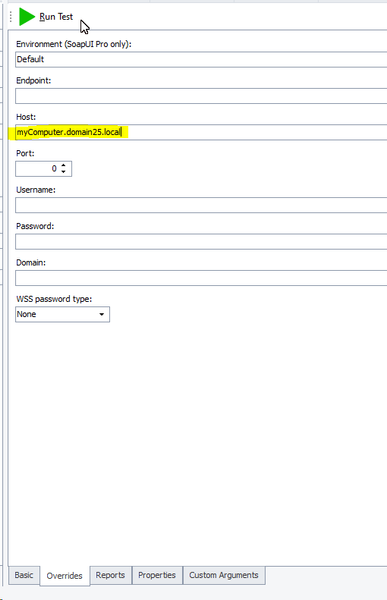
ContributionsMost RecentMost LikesSolutionsRe: Using tags with examples/scenario outlines I am essentially using what is described in option 2, but it doesn't seem to picking up the tags for the examples tables Re: Using tags with examples/scenario outlines Is there a way of doing this using scripts? We don't use the Execution plan, everything runs via scripts. Re: Using tags with examples/scenario outlines HI, Yes I've checked through all the TestComplete documentation regarding Tags. The examples shown in the documentation only have Tags on the Examples table. In my example, I have tags for the scenario and the examples table and I want to match tags from both. Using tags with examples/scenario outlines Hi, I have several BDD scenarios where I need to use scenario outlines and tags. I am programmatically running the tests and I am passing in the tags that I want to match against. The format of the BDD is as follows: test1 @Smoke @All @Card Scenario: Test 1 Given... When ... Then ... @System1 Examples: |Value| | a | @System2 @System3 Examples: |Value| |b| For example, I may want to run this scenario if I am running @smoke tests and sometimes I may want to use the data from examples table @System1, but at other times I may want to use the exampels table for@System2/@System3 In my script I am checking for the existence of both @Smoke and @System1 tags, however it does not seem to be detecting the @System1 tag I have tried moving the tags around, but I either get both sets of examples run or neither. Can this be done? If so, where should I put the tags for them to be picked up? Currently it looks as though it is only detecting the tags specified for the scenario not those for the examples tables Re: Calling SOAP UI from TestComplete Thanks for the suggestions. I'll take a look at the articles and see if I can find the SmartBear video. In the meantime, I have managed to work around it by creating a routine that calls my tests using command line calls to testrunner.bat where I can pass in host name etc as parameters Calling SOAP UI from TestComplete Hi, We have some SOAP UI requests that we call from within TestComplete via the ReadyAPI1.Test1.Execute() mechanism. I can see that the ready API Editor overrides page allows me to specify a different host to that specified in SOAP UI request. Is there a way that I can use a project variable here to set the host via my tests scripts? I have tried setting a project variable to my server name and then entering the project variable in the host field but it doesn't like it. Any ideas how I can run the same SOAP requests on different servers - via testscripts? Re: Unable to clear a (material ui 5) datepicker field on Firefox - works fine on Edge and Chrome Thanks Alex. obj.Keys("^A"); didn't work for me on Firefox, it opened a new tab with showing add-ons however, this did work. obj.Click(); obj.Keys(" "[Home]![End]") obj.Keys("[Del]"); Unable to clear a (material ui 5) datepicker field on Firefox - works fine on Edge and Chrome We have several date fields in our system, implemented using Material UI 5.10.2 datepicker. Our system is tested on Edge, Chrome and Firefox. We have some tests that clear the text component part of the datepicker field using SetText(""). This is working fine on Edge and Chrome however on Firefox it does not clear the field. I have also tried using Keys("") followed by a Keys("[Tab]"], which does not work either Has anyone else come across this or anything similar to this? Any ideas how I can clear the field in Firefox? Thanks SolvedRe: Tests failing with 'Cannot Find existing or open blank page error' part way through a test run Using Chrome for these particular tests. Tests failing with 'Cannot Find existing or open blank page error' part way through a test run I have a suite of tests that have been running successfully on a Chrome browser, but recently started failing part way through a test run. The tests start off fine and then fail to find the web page. The error I am seeing is: As far as I can tell the SmartBear extension is installed and is compatible with the version of TestComplete that I am using. I am using TestComplete v15.20 Bld 341 Has anyone encountered this before or can help diagnose what's happening. It's bizarre that the tests should start failing in this way part way through a test run.