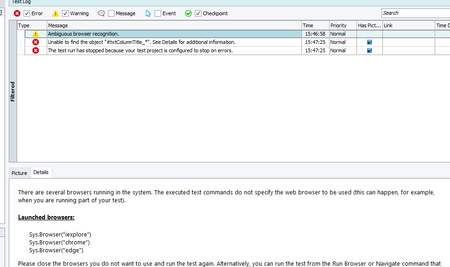
ContributionsMost RecentMost LikesSolutionsRe: Issue to find grid text box location Dear Alex, Thank you for very effective suggestions. I will look on those. Re: Issue to find grid text box location Thank you, I will try again . Re: Issue to find grid text box location Thank you, hope this will help, Re: Issue to find grid text box location Hi Marsha_R, Thank you for your prompt reply. I tried this way as below, textbox = page.FindElement("#txtColumnTitle_*") Inseated of textbox = page.FindElement("#txtColumnTitle_12"). It s not worked , I am not sure that I did appropriately! If you any further suggestion, it will be helpful. Issue to find grid text box location Hi friends, I am using new Trial version of Test Complete. and using 'Record Script (JavaScript)' in a web based application. I found a specific issue to find out the location of Grid Text box. On process of testing, there are text boxes in Grid which name is dynamically changing on each time running the web application. Example --when I recorded first time the text box name as recorded in script as below, page.FindElement("[role='dialog']:nth-child(12) .ui-button-text").Click(); textbox = page.FindElement("#txtColumnTitle_12"); But when I am running same Script, the name of the text box is changed like textbox = page.FindElement("#txtColumnTitle_17"); So, it could not able to find the element as it suffix number is changed . How can i overcome this issue? Please let me know if it make clear for all of you to response effectively. Solved