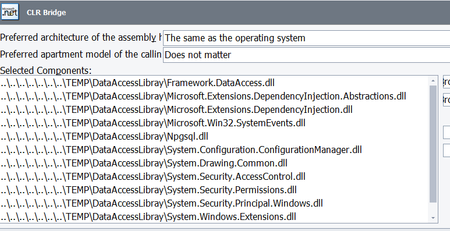
ContributionsMost RecentMost LikesSolutionsRe: Scripts succeeds only after running a first time Hello, Thanks for the reply. - If I add a wait time I get the same results: unable to find object. The screenshot associated to this step, however, shows clearly the element (a button) - The error message is unable to find element - It is a static element. It does not change and there is no other element with the same properties that can 'confuse' TC. It is simply a button that when clicked shows a new (static) form. - The failure occurs always at the same element. I have been able to bypass this problem changing the way the element is identified page.FindElement("//div[@id='secondBannerContent']/div/div/div[2]") instead of page.FindElement("//iframe[@id='Teams']").FindElement("//input[@value='Add Standard User']") This last locator was the one that TC wrote when converting my original (recorded) keyword test to script. Scripts succeeds only after running a first time Wonder if anybody else has experienced the same problem: (Running TC Version: 14.71.275.7 x64 in a Win 10 Virtual Machine) - Testing a web based application. Web server in the same machine as TC - TC is able to load the page, click in some elements, however, when it gets to a a button is it unable to find it Tested object: Sys.Browser("chrome").Page("https://standalone/Web/#Settings/Teams").FindElement("//iframe[@id='Teams']").FindElement("//input[@value='Add Standard User']") The screenshot shows the correct page, and the elements is displayed, however TC is unable to find it, - Close the browser and run the TC script again - Scripts succeeds - Execute a iisreset - Repeat from the beginning, script fails So, it looks like the object is not fully loaded into memory, I have tried to add delays and reload the page to not avail. Any suggestion or indication on how to solve this problem? Thanks in advance, Carles Roch-Cunill Re: Unable to load local DLL assemblies using dotNet Support ticket created 🙂 I have no problems accepting that TC does not currently offer support for a specific library. But considering that .NET Core 3.1 is not a fringe library only used by very few, I think that either TC should support it or state clearly or that is not supported (my original ticket was about interpreting what 'early preview support' means). If only partial support is offered, then state clearly the context in which it will work. Otherwise, it is a waste of time on our side (the customer) and on SmartBear side (answering all these emalls). Hopefully I am not unreasonable! Regards, Carles Roch-Cunill Re: Unable to load local DLL assemblies using dotNet I wish the documentation was clear and to the point. If .Net Core support is still in beta, then do not use the expression early preview support' . Simply indicate that is not released and the user should not expect a seamless behaviour. Thanks, Carles Roch-Cunill What does 'early preview support' imply? The article https://support.smartbear.com/testcomplete/docs/app-testing/desktop/net/supported-technologies.html says TestComplete supports testing .NET applications that use the following technologies: .NET Core 3.0-3.1, both 32- and 64-bit versions (early preview support). What does 'early preview support' imply? Does it mean that is buggy,? brittle? ..... The post (July 2020) https://community.smartbear.com/t5/TestComplete-General-Discussions/NET-Core-Support/m-p/201326#M37536 suggest that 'early preview support' in this case can be understood as no support at all. Would be possible to explicitly confirm that at this moment (Dec 2020) TestComplete Version: 14.71.275.7 x64 does not offer support for .NET Core 3.1 library Thanks SolvedUnable to load local DLL assemblies using dotNet Hello, I am trying to access a local DLL functions following the article https://support.smartbear.com/testcomplete/docs/testing-with/advanced/using-external-functions/calling-from-dotnet-assemblies.html So, I have added to the CLR Bridge the library that I want to access. In addition, following the tip in https://smartbear-cc.force.com/portal/KbArticleViewer?name=Why-is-my-NET-assembly-not-getting-loaded-after-I-add-it-to-the-CLR-bridge&sp=testcomplete I have also added its dependencies The final list added to the CLR is However, when invoking the dotNET object I can not see the library that I want to use Framework_DataAccess I can't see either some other libraries (p.e Microsoft.Extensions.DependencyInjection.Abstractions ) I have checked with the developers, and these are all the references this application uses. so sound improbable that I am missing some other reference. Which step I am missing? Any help will be appreciated Note: The library is built on .NET Core 3.1. and I am using TestComplete Version: 14.71.275.7 Thanks Solved