mikileungOccasional ContributorJoined 5 years ago16 Posts1 LikeLikes received2 SolutionsView All Badges
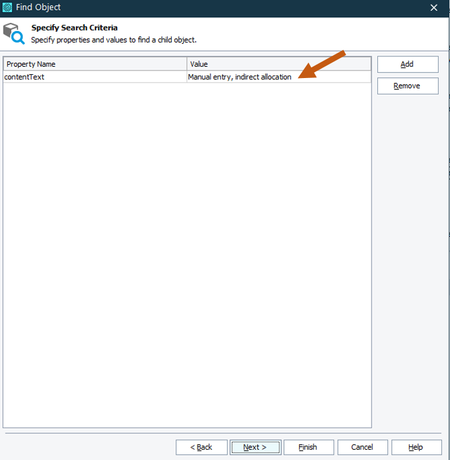
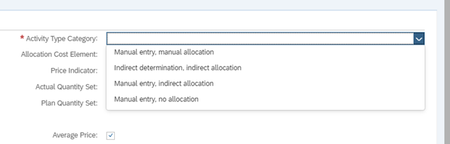
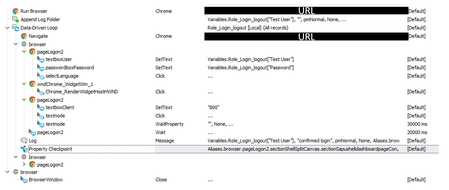
ContributionsMost RecentMost LikesSolutionsCan I use variable in FindObject operation (Keyword Test) Hi, I am writing a keyword test to find an object using "find object" with the criteria of contentText = "Manual entry, manual allocation" However, I would like to change it to a variable, so that I can make it data driven. Is it possible? If not possible for keyword test, can I do that with a simple script? Thanks SolvedRe: Web dropdown menu Thanks I have changed the p to narrow down the search area. I managed to find the object but now it says There was an attempt to perform an action on a zero-sized window. The drop down list does not hold up, which it is very hard to map the object. That is why I used the find object method. If I map the object with the object spy, it would say the object is not under the object tree. Is there a way to solve this problem? Here is my adjusted code, def my_test(): # Find all enabled buttons in the Replace dialog p = Aliases.browser.pageLogon.sectionShellSplitCanvas.frameApplicationActivitytypeMana.frameIframeid.activityTypeCat_dropdown_var my_choice = p.Find("contentText","Manual entry, manual allocation",2,True) if my_choice.Exists: Log.Message("FOUND IT!") my_choice.Click(-1,-1) else: Log.Message("Cannot find the menu option") Web dropdown menu Hi, I am trying to write a script (Python) to - click the down arrow button - select one of the options in the drop down menu. Here is my script. It failed with the log saying "The object does not exist. See Details for additional information." I am a Python beginner, it would be great if someone can help. def my_test(): p = Aliases.browser.pageLogon.sectionShellSplitCanvas.frameApplicationActivitytypeMana.frameIframeid.textbox_activityTypeCat p.Click() my_choice = page.Find("contentText","Manual entry, manual allocation",10,True) my_choice.Click() SolvedRe: Checkpoint image rename I can rename the log folders, but not the jpg itself. I need to see if it works in term of approver's perspective. Re: Checkpoint image rename Hi Alex, My test is a keyword test (below image). It is to test if all the required users have been created in the system. I have an excel sheet listed all the user IDs and passwords for data loop variables. I managed to do that and everything works. On top of that, I want to take screenshot of the home page for each of these users, because I found out that some of them have empty box with unloaded applications (see below images). I used checkpoint to do that but in my log file, the naming makes it very hard to find which is which user's home page. I would like to ask if there is a way to rename those images with username variables. thank you Below is my keyword test. Re: Checkpoint image rename Hi, I am not looking for searching an image. once the user logs into the system, I would like to capture that home page. Since I am testing over 50 users, I would like to rename all the images with the username which are variables from an excel. Thanks. Checkpoint image rename Hi, I am working on a data loop test, and want to capture all the images with a specific name using variables. How can I do it? - user and password (data loop variables) - login to the system - capture the home page - log out So i want the picture to be the username, how can I do that? Thanks SolvedRe: How to empty all the content in a column in excel (Python Script) I have used a IF...then...statement for this. Data Loop A: - user name "table data variables" - password "table data variables" - enter login SAP >>>data loop B: >>>>if excel column A (variables) equals to user name (previous data loop), the checkpoint if the page contains column B (variables) - log out SAP Hope it helps other people Re: How to empty all the content in a column in excel (Python Script) Hi Marsha, Thank you for your reply. Do you mind to show me how you can do it with variables to filter the information I need in the excel each time for the further DD test? Re: How to empty all the content in a column in excel (Python Script) Hi, yes. it is to filter the information I need for each loop.