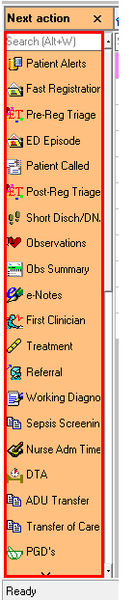
ContributionsMost RecentMost LikesSolutionsTest Complete License Hi , This is a request regarding the license details. For our company the license for test complete was acquired a while back hence we do have only the customer ID. Since we are in the need of changing the floating license server to a different machine, can i get some support on where to get those other license details for this customer ID. Regards. SolvedRe: Unable to handle a Frame in Desktop application Hi Alex, Thanks for the suggestion. I think this is the only for me left. I also spoke to the Dev team already and looking up for a grid like setup for the frame. Thanks, Ismail Re: Unable to handle a Frame in Desktop application Hi, Yes, This is a pure VisualBasic application Re: Unable to handle a Frame in Desktop application Sorry for the delay, I still couldn't able to get the text of the objects through any type Re: Unable to handle a Frame in Desktop application This isn't actually a dropdown, its more like a frame. Let me try the steps you given and come back to you. Thanks. Re: Unable to handle a Frame in Desktop application Thanks for the reply. Let me try and come back to you Unable to handle a Frame in Desktop application Generally, Dropdown items will be captured in an array format, by which we will be able to get all item properties and methods. But for this object, it displays the objects in Frame as like below, and we are unable to fetch the properties like wItemcount, wItems, WItemText, etc. Object: Sys.Process("application").VBObject("frmMain").VBObject("applicationesktop1").VBObject("ucDropDownMenu1").VBObject("FraMenu") The image of the frame is given below. Solved