CristianEOccasional ContributorJoined 5 years ago12 Posts2 LikesLikes received2 SolutionsView All Badges
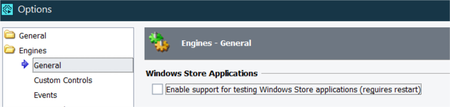
ContributionsMost RecentMost LikesSolutionsRe: Navigate to page taking a long time I don't know if I understood your scenario. But here are some suggestions: - after using the navigate method, you can add a new line to wait for the new popup window, or a child element, or a property from the newly loaded page - maybe the page is hidden in the background but the automation-driver (the one that sees the Tree elements) can see the elements and 'bypass' your assertion'. In this case, try to find an element from your page after is loaded and use WaitProperty method on it, for VisibleOnScreen property. - try another way to assert your step (not based on navigate result method) Re: Testcomplete Dropdown Selection Hi, Have you tried with the latest version of TC (15.55)? I'm curious if they fixed it or not because, in the change logs, it doesn't seem like they did something about it. 'In versions 15.53 and 15.54, we fixed an issue concerning the ClickItem() method to ensure it functions as expected.' Re: Unable to Select Correct Dropdown value in Test complete Version: 15.54.3.7 Same issue here. I have to use TC 15.50 with Chrome 111. I'm waiting for the new release to test if it's fixed or not : ( Re: ClickItem selecting wrong value / Chrome 115 Support Sorry to say that, but sounds like your response was generated by AI : D It would have been nice to leave me a link here to the official website of SmartBear where I can find the upcoming release dates. Thx ClickItem selecting wrong value / Chrome 115 Support Hello, Starting direct with the question: When will the next version of TestComplete be released (that will support Chrome 115.0.x)? My problem below: Recently, the Chrome browser from my environments were updated to the latest version (115.0.x) and I encountered some issue when selecting values from a dropdown using the ClickItem method (the wrong value is selected, even if I use the name or the index). Firstly, I updated the TC to latest version (as I saw in the change logs, an issue related to ClickItem was resolved in the latest release), but it didn't solve my problem. It even behaves worse than before (there were some 'extra actions' in the ClickItem process) With TC 15.50 and Chrome 111, the ClickItem method is working fine. Attached some videos with before update, and now with Chrome 115. Is there any chance that the next version of TestComplete will solve my problem? I would like to know when the new version of TC is scheduled for release, to know if it's better to wait a couple of days/weeks for it or if I have to downgrade Chrome and block the updates on all my environments. Thanks! Re: Wait for TestComplete Step to end Hi Corey, In the end, I went for this solution and it works fine. Thanks for the suggestion. As for the above problem (wait for TestComplete step to end), the problem is a known one and it is not a miss configuration on my part. Right? : D Thank you! Cristian Re: Wait for TestComplete Step to end Up Wait for TestComplete Step to end Hello, I recently started using ReadyAPI and I have a question about TestComplete Step I added a TestComplete step to my ReadyAPI Test Case to prepare the environment for the next steps (restore database, run some SQL scripts etc) and I observed that ReadyAPI doesn't wait for TC test to end, but immediately moves on to the next step. Is there a solution to wait for TestCase to be passed before moving on ? Edit: Also, I observed that even if I have the "Automatically displays test results after the test run is over" unchecked, TestExecute will automatically open the test result (.mht) file at the end of execution. TestExecute and TestComplete versions: 14.81.217 ReadyAPI version: 3.30.0 Regards, Cristian SolvedRe: DCOM Issue: TestComplete with HP ALM on Windows Server 2019 Hi Marsha_R, Before writing, I also looked at the instructions and tried to troubleshoot the problem. In the end, I found a solution that worked for me: In TestExecute Options I had to disable the Enable support for testing Windows Store applications. On Windows Server 2016, it works even if I have the option enabled. Hope this will also work for others Regards, Cristian DCOM Issue: TestComplete with HP ALM on Windows Server 2019 Hello, I have an automation project running on Windows Server 2016, using HP ALM as a Test Management Application and I want to use the same tests on Windows Server 2019. Everything goes ok, until I want to start the execution from ALM. When the ALM test has to create an instance of TestExecute in order to open the project and run the test, the TestExecute application cannot be started and I found the following log in Event Viewer: Event ID: 10000, DistributedDCOM Unable to start a DCOM Server: {07D....}. The error: "0" Happened while starting this command: C:\Program Files (x86)\SmartBear\TestExecute 14\Bin\TestExecute.exe -Embedding Notes: I created the setup as I did on WS 2016, where everything runs ok The TDConnection.exe (ALM Connectivity) tool is installed TestComplete and TestExecute version: 14.81 HP ALM version: 12.55 In the ALM Test script, the error is generated by line: Set TestExecuteApp = CreateObject("TestExecute.TestExecuteApplication.14") Solved