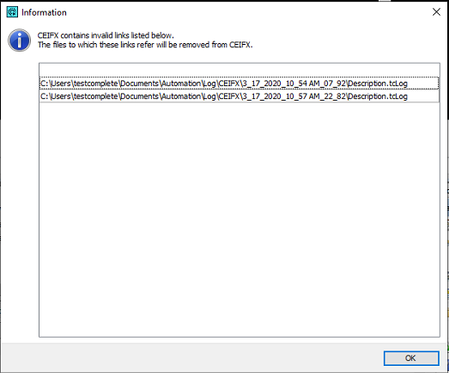
ContributionsMost RecentMost LikesSolutionsRe: eProtect iFrames in Browser Thanks. I'll update this when I hear back. Re: eProtect iFrames in Browser Version: 15.40.421.7 Re: eProtect iFrames in Browser Chrome Version 103.0.5060.134 eProtect iFrames in Browser We've recently implemented eprotect iFrames on some of our site pages, and testcomplete is unable to access the fields within those areas. I've seen and tried the steps listed here only to find that TC is still unable to access any of the protected fields. Is there another manner of accessing them that perhaps I'm overlooking? Thanks. Re: Information Window on TestExecute Start This had been brought up before, but I did not realize that it was a per machine option. I did not set it as I need to keep logs on my development machine when creating/debugging tests. Thank you! Re: Information Window on TestExecute Start sonya_mNo, I was not able to resolve it. I was able to delete the files from the drive, but it still requires manual intervention in order to not have the popup the next time TestExecute automatically opens. I could not find a way for TC to open and edit the tcLogs files. Re: Information Window on TestExecute Start WambooI don't have any XML files in my log folders, unless you're referring to the .tcLogs files. Re: Information Window on TestExecute Start I currently have a script to delete the files using aqFileSystem, but it does it at the end of the day for the current days logs. I think this is what's causing the error since it's deleting the log of the delete script as well. I like your idea of doing it at the beginning of the run. I could delete the previous days logs, that way it wouldn't affect the currently running tests. I'll test this out to see if it prevents the error. I also didn't know about that option to delete logs post execution. Thanks! Information Window on TestExecute Start Because of limited disk space where we have TestExecute installed, I need to delete local logs after I've exported/emailed them. I was initially going to do this at the very end of the day via a script that deletes the files directly, deleting all logs for that day. I'm getting this information window the next time the suite tries to run (because the previous days logs are now gone). Is there a way to get rid of this without manual intervention? Or a way to cleanly delete local logs from within TestExecute that doesn't leave this error on the next run? Solved