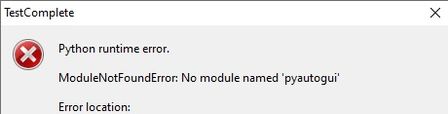
ContributionsMost RecentMost LikesSolutionsRe: Importing pyautogui - need real help please!!! Yes, I did. Thank you. Re: Documentation for this ActionButtonClick.BeginInvoke( para1, para2, para3, para4) please? The code fragment was written in python. There's no way BeginInvoke() is a C# method. Yes I meant Aliases but some code fragment get masked but hope you have understood what i'm talking about. Thanks. ps: the forum is very confusing, the green box is viewed as accepted solution and there are 2 green boxes. I was not the one to hit neither the 'Accept as Solution' buttons Documentation for this ActionButtonClick.BeginInvoke( para1, para2, para3, para4) please? Hello - Could you please provide where I may get more info about this kind of action that seems to be an attribute/action/method of this mapped object, in this case a button as shown btnSearch = Alias.ABCpanel.DEFentity.SomeDerivedWinformButton btnSearch = ActionButtonClick.BeginInvoke(None, None, None, None) #what does this do? Basically I am to take on some stuff done by a previous staff that is on a long vacation and from what i heard he won't be back. Thanks in advance for your help. SolvedRe: Importing pyautogui - need real help please!!! I got this auto-populated entity Sys instead of sys. What's the difference b/w Sys and sys. When I do a dot keystroke, there is no "path" available in the context-menu that appears shortly afther I hit he dot key. So obviously Sys and sys are different what do they refer to specifically? Thanks Importing pyautogui - need real help please!!! Has anyone get any luck importing pyautogui into TestComplete? This error pops up when I do "import pyautogui" in my script. Where do I go about to check TestComplete's system path [or somehing like that] so that TestComplete IDE can recognize this library pyautogui?? Or Where should I put a "pyautogui" (which I get from a different PC drive) to make it visible to TestComplete python interpreter? Currently I have uninstalled all python programs I previously had so that Test complete wont get confused, but it still gives me this error when ever it get to the line import pyautogui ? To make things more misterious, I put the pyautogui folder into the Lib folder of my TestComplete 14 folder (please see the last 2 screenshots) I ran python.exe on CMD and then ran import pyautogui, something works, looks like pyautogui only get recognized here, but it is useless to me. I need it works in TestComplete IDE What are my options? Please help. Thank you for your time! SolvedRe: Use Key Method to Press arrow-key-down for a certain time No, this does not work for me either. The effect is the same as .Keys('[Down]') self.stage_search.Keys('[Hold][Down][ReleaseLast]') the letter a trick didn't work either. self.stage_search.Keys('[Hold][Down]a[ReleaseLast]') Re: Use Key Method to Press arrow-key-down for a certain time LLPlayer Object does not work for me. sDelay = 20000 self.search_bar.SetFocus() self.search_bar.Keys('[Down]') LLPlayer.KeyDown(VK_DOWN, sDelay); # (1) self.search_bar.Keys('[Down]') LLPlayer.KeyUp(VK_DOWN, sDelay); # (2) Thrown in several lines of codes, with different orders of lines, and none of them make any difference. All I got is " Waiting for a delay between low-level events" when line 1 and 2 got hit Use Key Method to Press arrow-key-down for a certain time When the arrow-key-down button is pressed, this mapped object in my winform app will display a 'dropdown' panel, Currently , it's neccessary that I use method .Keys('[Down]') on this object search_bar to stimulate the visibility/appearence of the 'dropdown' panel self.search_bar .Keys('[Down]') The panel does show up, however just for 1 second or so. I need to make the 'dropdown' panel stayed for a longer time-frame, i.e. 50 seconds How can I make the .Keys('[Down]') stay longer than 1 second as it would normally does. self.search_bar = Aliases.SomeAppClient.Console.Streaming.Tabs.XyxStage.AbcSearchBar SolvedRe: Use Key Method to Press arrow-key-down for a certain time I have tried using the timer start_time = time.time() while (time.time() - start_time < hold_time) : self.search_bar.Keys('[Down]') ############################ Also, have tried this suggested somewhere in the forum: self.search_bar.SetFocus() self.search_bar.Keys('[Down]') Sys.Desktop.KeyDown(Win32API.VK_CONTROL); Delay(50000); Sys.Desktop.KeyUp(Win32API.VK_CONTROL); Nothing has worked!