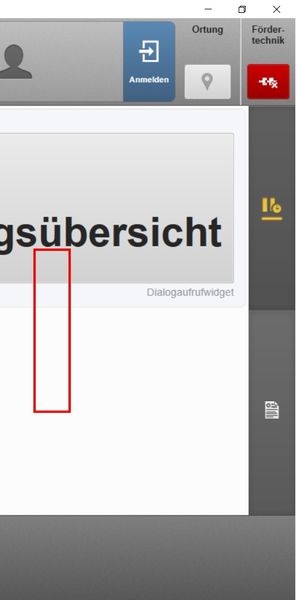
ContributionsMost RecentMost LikesSolutionsRe: TC doesn't find KeywordTests after renaming Thanks. Good to know, that you can also recreate it. So it's for sure a bug Re: TC doesn't find KeywordTests after renaming Thanks, but if possible I wanna avoid changing everything manually Re: TC doesn't find KeywordTests after renaming I opened a support ticket now. But maybe you have an idea for a workaround? Can TestComplete regenerate the .mds file? Re: TC doesn't find KeywordTests after renaming I did the renaming in TC by clicking the test name in the Project Workspace and then typing in the new name. The unavailable test you see on the screenshot are at their old position in the structure. TC doesn't find KeywordTests after renaming Hello, I renamed and re-structured all keyword tests in my project. After restarting, TestComplete can't find these tests anymore. In the Windows File Explorer I can see, that the tests were renamed in the KeywordTests.tcKDT file. In the Keyword-Test folder the files were also renamed. But aparently they were not renamed in the subordinate .mds file. In TestComplete's Project Explorer the tests are shown as unavailable, still in the old structure and with old names. I guess that's a bug. But what can I do about it to avoid having to edit the .mds file manually? Edit: I use Git, but it's not linked to TestComplete. When opening TC, I get the message "The Git executable was not found". I said "Work without Git". Thanks in advance Tobias Error adressing objects, when working on multiple monitors Hi all, when executing my desktop tests, it sometimes suspends with error "There was an attempt to perform an action at a point, which is beyond the screen." This only happens, when working with several monitors. No matter where on the three monitors the application window is, TestComplete can highlight the objects without a problem. But it just won't find it during the test execution. I also tried to map the object again. But this red frame, that highlights the object is always displaced, while the program window is opened on one of the connected monitors. Only on the laptops main screen the frame is placed correctly. Now, the picture of the mapped object looks like this: I try to adress the button in the right bottom corner. I don't wanna work with coordinates, but the objects name. So how can I prevent the displacement and the error message? Thanks in advance Best regards Tobbs Solved