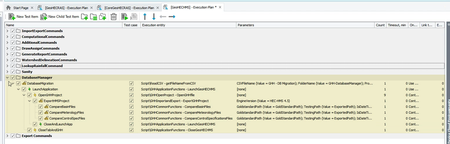
ContributionsMost RecentMost LikesSolutionsTestComplete Test Run On Azure DevOps - Passing Additional Command Line Parameters in Yaml # Variable 'BuildNameforReport' was defined in the Variables tab # Variable 'PipelineStartTime' was defined in the Variables tab # Variable 'TypeofBuild' was defined in the Variables tab variables: - name: timestamp value: $(Get-Date -Format 'yyyy-MM-dd HH:mm:ss') - name: buildType value: "RC" jobs: - job: Job_2 displayName: Install Build timeoutInMinutes: 240 pool: name: RXY Testing Pool steps: - checkout: self clean: true fetchTags: false - job: Job_4 displayName: Sanity Test timeoutInMinutes: 240 dependsOn: Job_2 pool: name: RXY Testing Pool steps: - checkout: self clean: true fetchTags: false - task: PowerShell@2 displayName: Set Timestamp and Build Type continueOnError: True inputs: targetType: inline buildType: "$(buildType)" - task: VisualStudioTestPlatformInstaller@1 displayName: Visual Studio Test Platform Installer continueOnError: True - task: SmartBearSoftware.install-testcomplete-adapter-task.install-testcomplete-adapter-task.InstallTestCompleteAdapter@1 displayName: TestComplete test adapter installer continueOnError: True inputs: installExecutor: false updateExecutor: false accessKey: xxxxxx cmdLineParams: '/PrjVar:buildType="RC"' - task: VSTest@2 displayName: 1D Sanity Tests continueOnError: True inputs: testAssemblyVer2: '**\test.pjs' testFiltercriteria: 1D Sanity Test vsTestVersion: toolsInstaller - task: VSTest@3 displayName: 2D Sanity Tests continueOnError: True condition: eq(variables['2D Sanity Test'], 'True') inputs: testAssemblyVer2: '**\test.pjs' testFiltercriteria: 2D Sanity Test vsTestVersion: toolsInstaller For the above Yaml, how can I pass additional parameters that I can grab in a test run using BuiltIn.Parameter(0) I tried multiple formats but i am unable to get this in testcomplete run. Please suggest. Re: Azure DevOps VSTest Step - Test Case Filter Criteria Raghav: The problem is that the application fails to run the passed in tests and it does not show any problem it simply says there is no tests case to run in the passed in tests case filter critiria. As you can see in the below screen capture I want to run a DatabaseManager test it has multiple nested nodes within, I want to run them all. I am not sure how to pass value in Azure's VSTest task's Test Filter Criteria field. Re: Azure DevOps VSTest Step - Test Case Filter Criteria Alex: It is marked as test case as you can see in the below screen capture, I want to run a Databasemanager test it has multiple nested nodes within, I want to run them all. I am not sure how to pass value in Azure's VSTest task's Test Filter Criteria field. Azure DevOps VSTest Step - Test Case Filter Criteria I am running automation tests by creating a pipeline in Azure DevOps, I have a testsuite in which I have multiple projects. Ex. GeoHECRAS, GeoHECHMS etc. The GeoHECHMS project's MDS file structure is like this: Sanity --SanityTest DatabaseManager --DatabaseMigration I also attached the screen capture for reference. I created two separate VsTest steps to run automation. In one job I defined Test filter criteria as "GeoHECHMS\\Sanity" In another job Test filter criteria as "GeoHECHMS\\DatabaseManager" As you can see the node structure is the same for both of these tests in the GeoHECHMS MDS file but the test is running successfully for the first job (Sanity) and it is failing for the second job (DatabaseManager). I compared all the details in both the jobs, everything is the same, I am not able to figure out the problem, why the jobs are failing. Test Execution Issue while running using Bamboo When we run the automation test servers using TestExecute, sometimes the bamboo job fails to run. When I checked the logs there is no error shown in the logs. However, I can see the below compilation error in the Job summary tab: I have not been able to figure out the reason. This is very random and happens with a different sets of jobs every time. Dependency on coordinate clicks on WPF View Control - Query We have a desktop application. In our desktop application, we have the View Control panel of WPF. This panel has a diagrammatic interface. We are using coordinate clicks to automate the steps on this WPF View Control because TestComplete cannot identify the elements inside this WPF View Control. The development team increased the height of this WPF View Control panel by 1px to fix an issue in the application. So, all the coordinate base clicks we are using in automation testing are impacted because of this change. Is there any way to fix this problem without needing to update the coordinates? Please suggest. Thank you. SolvedCalling function from .NET Assembly - Query I used the Sys.Process("MyProcessName").AppDomain("AppDomainName").dotNET.namespace.class.subclass.method(parameters) method to call a function from a dll. This is working fine if the dll is not obfuscated but when the dll is obfuscated I am unable to use the function. The dll is not getting visible in the intellisense. Please note the function is a public static function so it should be accessed even after the obfuscation. Can anyone guide me to resolve this issue. Thanks in advance. SolvedUsing Call before the action What is the difference between: (1) Call Aliases.Test.Createbutton.Click and (2) Aliases.Test.Createbutton.Click Both the lines of code works for me, then what is the use of Call? SolvedName Mapping aliases name of objects Can we change the aliases name of already mapped objects in the Name Mapping file? SolvedRe: Is there recommended TestExecute lify cycle time? You can keep the process ON for the indefinite time period (that might affect the system performance a bit), but I don't see any benefits of doing so. Why specifically you need to do this?