RammherzOccasional ContributorJoined 7 years ago9 Posts4 LikesLikes received2 SolutionsView All Badges
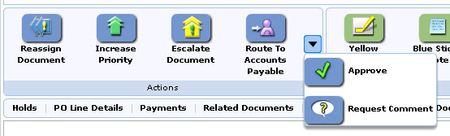
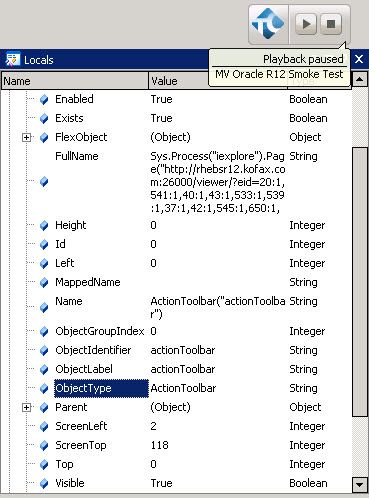
ContributionsMost RecentMost LikesSolutionsProblem with finding TimeInterval when start time and finish time are in different dates Hi all! I use the following code to measure time needed for test execution nTestStartTime = aqDateTime.Time(); nTestExecutionTime = aqConvert.DateTimeToFormatStr(aqDateTime.TimeInterval(nTestStartTime, aqDateTime.Time()), "%#H:%M:%S"); I have a problem with case when start time and finish time are in different dates. I.e: Test start: 2018-05-17 23:54:58 Test finish: 2018-05-18 00:01:37 Expected result: 00:06:39 Actual result: 23:53:21 Please help me to correct code to get actual result. Thanks! SolvedRe: Flex object is not presented in object tree I found the solution. I just use page URL instead of ActionToolbar as parent object in the function function Approve() { var oParent = ActionToolbar(); var aProps = ["Caption", "ObjectType"]; var aVals = ['Approve', 'ToolButton']; return CFInternetBrowser.FindObjectByProperties(aProps, aVals, oParent, "Approve"); } and it finds both types of buttons. So I wonder why developers of this autotests used ActionToolbar as parent objects... I suggest they had reasons for it. But I have no problem to resolve now :) tristaanogre, thanks a lot! Re: Flex object is not presented in object tree Ok, thanks.. I`ll try to explain the origin problem. I need to click action button. Here are actions: As you can see actions Approve and Request Comment are in "More Actions" menu. The problem is to find their objects. All logic of autotest looks good: we look for action, if we cannot find it we look for "More actions" button (little arrow on the pic), click it, and then try to find action button again. In both cases (in "More actions" and not in "More actions") we use the same function to find the action button, you can see it in my message above. But if the action button is in "More actions" menu (i.e. Approve on the screenshot) TestComplete can`t find it. I marked action buttons in object tree on screen below: It seems that it worked when this test was created, but I`m not sure, nobody knows... Maybe it something wrong with my environment? Re: Flex object is not presented in object tree Thanks! Actually another part of code doesn`t work, and I`m trying to understand the structure of objects to fix it. Yes, here is a lot custom code. MVVO_PageContainers.DocumentViewer returns Document Viewer object container: function DocumentViewer() { var oParent = Page(); var aProps = ["ObjectType", "ObjectLabel"]; var aVals = ["DocumentView", "documentView"]; return CFInternetBrowser.FindObjectByProperties(aProps, aVals, oParent, "DocumentViewer", 100); } CFInternetBrowser.FindObjectByProperties is more complicated function, it searches the specified parent object for an object who's that matches the specified property values. function FindObjectByProperties(aPropertyNames, aPropertyValues, oParentObject, strDescription, nDepth, bTryWaitForBrowser) { var strModuleID = c_strModule + GetFunctionName(arguments.callee); var strStatus = "(Object NOT found)"; var oReturn = null; var oObject = null; var oPage; try { CFLog.DebugMessageBegin(strModuleID + " Values: " + aPropertyValues.toString()); // Assign default parameter values. nDepth = CFGeneralUtilities.GetValueOrDefault(nDepth, 50); bTryWaitForBrowser = CFGeneralUtilities.GetValueOrDefault(bTryWaitForBrowser, true); if (CFObject.ObjectExists(oParentObject)) { // Refresh the parent object oParentObject.Refresh(); } else { // The ParentObject does not exist, so there is not point in continuing to attempt to find the child element throw new kfxException(strModuleID, "The provided oParentObject does not exist. #1", null, strDescription); } // Try to find the object the first time oObject = CFObject.FindObjectByProperties(aPropertyNames, aPropertyValues, oParentObject, strDescription, nDepth); // If the object was not found, try one last time. if ((CFException.IsException(oObject)) && (bTryWaitForBrowser)) { // Find the page object in the hierarchy oPage = GetPageFromDescendent(oParentObject); CheckResult(oPage); // Make sure the page is loaded and rendered before trying again. CheckResult(WaitForBrowser(oPage)); if (CFObject.ObjectExists(oParentObject)) { // Refresh the parent again oParentObject.Refresh(); } else { // The ParentObject does not exist, so there is not point in continuing to attempt to find the child element throw new kfxException(strModuleID, "The provided oParentObject does not exist. #2", null, strDescription); } // Try one more time to see if we can find the object. oObject = CFObject.FindObjectByProperties(aPropertyNames, aPropertyValues, oParentObject, strDescription, nDepth); } // Finally if the object was not found, throw an exception. CheckResult(oObject, "Could not find object: " + strDescription); // Set the return value oReturn = oObject; } catch(oException) { oReturn = CFException.ProcessException(strModuleID, oException); CFLog.DebugException(oReturn); } CFLog.DebugMessageEnd(strModuleID); // Object was found if (! CFException.IsException(oObject)) strStatus = "(Object found)"; WriteToLog(strModuleID, strStatus + ": Names='" + aPropertyNames.toString() + "', Values='" + aPropertyValues.toString() + "', Depth=" + nDepth); return oReturn; } CFObject.FindObjectByProperties: function FindObjectByProperties(aPropertyNames, aPropertyValues, oParentObject, strDescription, nDepth) { var strModuleID = c_strModule + CFGeneralUtilities.GetFunctionName(arguments.callee); var oObject = null; try { CFLog.DebugMessageBegin(strModuleID + " Values: " + aPropertyValues.toString()); // Assign default parameter values. nDepth = CFGeneralUtilities.GetValueOrDefault(nDepth, 100); // See if provided parent object is an exception object if (CFException.IsException(oParentObject)) throw new kfxException(strModuleID, "The provided oParentObject was already an exception object.", oParentObject, strDescription); // Make sure we were given a valid parent object. if (oParentObject == null) throw new kfxException(strModuleID, "You must supply a valid parent object. The parent object specified is null."); // We need to convert the arrays for use with the TestComplete API. var aConvertedPropertyNames = CFGeneralUtilities.ConvertArrayToDictionary(aPropertyNames); var aConvertedPropertyValues = CFGeneralUtilities.ConvertArrayToDictionary(aPropertyValues); // Attempt to locate an object that matches the set of properties we were given. oObject = oParentObject.Find(aConvertedPropertyNames, aConvertedPropertyValues, nDepth); // Finally if the object was not found, throw an exception. if (! ObjectExists(oObject)) throw new kfxException(strModuleID, "Could not find object: " + strDescription, null, "", arguments); } catch(oException) { oObject = CFException.ProcessException(strModuleID, oException); CFLog.DebugException(oObject); } CFLog.DebugMessageEnd(strModuleID); return oObject; } And this object uses parent ActionToolbar (successfully): function Approve() { var oParent = ActionToolbar(); var aProps = ["Caption", "ObjectType"]; var aVals = ['Approve', 'ToolButton']; return CFInternetBrowser.FindObjectByProperties(aProps, aVals, oParent, "Approve"); All objects in my application which were used in code I could see object tree, except of ActionToolbar. In debug mode I also see ActionToolbar object: So as I see this is real object.. So why I can`t see it in project tree?)) I don`t understand. Flex object is not presented in object tree Hi all, In Test Complete project, which was written in 2013 (not by me), I see that one of the flex objects can be successfully found: function ActionToolbar() { var oParent = MVVO_PageContainers.DocumentViewer(); var aProps = ["ObjectType", "ObjectLabel"]; var aVals = ["ActionToolbar", "actionToolbar"]; return CFInternetBrowser.FindObjectByProperties(aProps, aVals, oParent, "ActionToolbar", 2); } But I don`t see object 'ActionToolbar' in object tree: On pic above I marked objects which exactly have 'ActionToolbar' as parent object (according to autotests code). Could you explain why 'ActionToolbar' object is not presented in object tree? If it is make sense I use Debug Version of Flash Player approach. P.S. Sorry for my questions, I`m new in automation testing :) SolvedRe: How to obtain process object of just launched cmd I found out that ADO connection can`t work with multiple PL/SQL blocks in one script. Like this: variable a number; variable b number; def a = x; def a = y; begin .... end; / begin .... end; / So I changed this to: declare a number := x ; b number := y ; begin begin .... end; begin .... end; end; And it helped! Now I can run my script via ADO, so I don`t need to run shell. Thanks for all advices! Re: How to obtain process object of just launched cmd tristaanogre, cunderw, thanks a lot! Actually these are my first steps in automation testing, some my decisions can be really silly. I'll try to explain what I want to do. I have complex PL/SQL scipt with many 'begin' blocks and script variables. This script creates invoice in Oracle EBS and performs few more actions. Off curse it would be great for me to run this script via ADO connection, I have all prepared structure for it. But it fails. I tried whole day to run it, I looked for decisions here and in google, but now I`m not sure it is possible. So I installed SQL*PLUS and created .bat file which will run that PL/SQL scipt. And now I`m trying to run it using SQL*PLUS. Also there are parameters in this script, and actually I want to have ability to change them... But now I hardcoded all parameters and just try to run script and get output. In output of script there is generated name of created invoice. I need it for further work. So I need to obtain output somehow. Well, that`s it. Maybe you can suggest some new decision for my goals. Thanks! P.S. Sorry for my english, hope you will understand this text :) How to obtain process object of just launched cmd Hi there, I have one cmd instance launched (#1), and then I run one more instance (#2): var obj = Sys.OleObject("WScript.Shell") obj.Run("C:\\Users\\admin\\run_sql.bat") After it I need to obtain run_sql.bat output. I do following: var p = Sys.Process("cmd"); var w = p.Window("ConsoleWindowClass", "*"); var txt = w.wText; But I get output of cmd instance #1 instead of just created instance. Please help me to get correct process object Solved