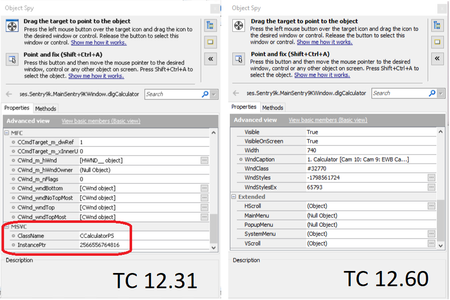
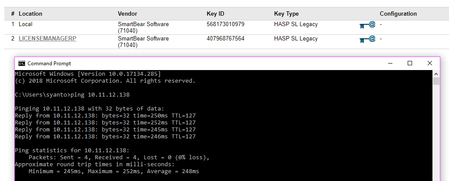
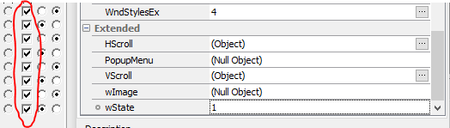
ContributionsMost RecentMost LikesSolutionsScript to change global update option for Table checkpoint? Refer to this documentation: https://support.smartbear.com/testcomplete/docs/testing-with/checkpoints/tables/updating.html The 2nd method allow us to change the update behavior to update the current table's data instead of verifying the table's data. But seems like I need to change it manually. Is there a script to change this Table Checkpoint global update option(verification/update data)? SolvedMFC - MSVC property group gone on TC12.60? Is there some changes in TC12.60 regarding object property mapping? We used TC 12.31 to test MFC application and we use the MSVC property (classname, etc) for the object mapping. After we upgrade to TC12.60, these properties is gone and the ControlId of the tested objects always 0. Should I contact the tech support? Because it seems this issue is pretty similar with this one: https://community.smartbear.com/t5/TestComplete-Functional-Web/MSVC-property-group-is-occasionally-not-available-in-TC10/m-p/83190#M18743 Re: VPN License Key not detected Ah, thank you so much Alex! Turns out i was missing this step on the Admin Control Panel configuration: Clear the Broadcast Search for Remote Licenses check box. VPN License Key not detected We have LicenseManager server where the TC12 floating license is available. But right now when I open TC12 on my local computer, it always tells me that my trial license is already expired (there's trial license in the local computer) I have already tried to follow this guide: https://support.smartbear.com/testcomplete/docs/licensing/how-to/general/using-testcomplete-in-virtual-private-networks.html But it still not working. Are there any other steps that i need to do? Or is there a way to remove the license manager on my local computer so i can remove the previous trial license? Below is the screenshot from the sentinel admin control SolvedRe: SetText issue, upgrading from TC11.31 to TC12.31 Finally figured the workaround for this. So i used the FindChild method instead of the mapping (still not sure why the mapping didn't work tho): Aliases.MainWindow.FindChild(["WndClass","ControlId"],["Edit",1745],6,true).SetText(100); Thank you for the replies! Re: SetText issue, upgrading from TC11.31 to TC12.31 Thank you for your response. I just check the captured picture, however i didn't see anything wrong. On the first error "Unexpected window", it only showed the dialog window that have edit box that i want to fill. On the second and third error, it showed the entire windows desktop while the application is running. I have tried using the "Ignore Unexpected Window" on the project properties, however I receive the following error: "The 'Default Library' window is invisible and thus cannot be activated. 10:15:49 Normal " "The test execution was interrupted. 10:15:49 Normal " This is so weird because the edit box that i want to SetText in not in the 'Default Library' window, I don't even have 'Default Library' window on my name mapping. SetText issue, upgrading from TC11.31 to TC12.31 So i just upgrade my project from TC11.31 to TC12.31, however i encounter a problem when i am using SetText method to certain edit box. The error is as shown in picture below, somehow it detect unexpected window but there wasn't any other window. There's also the log error "the operation was interrupted by the user", but i didn't do anything. The code was working fine on TC11.31, can anyone help me on this? Re: passing variables on FindChild That is one of the object button, I got the value 45 which is the property value of the property name "Index" using the Object Spy. So in this case there're a lot of check boxes and radio buttons (there are like hundreds of them) that arranged in rows and columns. One of the test case is that I need to make the testing for each desired rows only. Using the Object Spy, i figured that the property value of the property name "Index" of the buttons in the same row is in sequence (for example in row 5, there are 9 buttons with the property value of the property name "Index" are: 37,38,39,40,41,42,43,44,45). Therefore I plan to use loop with FindChild to taking care of the mapping, but the loop i made before is not working. Re: passing variables on FindChild I have tried to use the FindAllChildren method, however it's too hard for me to use because on the window that i test consist of a lot of check boxes and radio buttons. The object properties i can use to limit the search is only the WndCaption and WndClass. Or do you have any other suggestion of technique i can use? My current test purposes is to make sure all these check boxes and radio buttons always work properly. Re: passing variables on FindChild Thank you for your reply, will! However the objects that i want to map do have wState. I tried to use the method as follow: child[i] = parent.FindChild( ["WndClass", "Index"], ["Button", 45], 2, true).wState; And it's working, however if i change the index 45 to the i variables, i got the error: "Unable to find the object wState. See Additional Information for details."