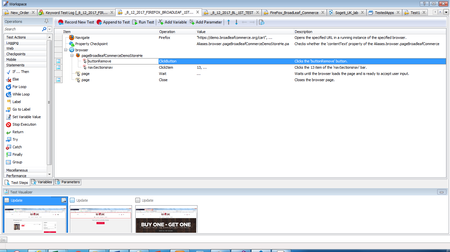
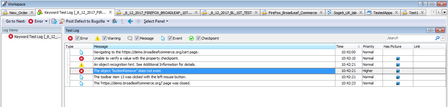
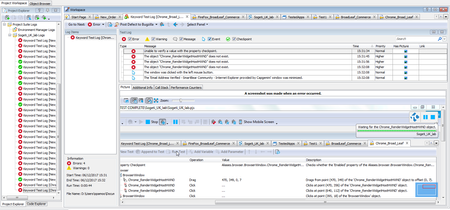
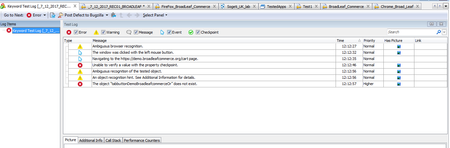
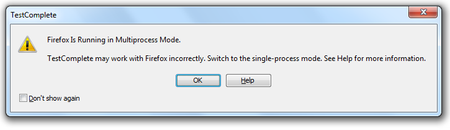
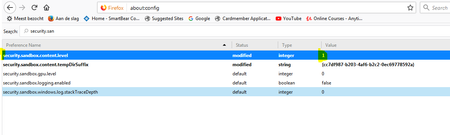
ContributionsMost RecentMost LikesSolutionsRe: Firefox Is Running In MultiProcess Mode .. TestComplete May Work With Firefox Incorrectly...... Hi, thank you prompt messages. I have attached a copy of the screen shot of the keyword test. Here is a description of the test steps: 1. Open Google Chrome 2. Type in the URL: https://demo.broadleafcommerce.org/ 3. Search for "green ghost" 4. Select "green ghost". 5. Move item ("green ghost") into to Basket 6. Apply checkpoint on the cost if the item ($9.00) 7. Delete the item from the basket 8. Go back to the Home Page 9. Close Browser 10. End Test Please, let me know if you require more information. Re: Firefox Is Running In MultiProcess Mode .. TestComplete May Work With Firefox Incorrectly...... tristaanogre- Thank you for your email. I closed the browser (as suggested) & re-recorded the test. I also opened the browser as part of my test. Afterwards, I got fewer than expected test steps in the test log. In addition, when I re-ran the recorded test, the test steps TestComplete displayed were much shorter than what I did when I recorded the test. I am attaching a screen shot of the error. Re: Could Not Set Up BreakPoint In Google Chrome; Among Other Issues Hi, Thanks for your response. I confirm that I have enabled it. It still gives the error. Thanks.. Could Not Set Up BreakPoint In Google Chrome; Among Other Issues I ran a browser-based test (from: https://support.smartbear.com/testcomplete/videos/smartbear-academy-testcomplete-101-april-2017/), and, I was not able to set up a breakpoint (using Google Chrome). I Could Not Set Up A BreakPoint In The Test. The BreakPoint Was For A Text Entry. But The BreakPoint Red Highlight Window Covered The Entire Browser Window… Could It Be Due To Compatibility Issues ? I Am Using Google Chrome Version 6.2.03202.94 (Official Build) [64-Bit] Also, I Noticed That There Were Fewer Steps Than I Expected (i.e. Compared To Test Steps) In The Steps Window. On Replaying The Test, I Get: "System TimeOut" Errors From Internet Explorer & Not The Google Chrome Browser That I Used During The Test. Re: Firefox Is Running In MultiProcess Mode .. TestComplete May Work With Firefox Incorrectly...... dganov- Here Is Where I Changed The Value Of The Parameter To 1: Re: Firefox Is Running In MultiProcess Mode .. TestComplete May Work With Firefox Incorrectly...... dganov- Many Thanks for your prompt response.. I tried what you suggested. But, the issue still persists. On replaying the recorded test, it takes me to the checkout cart webpage. This is different from what I did when I was recording the test. Thank you. Re: Firefox Is Running In MultiProcess Mode .. TestComplete May Work With Firefox Incorrectly...... AlexKarasThanks for your response. Yes, I used the information in that article. But, that did not help in solving the problem. Re: Firefox Is Running In MultiProcess Mode .. TestComplete May Work With Firefox Incorrectly...... I am using Mozilla Firefox V 57.0 (64-Bit). I am downloading Firefox patches from here: https://support.smartbear.com/downloads/testcomplete/firefox-patches/ & will update you. Thanks.. Re: Firefox Is Running In MultiProcess Mode .. TestComplete May Work With Firefox Incorrectly...... I have turned off Automatic Updates on Firefox. But it appears that Firefox has been updated already. I also tried using Google Chrome, but, I get a different set of errors. Thank you. Firefox Is Running In MultiProcess Mode .. TestComplete May Work With Firefox Incorrectly...... I ran a browser-based test (from: https://support.smartbear.com/testcomplete/videos/smartbear-academy-testcomplete-101-april-2017/), and, I got the error in the 1st screen shot. Action Taken So Far: A.) Used Test Complete Help Menu To Change FireFox To Single Process Mode. The Parameters: “browser.tabs.remote.autostart” and “browser.tabs.remote.autostart.2” have been set to “False” – as per instructions from the TestComplete Help File Regarding This Issue. B.) Re-Recorded The Test. But, The Same Issue Arises. Let me know what your thoughts are please.