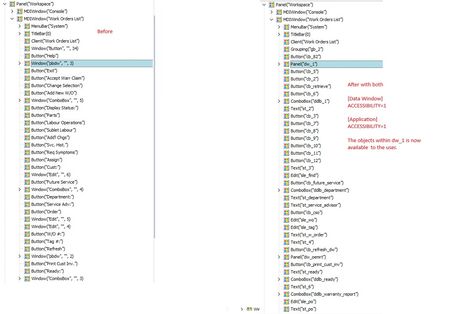
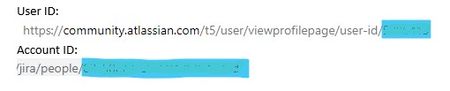
ContributionsMost RecentMost LikesSolutionsRe: POWERBUILDER & TESTCOMPLETE Just an FYI in case anyone is still using PowerBuilder like us :). We just migrated to PB 2025 and the pb.ini file needs to include the following to view the objects within a datawindow. [Data Window] ACCESSIBILITY=1 [Application] ACCESSIBILITY=1 Re: POWERBUILDER & TESTCOMPLETE No, at the time of this post I remapped all of the existing objects. Re: Trying to access the objects on Appeon's Ribbon Menu. Thanks, already tried that one also. pbdw* is used for powerbuilder to allow access to the data objects. Re: Trying to access the objects on Appeon's Ribbon Menu. Thanks, just added it and same result. Trying to access the objects on Appeon's Ribbon Menu. Hi, I'm trying to access the objects on the powerbuilder ribbon bar. Any suggestions / ideas on how to have these objects (buttons) accessible. Thanks Dave Zephyr & TestComplete Does Zephyr actually run the tests or just connect with TestComplete and get the results of the latest log file for each test? Zephyr Squad & Test Complete Hi, I'm using Zephyr Squad plugin with Jira to automate my test scripts that are created in TestComplete. I'm having trouble executing the tests and wondering if anyone can offer some suggestions? I can connect Zephyr with TestComplete and link the actual test in Jira but I'm just wondering if Zephyr actually run the tests or just connect with TestComplete and get the results of the latest log file for each test? Thanks Dave Zephyr/Jira - Zbot Configuration I’m trying to setup Zbot but my credentials are causing an error. The readme file easily explains the setup. ***********How to configure the Zbot agent*********** # ****In dynamic.prop.file.name, "file:///"provide dynamic.prop.conf path **** dynamic.prop.file.name=file:///D:/zfjcloud/vortex/Testautomation/dynamic.prop.conf Go to the dynamic.prop.conf file and provide the access key, secret key and account id Example: zfj.cloud.base.url=https://prod-api.zephyr4jiracloud.com/connect zfj.cloud.access.key=LDJFLKSAJDFLJDLFKJSDLFAJLDSAFJLKDSFJALDSFJLSDAJFLSFJ234SKLDAFJLKDJAKASFDJ zfj.cloud.secret.key=KL30409lasjdlfjJKLASDJFJF98203JKLJ zfj.cloud.account.id=557058:11111-1111-111-111-111SDF3G2 557058:11111-1111-111-111-111SDF3G2 User id Account id The example above shows zfj.cloud.account.id but from what I can find it’s the user id and account id provided by Atlassian. The account id I found Jira and the user id I found while logged in to https://community.atlassian.com/ and viewing my profile. Are these the correct location to find the user id & account id? POWERBUILDER & TESTCOMPLETE Just wondering is there a workaround with the MSAA (pbdw*) to accommodate Powerbuilder 2019 & 2022. We migrated to 2019 and I remapped all of the datawindows in TestComplete so it would be recognized during runtime. Again, we migrated to 2022 and I'm to the same issue. I know about the supported version... Supported PowerBuilder Versions With TestComplete, you can create and run tests for applications created with PowerBuilder Classic version 12.0, 12.5, 12.5.2 and 12.6. I saw other posts with similar questions regarding the same issue. Support ticket created Thanks 🙃 SolvedRe: Automate Test Cases using Task Scheduler Hi... Here's what I found... 1. I resolved a minor issue with my name mapping 2. I added a couple delays near the beginning of the Execution plan. I normally set my delays from 500 to 800. Using Task Scheduler I added a delay at the opening script of 15000 & when the program opened another delay of 20000. 3. The user account setup to run the Automated task on our internal server needed access to the files being run. I logged into that generic account and ran the files needed and set the project suite as default for the Internal Server account. Done a test run overnight and it worked great! Thanks for the help!