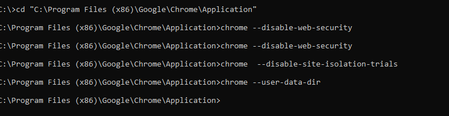
ContributionsMost RecentMost LikesSolutionsRe: TC 14 not able to recognize a frame on Chrome web page Thank you so much ! you guys are aswome as always :heart: Re: TC 14 not able to recognize a frame on Chrome web page url: Notneededanymore enter number: 45454545 and other data and click recharge. Click again on next screen. Payment screen will show up. Waiting for your repsonse. Thanks Re: TC 14 not able to recognize a frame on Chrome web page Jusr run the command line switches below but nothing happened Thats wat you meant by chrome keys right ? "Try to run Chrome with keys: --disable-web-security --disable-site-isolation-trials --user-data-dir" Re: TC 14 not able to recognize a frame on Chrome web page AlexKaras Yes I have a active Desktop license extension enabled TC 14 not able to recognize a frame on Chrome web page I am testing web application and at a certain stage TC 14 spy tool is not able recoginize frame which is payment transaction window poup. object browser is showing it as ["wndChrome_WidgetWin_1"]["Chrome_RenderWidgetHostHWND"] I tried enabling '*' option for MSAA (Current Project Properties|Open Applications|MSAA). But it did not help aswell. I have attached screen shot and annotate the window which is not recognizable. How it should be handled ? Please Help SolvedTestComplete 12 and Visual Studio 2017 Integration I want to integerate TestComplete 12.6 with Visual Studio 17. Followed the steps given in link below.: https://support.smartbear.com/testcomplete/docs/working-with/integration/ms-vs/alm/add-tc-tests.html Main steps includes: 1- Run VS integeration which is given at path in local testcomplete folder <TestComplete 12>\VS Integration\VSIntegration.exe 2- Run this installer after installing TestComplete on your computer. In the installation wizard, select the Visual Studio Integration feature appropriate for your Visual Studio version. On second step I selected Visual Studio 2017 Integerartion and Microsoft Visual Studio 2017 Test Agent Integeration. But I faced an error message on this step that I don't have VS 17 Test agent integeration. Error message is attached. Do I really need VS 17 test agent integeration to run Testcomplete scripts in VS 17 on local machine where tescomplete is also installed ?. Also I don't see any option of testcomplete test while adding it to VS 17 project. I installed it without selecting VS 17 Test agent integeration. Where I am going wrong ? SolvedRe: SQL Server does not exist or access denied- ADO Connection tristaanogre Ohh Thanks alot :) SQL Server does not exist or access denied- ADO Connection I am not abel to connect to database and execute query. Test complete throws an err that " function SQLdbconnection() { var AConnection, RecSet; // Create a Connection object AConnection = ADO["CreateADOConnection"]() // Specify the connection string AConnection["ConnectionString"] = "Provider=SQLOLEDB;Data Source=192.168.0.98\QASQL;User ID=sa;Password=somepasword;Initial Catalog=mydbqa;Persist Security Info=False"; // Suppress the login dialog box AConnection["LoginPrompt"] = 0; AConnection["Open"](); // Execute a query RecSet = AConnection["Execute_"]("Select * from tax"); RecSet["MoveFirst"](); while (!RecSet["EOF"]) { Log["Message"](RecSet["Fields"]("tax1_name")["Value"], RecSet["Fields"]("tax2_name")["Value"]); RecSet["MoveNext"](); }; AConnection["Close"](); } On executing above code I receive an error that "JScript runtime error. [DBNETLIB][ConnectionOpen (Connect()).]SQL Server does not exist or access denied" What wrong I am doing ? Otherinformation: - My Testcomplete information: Version: 12.60.5545.7 x64. - Microsoft Windows 10 Enterprise, 64-bit (10.0 Build 17763) - Microsoft SQL Server 2012 (SP1) - 11.0.3000.0 (Intel X86) Oct 19 2012 13:43:21 Enterprise Edition on Windows NT 6.2 <X64> (Build 9200: ) (WOW64) SolvedRe: Unable to perform action on second date-picker of the range value Alex thanks for your reply ! Will try standard approches you shared. For now only difference I found is "Focused Day" property and "index" property but these object does not support Key stroke methods. As I am using Right or Left keystrokes in my function by adding or subtracting user date with Focused date. Below is my function: function datepicker(Month,Day,year) { var date_pickercontrol, Calender_object,Focus_day,newcalnderobject; var dd,mm,yyyy; date_pickercontrol = FindObject("WinFormsControlName","cntrlDateTimePicker"); Calender_object = date_pickercontrol.FindChild("WinFormsControlName","Month"); Focus_day = Calender_object["FocusDay"]; dd = Focus_day["Day"]; mm = Focus_day["Month"]; yyyy = Focus_day["Year"]; if(year == yyyy) { Log["Message"]("Same year") } else if(year > yyyy) { var btnright = FindObject("WinFormsControlName","btnYearRight"); newyear = year - yyyy; for (var i=1;i<= newyear;i++) { btnright["Click"](); } } else if(year < yyyy) { var btnright = FindObject("WinFormsControlName","btnYearLeft"); newyear = yyyy - year; for (var i=1;i<= newyear;i++) { btnright["Click"](); } } /////////////////////////////MONTH/////////////////////////////////////////// if(Month == mm ) { Log["Message"]("Same Month") } else if(Month > mm) { var btnright = FindObject("WinFormsControlName","btnMonthRight"); newmonth = Month - mm; for (var i=1;i<= newmonth;i++) { btnright["Click"](); } } else if(Month < mm) { var btnright = FindObject("WinFormsControlName","btnMonthLeft"); newmonth = mm - Month; for (var i=1;i<=newmonth;i++) { btnright["Click"](); } } ////////////////////////////////DAY///////////////////////////////////////////////// if (Day == dd) { Log["Message"]("Same Day") } else if(Day > dd) { newday = Day - dd; var date_pickercontrol = FindObject("WinFormsControlName","cntrlDateTimePicker"); var Calender_object2 = date_pickercontrol.FindChild("WinFormsControlName","Month"); for (var i=1;i<= newday;i++) { Calender_object2["Keys"]("[Right]") } } else if(Day < dd) { newday = dd - Day; for (var i=1;i<=newday;i++) { Calender_object2["Keys"]("[Left]") ; } } Sys["Keys"]("[Enter]"); return; } Unable to perform action on second date-picker of the range value To fetch a report I am giving date range using two datepickers . first one is "From date" and 2nd is "To date". I have a function of date picker which selects a date from date-picker.My function easily selects first date i.e From date but selecting To Date 2nd date picker gives me the error (attached) which is window is invisible and thus cannot be activated. Testcomplete is expecting first datepicker i.e From Datepicker to be reopen to perform action on it. and thats becuase Dev team is using same datepicker control for both dates (from and to) and thus my function expects first control found to be reopened. So both controls have same object name. What else should I do to select a date from "To datepicker" using my function? keeping in mind following things: - Its not a textbox to insert a date directly by changing text. its a dropdown not a textbox. screenshot attached. - I tried changing text aswell, it does change the text on the dropdown button but its only change the text and calendar still shows the previous date. Anything I can do to change text only and gives me the effect on calendar aswell ?