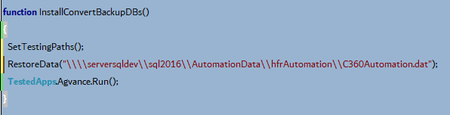
ContributionsMost RecentMost LikesSolutionsRe: screen resolution seems to change between runs on the same machine We are not using Session Creator but I will show this to my manager and see what he thinks. We are also exploring other hardware solutions. Thank you! screen resolution seems to change between runs on the same machine We run our nightly tests on 2 separate machines, neither of which will necessarily display on a monitor while running (unless someone physically logs into that machine while the test is running). We have been having a lot of issues where sometimes the run will behave as expected and all objects are visible. On other runs, the resolution is different and some objects are now offscreen, causing lots of errors. In an attempt to figure out the issue, we wrote a script to create a warning when the resolution is not a multiple of 1920X1080 (to account for multiple monitors potentially being used when running tests manually). I have looked in our setup scripts to make sure nothing is changing the screen resolution there, and have found nothing. I also checked our scheduled tasks for something that would modify the screen res and found nothing there as well. We also restart our automation machines before running the tests each night. I understand that one of your answers in the past has been to add 'scroll into view' to objects that are sometimes offscreen but I have not had great luck with that function, sometimes it works for the object I need it for, and sometimes it doesn't. I recently had to add a fairly significant script to scroll something into view in a list if it is not already visible and/or existing in memory. I am just wondering if anyone else has had this issue and knows why the scripts would run as expected sometimes and in a different resolution other times. SolvedRe: tested app is not using the working folder I was thinking I couldn't do that because we will be using the data on a remote server, but for the purposes of this test, that would work (restoring locally). We had tried the full network path and it didn't like that either. I will go ahead and accept this as a solution and see how it goes. Thanks! Re: tested app is not using the working folder App config: At one point I deleted the tested app setup and recorded opening the program and letting TestComplete create the tested app for me. It was created exactly as I had set it up before. I have also tried running the tested app from a keyword test by commenting out the first 2 lines below and pulling the InstallConvertBackupDBs into a keyword test. Script: I have been commenting out the first 2 lines in the script as they are already done and I am just focusing on getting the program to open. Re: tested app is not using the working folder I was trying to say that the database is SQL. In order to open the database it has to be restored to a particular location. The working folder is pointed to that location, not to the program files exe. I had already added the 'Everyone' group to the security permissions and set that to full control. tested app is not using the working folder I use TestComplete to test web applications, but we are converting from a legacy Windows product. I need to write a test that opens our legacy program (among other things). I have added the legacy program as a tested app where the application path leads to the legacy program's main exe file. I have no command line parameters. The Working Folder is pointed to where the data has been restored (SQL database). When I run the tested app, I get the message "The start in directory 'C:\Windows' is invalid." When I look at the start in input of the properties for the legacy program's icon, it is pointing to the working folder that I set up in the tested app. If my manager does the same thing, it seems to be running correctly for him. I have looked through all the options and current project properties and I can't find anything to explain why I am getting this message. Please help and thanks in advance! SolvedRe: Using FindChildEx with regexp Yep, I think that's going to have to happen (where the devs add a unique attribute for QA). We are heading down that road, hopefully soon. I'm trying to get my head wrapped around the CSS properties and things like that now. Thank you! Re: Using FindChildEx with regexp The coders use indexes, which I do not find extremely helpful when trying to write a script to be used later. It is less user-friendly to have to look at the object browser every time you want to use a routine, rather than just input the name you see on-screen that you want to use. Re: Using FindChildEx with regexp Yes, I understood. My issue is that when I am working with a certain level of objects, almost all of the properties are exactly the same as the other objects at that level so it will not give me more uniqueness to select more properties that are the same as all the other objects at that level. Re: Using FindChildEx with regexp I have been looking through the properties that are available to me and because of the way the pages are being built I don't have a lot of options as far as using another property. The reason I am using content text at that level is because I need that level to get to the checkbox. If I use class name, all of the objects on the level I am looking at have the same class name, so it will still rely on the content text to be different and it will still find the wrong object unless I use regexp. In addition, other objects on nearby levels have very similar class names, such that I would have to wildcard out the difference because it could be dynamically generated as the page is built. If I use other properties, I am still having to rely on the name on the page, so I will continue running into the need for regexp. I wasn't using the optional parameters in the method because I agreed with the defaults and had no need to change them (to me it looks like the refresh tree default is true). The timeout is not working, and couldn't be the issue because I am working on the code with the page open so there is nothing to wait for.