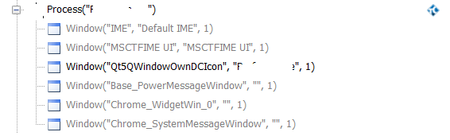
ContributionsMost RecentMost LikesSolutionsRe: Unable to identify objects in QT application Hi Shane, This is what I am seeing under Object browser . Unable to identify objects in QT application Hi Guys , We have a Desktop QT application whose frontend is coded in AngularJS. Using Test complete 14 I am unable to identify any objects. Can someone please help me out. Running tests in parallel for via test complete for Desktop applications We have keyword script based Automation framework and we use to complete as the Automation Tool . I would like to run tests in parallel inorder to reduce the execution time . Can someone please help me on that. SolvedTest comeplete for QT applications HI Guys , I know that TC allows us to test QT applications . We've a QT application for which we need to perform some automation . I went through a couple of documents related to testing QT applications and I did do the basic checks however I am unable to identify the objects in the QT application . I am only to Identigy only the main Window and nothing else. Currently I am using TC 12.20.935 and QT modules for the same version . Can someone help me out on this Please :) SolvedRe: New object is opening instead of identifying the existing one in the object browser I am actually writing data on the excel. New object is opening instead of identifying the existing one in the object browser Hi Guys , I am using windows 10 and TC 12.5 version . In my system I have opened a blank excel sheet and via Test complete I initialize excel via the below code : if(MsExcel != null) return; MsExcel = Sys["OleObject"]("Excel.Application"); return MsExcel; I see in object browser that a new excel is being opened instead of identifying the existing opened Excel . In windows 7 and TC version 12.20 I don't see this issue . Can someone help me out here Re: Can someone please explain me the below FindChild method. Thanks Alex Can someone please explain me the below FindChild method. Hi can anyone please explain how does this work . Aliases.PM.PopupWindow.FindChild(Array("ClrClassName","ToolTip"), Array("Button",KeywordTests.ClickButtonOnWindow.Parameters.ButtonName), 50, True) Thanks, Ashish SolvedWant to open a web browser while using Test complete for Desktop Application Hi Guys , I am using Test Complete to test a desktop application but I need to open a web browser while testing the Desktop application is it possible ? Re: A compare tool like beyond compare for Keyword Tests Thanks tristaanogre hoping TanyaYatskovska and DanaRogo can help me out here . This would even help people comparing multiple projects without having to use multiple instances of test complete.