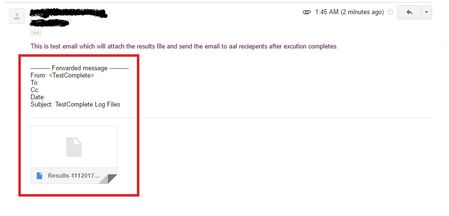
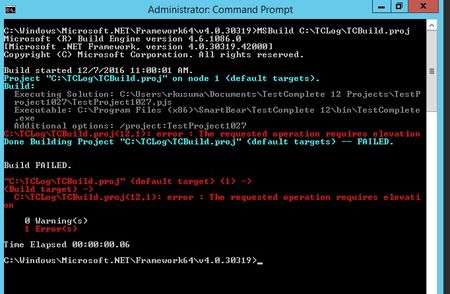
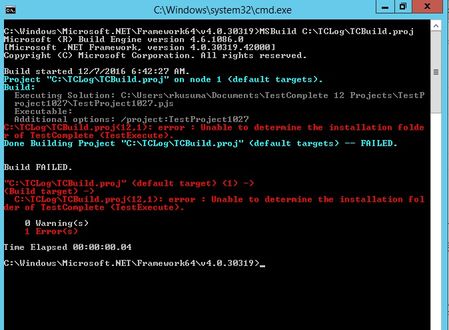
ContributionsMost RecentMost LikesSolutionsRe: Sending Email with attachment from script is just forwarding another system generated email Hi Colin, I can able to see the valid file attached to the mail in Sent Mail list of gmail (as you can see in the screenshot). Above the file attachment did you observed the forwarded message note? Re: Sending Email with attachment from script is just forwarding another system generated email Hi Colin, No errors, Email was sent successfully but with the format showed in the screenshot. I couldn't able to find the attachment in the received mail. Please find the code below which I was used. Function SendEmailResults(mFrom, mTo, mSubject, mBody, mAttachment) Dim smtpServer, smtpPort, userLogin, userPassword Dim authenticationType, useSSL, connectionTimeout Dim schema, mConfig, mMessage smtpServer = "smtp.gmail.com" smtpPort = 25 userLogin = "******" ' e.g. "abc" if the address is abc@gmail.com userPassword = "******" authenticationType = 1 ' cdoBasic connectionTimeout = 30 ' Required by Gmail useSSL = True Err.Clear() On Error Resume Next schema = "http://schemas.microsoft.com/cdo/configuration/" Set mConfig = Sys.OleObject("CDO.Configuration") mConfig.Fields.Item(schema & "sendusing") = 2 ' cdoSendUsingPort mConfig.Fields.Item(schema & "smtpserver") = smtpServer mConfig.Fields.Item(schema & "smtpserverport") = smtpPort mConfig.Fields.Item(schema & "sendusername") = userLogin mConfig.Fields.Item(schema & "sendpassword") = userPassword mConfig.Fields.Item(schema & "smtpauthenticate") = authenticationType mConfig.Fields.Item(schema & "smtpusessl") = useSSL mConfig.Fields.Item(schema & "smtpconnectiontimeout") = connectionTimeout mConfig.Fields.Update() Set mMessage = Sys.OleObject("CDO.Message") Set mMessage.Configuration = mConfig mMessage.From = mFrom mMessage.To = mTo mMessage.Subject = mSubject mMessage.HTMLBody = mBody If 0 < Len(mAttachment) Then mMessage.AddAttachment(mAttachment) End If mMessage.Send() If Err.Number > 0 Then Call Log.Error("E-mail cannot be sent", Err.Description) SendEMail = False Err.Clear() Else Log.Message("Message to <" & mTo & "> was successfully sent") SendEMail = True End If End Function Sending Email with attachment from script is just forwarding another system generated email Hi, I am saving the log file( in .mht format) in a folder after execution completes and sending email with attachment. But the email I received contains another forwarded email and not able to open the attached results log file. When I check the sent email folder, It is displaying as forwarded message. Please see the screenshot. Re: Getting error "Unable to determine the installation folder of TestComplete" Thanks a lot AlexKaras... Issue got resolved after modifying the uiAccess value as false in the Testcomplete manifest file. Thanks again Rajkiran. Re: Getting error "Unable to determine the installation folder of TestComplete" Thank you Colin_McCrae & tristaanogre Problem got resolved after re-installing the Testcomplete. But now I am getting a new error "C:\TCLog\TCBuild.proj(12,1): error : The requested operation requires elevation" Please see below screenshot. Getting error "Unable to determine the installation folder of TestComplete" Getting error " C:\TCLog\TCBuild.MSBuild(13,1): error : Unable to determine the installation folder of TestComplete (TestExecute)." when trying to execute the MSBuild project file. MSBuild code: <!-- File: MSBUILD.proj --> <!-- Root element of the MSBuild project --> <Project defaulttargets="Build" xmlns="http://schemas.microsoft.com/developer/msbuild/2003"> <!-- Declares the task type, ExecuteSolution, that will be used to run TestComplete projects (TC12 is a namespace). --> <UsingTask TaskName="TC12.ExecuteSolution" AssemblyName= "MSBuildTC12Task, Version=1.1.0.0, Culture=neutral, PublicKeyToken=e33f56e68d0f845e"/> <!-- Target --> <Target Name="Build"> <!-- Executes the task. Note that the tag name, ExecuteSolution, coincides with the registered task name. --> <ExecuteSolution SolutionFile="C:\Users\rkusuma\Documents\TestComplete 12 Projects\TestProject1027\TestProject1027.pjs" StopIfFail="true" AdditionalOptions="/project:TestProject1027" GUIInteractive="true" LogFile="C:\Users\rkusuma\Documents\TestComplete 12 Projects\TestProject1027\MyResults.mht" /> </Target> </Project> SolvedRe: text fields were not recognizing the text entered by SetText method. Thanks Robert and ghuff2. Thanks for responding to my message. Re: text fields were not recognizing the text entered by SetText method. Following events are used in my application. focus, blur (leave), change SetText method support these events? Re: text fields were not recognizing the text entered by SetText method. Hi Robert, I am using the Testcomplete Version 11.31 Build 2420 Yes, Actually my application has inline validations for mandatory text fields. While entering the username in username edit box it will validate the conditions instantly. Re: text fields were not recognizing the text entered by SetText method. Hi Robert, Error coming up on my application. I am assuming that the text entered in the textfields are not pushed to the database after clicking on the Save button. It's working fine with the Keys method.