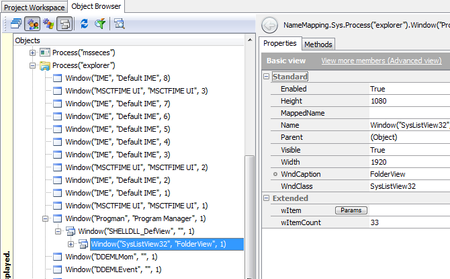
ContributionsMost RecentMost LikesSolutionsRe: Object browser on distributed tests I am glad to hear that I am not the only one with this request. Thank you Helen for this information. I "voted" for the feature request, though it was for Android apps - I would need it for desktop applications. Peter Re: Standalone object spy I would like to have a standalone Object Spy (or Object Browser), too, for desktop applications. Re: Object browser on distributed tests Yes, this is exactly my problem. It is too much work (and also a question of license) if I must install TC on every supported operating system (Windows 7, 8.1, 10,...) and language while developing our tests. Re: Object browser on distributed tests Hi Marsha_R, thank you for your reply. Probably we misunderstood each other. What exactly do you mean with: "...the test machine is visible on the network..."? I did not want to browse the test project with TC but I want to browse the (window) objects of the processes running on the test machine, like: Meanwhile I found some other tools like "WinSpy", "Spy++" or a tool that is included in the "AutoIt" scripting program named "Au3Info.exe". I wanted to know whether there is something included in TestComplete or TestExecute - without installing TC on the test maching - as you suggested as the last but not recommended possibility. Object browser on distributed tests TestComplete has the "Object Browser" e.g. to trouble shoot (Window) objects in the case if tests are failing. I run my tests distributed on several operating systems and languages with TestExecute and sometimes they are failing, because objects have different properties. How can I browse the objects on those PCs? What is the best tool? TestExecute does not include the "Object Browser", right? Peter SolvedRe: Copy/Paste of KeyWord test items does not copy the bitmaps of the TestVisualizer mgroen2: Technically your might be right, that the images do not belong to the test item entities, but practically the images help documenting the test steps (sometimes better than the descriptions) and therefore it would help not dropping them. cunderw: Thank you for the hint with the Update option. I can use it as a work around. (Sorry for the late response) Add Redmine as defect tracking tool TestComplete supports defect tracking tools like JIRA to automize bug reports. Please add Redmine (http://www.redmine.org/) as an additional tool. Copy/Paste of KeyWord test items does not copy the bitmaps of the TestVisualizer When recording a keyword test, the recorder automatically saves the screen shots of my test application, which are shown in the the Test Visualizer. If I copy one of those recorded test item to another KeywordTest, the recorded screen shots are not being copied. Especially if you cut and paste the item, you'll lose the bitmap information completely.