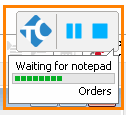
ContributionsMost RecentMost LikesSolutionsRe: change bottom line of the indicator? thanks for answering my question Re: change bottom line of the indicator? Hello, thanks for your reply - I have looked through the support material for the indicator, and please correct me if I'm wrong, but all the methods listed in the support for changing the indicator text only change the top line of text- not the bottom line, right? Can I specify which line to push text with the PushText method? I'm trying to change the bottom line of text - the one that reads "Orders" in the image below. Thanks again! change bottom line of the indicator? Is it possible to change the bottom line of the indicator to show the project and the current script file being run? By default, it only shows the current project, and I usually am aware of which project is being run, and knowing which script file is being run would be more helpful. I know how to set the top line of the indicator to show the script name, but it only appears for a split second every once in a while during the tests if no other message is being displayed. Re: changes to General Events files 1) No, but I almost always save before closing Test Complete so I wouldn't get the same prompt, but the files do get changed by Test Complete when I run the same tests, and I happen to save those changes when I save my intended changes. 2) Yes, the versions are the same. Re: changes to General Events files Yes we use event handling changes to General Events files After running tests in Test Execute, it is asking me if I want to save changes to several "General Events" (GeneralEvents0.tcax.tlb) in the test projects I just ran. Can someone explain to me why changes are being made to these files in Test Execute? Property of mapped object available in one project, not others I have a routine in a script file used by all my various test projects and one line is giving me trouble: If Aliases.[parentObjects].WaitAliasChild("dlg", 2000).Visible Then ... This line tests if a pop up dialog is visible on the screen so the tests and can handle that situation if it appears. In some test projects, it works fine and returns either True or False and the script moves on. In other projects I get an error at this line: "The test object was not found when executing the Visible command". The two projects in question do have different name mapping files, so I think that may be the issue. When I look at the object in the name mapping editor for either name mapping file, however, it appears to have the "Visible" property. What can I do to try and make this work? Thanks Re: script playback "missing" clicks on GDI viewport/canvas Thanks! I'll try that script playback "missing" clicks on GDI viewport/canvas I have multiple script tests that click on a GDI viewport/ canvas-type object in our application to test drawing in the viewport and using various custom controls that appear in the viewport. In the past week, the scripts that test various operations in the mentioned viewport have become very unreliable because the clicks on the viewport will often not work. In the log I am seeing that the object was clicked for every .Click() action the script calls, but the viewport is not registering them as clicks -- seemingly at random. I have tried putting short delays after the click actions and even HoverMouse at the same XY coordinates right before the clicks to no avail. Is anyone else experiencing this issue or have any suggestions? Thanks How can I make Test Complete recognize an Infragistics valuelistdropdown as a combo box? I'd like to be able to use "ClickItem" on a ValueListDropDownUnsafe form in a cell of an Ultragrid, but Test Complete was "unable to find object"- so for now I am only able to click the dropdown button and click an item by coordinates, which is unreliable because the list items can change.