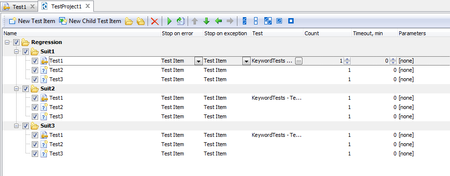
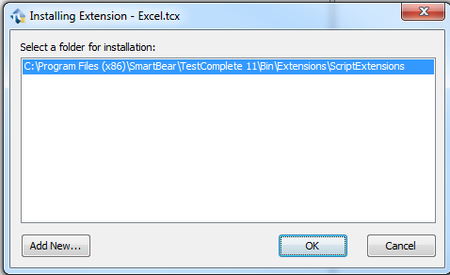
ContributionsMost RecentMost LikesSolutionsRe: How to ‘Wait’ object ‘Right’? yes, of course we did. we even checked that object Exists, VisibleOnScreen,Visible and Enabled but it didn't help Re: Selecting value from drop down Hi, try to use this: yourObjct.ClickItem("DropDownValue"); Also maybe it's help you https://support.smartbear.com/viewarticle/75906/ How to ‘Wait’ object ‘Right’? We are using script tests and before working with element we are waiting element via it’s properties: (obj.Exists == true && obj.VisibleOnScreen == true && obj.Visible == true && obj.Enabled == true) In most cases it’s work, but sometimes we are getting error, something like ‘Testcomplete are not able to perform action with disabled element’ or warning ‘The action may be performed incorrectly, because the control is disabled.’ On the screenshots we see that window is opened, but our element is not displayed yet. We use loops and “aqUtils.Delay(1000)” like workaround, but it’s hardcode and sometime doesn’t work. So, question is how to deal with it? I would be grateful for any help. Thanks in advance Denis SolvedRe: How to deal with suit and sub-suit test items? i see that you mean, thank you Re: How to deal with suit and sub-suit test items? and what a better way? rekording :smileyvery-happy: ? Re: How to deal with suit and sub-suit test items? well, do you have any better idea? Re: How to deal with suit and sub-suit test items? any thoughts, suggestions guys? How to deal with suit and sub-suit test items? I have Regression Suit and some sub-suits, see below: The question is: How to stop running Suit 1 (Test 2 and Test 3) if Test 1 failed and continue to run Suit 2 and Suit 3. I can add some logic in test scripts, but seems like we shoud have easier way. I would be grateful for any help. Thanks in advance Denis SolvedHow to create your own plugin? I have created ExcelOLEcode.js file for working with Excel, see below code: function Create(fileName) { oWorkBook = Sys.OleObject("Excel.Application").Workbooks.Add(); oWorkBook.SaveAs(fileName); oWorkBook.Close(); Sys.OleObject("Excel.Application").Quit(); } function Open(fileName) { oWorkBook = Sys.OleObject("Excel.Application").Workbooks.Open(fileName); } function Close() { oWorkBook.Save(); oWorkBook.Close(); Sys.OleObject("Excel.Application").Quit(); } function GetSheet() { return Sheet; } function SetSheet(sheetName) { Sheet = sheetName; } function CellRead(row, col) { return oWorkBook.Sheets(Sheet).Cells(row, col).value; } function CellWrite(row, col, text) { oWorkBook.Sheets(Sheet).Cells(row, col).value = text; } Also I have description file description.xml with bellow code: <?xml version="1.0" encoding="UTF-8"?> <ScriptExtensionGroup> <Category Name="Runtime Objects"> <ScriptExtension Name="Excel OLE" Author="Denis Medvedev" Version="1.0" HomePage="https://ua.linkedin.com/in/medvedevdenis"> <Script Name="ExcelOLEcode.js"> <RuntimeObject Name="ExcelOLE"> <Method Name="Open" Routine="Open"> Opens an Excel file as OLE object </Method> <Method Name="Create" Routine="Create"> Creates a new Excel file </Method> <Method Name="Close" Routine="Close"> Closes an Excel file </Method> <Property Name="Cell" GetRoutine="CellRead" SetRoutine="CellWrite">Excel cell</Property> <Property Name="Sheet" GetRoutine="GetSheet" SetRoutine="SetSheet">Excel sheet</Property> <Description>Provides access to Excel files via OLE</Description> </RuntimeObject> </Script> </ScriptExtension> </Category> </ScriptExtensionGroup> I put them to ExcelExtension folder and created zip archive, after that renamed it to Excel.tcx Then I installed new extension Right now I expect my extension in “Script Extension” screen, but it is not added. The quiestion is: What I’m doing wrong? P.S. I have installed https://support.smartbear.com/downloads/testcomplete/sdk/, but I’m not sure how to use it. SolvedHow to show code that is currently executed during test run? I know that we have this option in project properties, but can’t find it. Solved