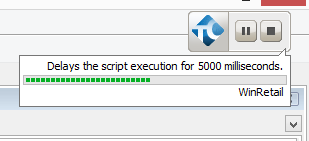
ContributionsMost RecentMost LikesSolutionsRe: Tests not entering correct figure in text box. Ya, its the exact same issue with a Keyword test. I had already tried that. Do you just want a list of everything under Extended from the Object Spy? Tests not entering correct figure in text box. We have an C++ application with Telerik controls and Test Complete looks to be recording the test fine but on play back its truncating some of the SetText entries. The test records entering 10 into a text box, but playback will truncate it to 1 for some reason. This is happening on numerous forms. Example of code: Set radTextBox = radWizard.panel5.tboxAddress1 Call radTextBox.HostedTextBoxBase.Click(24, 5) Call radTextBox.SetText("") Call radTextBox.SetText("Address ") Call radWizard.Click(400, 426) Set radMaskedEditBox = radWizard.panel2.mboxDiscountPercent Call radMaskedEditBox.mboxDiscountPercent.Click(0, 11) Call radMaskedEditBox.SetText("10.00") Error from TC: The editor cannot contain more than 1 symbols. The text '10.00' has been truncated to '1'. Re: TestComplete NetworkSuite - Copying project to slave - Can you automate it? Thank you, that appears to be working for me now using an automatic deploy mode. Thank you very much. CK TestComplete NetworkSuite - Copying project to slave - Can you automate it? Hi I am currently looking into setting up my TestComplete NetworkSuite to run automatically at night. What I do at the moment is, boot up my VMs, Open TestComplete, Go to the Hosts page under NetworkSuite, Verify that the VMs are online and click the 'Copy Project to Slave' button. The project is on a server and it gets copied to each slave. Once that is complete I just run the Job or Task under the network suite, which opens TextExecute in the VMs and they use the local copy of the project which was just copied to them. I would like to automate this whole process. Spinning up the VMs is something that is outside of TestCompletes control and I have done that using Windows Task Scheduler. Opening the NetworkSuite should be fine as there are TestComplete command lines to do that. My problem is getting the project to the Slaves, which is handled in the TestComplete UI by clicking 'Copy Project to Slave' button. Can this step be automated via a TestComplete command line? Thanks CK SolvedTestComplete Playback Control - In the way of tested app The small TestComplete control form that is present during playback, can that be moved or hidden? Pic below: For some reason, it is now interfering with playback and the tested applications controls behind it are obscured when TestComplete is trying to click them. If this could be hidden or a least moved, it would solve my problem. Thanks. SolvedDatabase table checkpoints failingI have created a few database table checkpoints, and none of them pass when playing back the test. Unable to find record 0 in the dataset is the error. I am using TC 10.30, and the database checkpoints look fine when I am creating them, the SQL database connection string is obviously correct as the query is giving results within the checkpoint wizard. I can't figure why it can't see the data when playing back. ThanksRe: Does TC have a coordinate based recording function?Thanks Alexei, That was exactly what I was looking for. It seems to be working perfect for me so far. Thanks again. Does TC have a coordinate based recording function?Hi, I am having trouble using Test Complete with our tested app when there are 3rd party conrtols present. I can't play back properly, it is unable to identify some objects on playback. In the past using other automation tools, I had the option to switch from Object Based recording and use a simple coordinate based recording function. This was a workaround I could use. Is there such a thing in Test Complete? A way to ignore the object map and just record and playback based on coordinates? Thanks...SolvedTestComplete doesn't like our Drop Down Menu'sHi, New TestComplete user here. We have several drop down menu's in our tested app and TestComplete doesn't seem to like them at all. It records our actions, selecting an item from a drop down menu but it does not play them back. It clicks into the drop down box, but does not select anything. I think it has trouble attaching or identifing where to click once the drop down menu is on on screen. Is it possible to record with TestComplete in a way where it only records based on coordinates rather than object mappings, I think if I could record this test without the objects mapping confusing things it might play back ok? Any help would be appreciated.