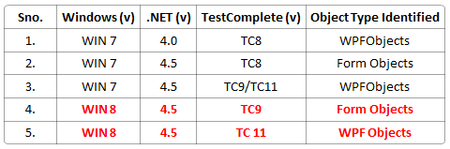
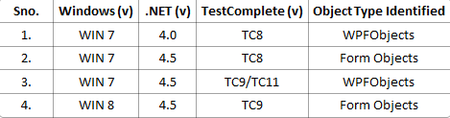
ContributionsMost RecentMost LikesSolutionsRe: objects are identified differently based on .net version Hi Alex, I have Win8.0 with TC 9.20.2460.7 version installed. -Mamatha Re: objects are identified differently based on .net version Hi Tanya, I agree, but the wierd thing I observed is, the objects are identified as Form objects in win8 (.NET 4.5) using TC9 and WPFObjects using TC11. please refer to below table: Just curios to know why it is different in 4th and 5th case. Am I missing anything here? please advice! -Mamatha Re: objects are identified differently based on .net version Hi Tanya Gorbunova, Thanks for the information!! So u have mentioned TestComplete doesn’t recognize objects as WPFObject in the .NET 4.5 app. But the APP doesn't have any behaviour specific to any .NET version. The app engineer has confirmed they aren't doing anything specific to .NET version. 1. Check your TestComplete version and review the "Supported .NET Technologies" help topic (press F1 to open the offline documentation). Perhaps, the TestComplete version you are using doesn’t support .NET Framework 4.5. Yes you are right, TC 8 doesn't support .NET 4.5. But I have couple of questions regarding this compatibility check. Below is the table which gives combinations I have tried to identify same object against different .NET versions versus different TestComplete versions and OS. From the above table it is evident that though WIN8 has .NET 4.5 version which is supported by TC9, still objects are identified as Form Objects than WPFObjects. I think something is missing here. Can you detail why it is different with WIN8 OS? 2. Do you use the same TestComplete project to review the objects in the .NET 4.0 and 4.5 apps? If you use different projects, make sure project options in both projects are set to the same values. We have same TC project settings for all the apps on any .NET version. 3. In the problematic project, open the Open Applications | General project settings and make sure that the NativeClrObject namespace is located in one of the top positions. Moving NativeClrObject namespace didn't help. -Mamatha objects are identified differently based on .net version Hi, I find same object is identified as WPF Object in .Net 4.0 version and Form Object(Button,ListItem,etc) in .Net 4.5 version. Making automation script compatible to .Net versions costs more as it is same as rewrite of whole script. I have attached dotNet40 image file which holds object tree on .Net 4.0 machine and dotNet45 image file which holds object tree on .Net 4.5 machine Can anyone suggest why Test Complete identifies same object in differenyt ways? Do we have any efficient workaround for this? Let me know if any additional information is required. Thanks & Regards, Mamatha Re: aqDateTime.Time() method returning accurate time but wrong date(Dec 30 Sat 1899)Thank You!! :-)Re: aqDateTime.Time() method returning accurate time but wrong date(Dec 30 Sat 1899)Hi Phil, I know the method you have mentioned to format the date/time to string. The thing is when we use aqConvert.DateTimeToStr(aqDateTime.Today() )it returns current date, only date is logged in log file without any explicit format [aqConvert.DateTimeToFormatStr(aqDateTime.Today(), "%m/%d/%y"));] but when we use aqConvert.DateTimeToStr(aqDateTime.Time()) why only time is not returned. Hope you got my point. Hope the image attached gives you info about what am I asking. the Jscript used is : Log.Message('Current date and time is '+aqConvert.DateTimeToStr(aqDateTime.Now())); Log.Message('Current time only '+aqConvert.DateTimeToStr(aqDateTime.Time())); Log.Message('Current date only '+aqConvert.DateTimeToStr(aqDateTime.Today())); Thanks, MamathaaqDateTime.Time() method returning accurate time but wrong date(Dec 30 Sat 1899)Hi, I am using TestComplete 9, and code snippet (using Jscript) that i used is to get current time is aqDateTime.Time(). But the result is as "Sat Dec 3- 00:47:43 UTC +0530 1899" but according to the index help it shows that use Time method to get current time. Could any one please help me out of this. thanks!!