nancypnpOccasional ContributorJoined 11 years ago15 Posts1 LikeLikes received1 SolutionView All Badges
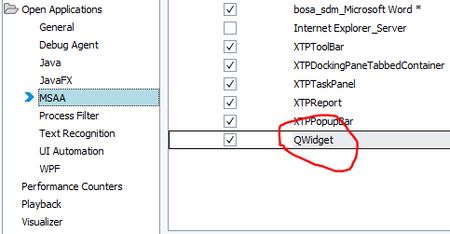
ContributionsMost RecentMost LikesSolutionsRe: Unable to recognizing QWidget objects. Trying to access OPC UA expert tool Able to resolve the issue by adding classname in tools-> Current project properties -> Open applications Thanks!! Re: Unable to recognizing QWidget objects. Trying to access OPC UA expert tool Hello Marsha_R, Thank you for the reply. I have tried all the settings mentioned and also below https://support.smartbear.com/testcomplete/docs/ver-14-93/reference/test-objects/controls/desktop/qt/tree-widget/index.html and https://support.smartbear.com/testcomplete/docs/app-testing/desktop/qt/requirements.html but still the issue is same. Note: "UaExpert" is written by Qt4 framework Unable to recognizing QWidget objects. Trying to access OPC UA expert tool Hello, I am trying to automate OPU UA expert tool to connect to a server and client. Problem: I am unable to access the tool and it had QWidget object. Unable to proceed further parent window. Tried to add the QT tool in settings, however the object spy cannot see these objects. SolvedRe: Error while installing trail version - TestComplete.exe is running Hi, Issue is still not resolved. Error while installing trail version - TestComplete.exe is running Hi, when i try to install TC trail version attached error is shown. But no test complete is running in backend. also tried with restart of system. SolvedRe: TestComplete Integration With Microsoft Visual Studio and validating test result Thank you for the reply. TestComplete Integration With Microsoft Visual Studio and validating test result Hi All, I have integrated TestComplete 10.5 with Visual Studio 2010. And able to execute my test. But i want to validate the test results in Visual Studio. like i call a function from test complete or a test Item and check the result in my Visual Studio code. Please help me with the same. Issue with mMessage.Send in SendEmail - takes long time to send message Hi, I am using below code to send email with an excel as attachment. Whenever i try to send the email it takes almost 3 to 4 ins to send mail. when i debugged, at line mMessage.Send it takes 3 to 4 mins. Can any of you suggest me some solution on the same. Function SendEmail(mFrom, mTo, mSubject, mBody, mAttachment) Dim RemoteSMTPServer Dim SMTPPortNumber Dim HTMLLinkToLogFile Dim schema Dim mConfig Dim mMessage, i Err.Clear On Error Resume Next schema = "http://schemas.microsoft.com/cdo/configuration/" Set mConfig = Sys.OleObject("CDO.Configuration") mConfig.Fields.Item(schema + "sendusing") = 2 ' cdoSendUsingPort RemoteSMTPServer = SMTPSERVER //not giving the server name due to confidential. SMTPPortNumber = 25' mConfig.Fields.Item(schema + "smtpserver") = RemoteSMTPServer ' SMTP server mConfig.Fields.Item(schema + "smtpserverport") = SMTPPortNumber ' Port number mConfig.Fields.Update() Set mMessage = Sys.OleObject("CDO.Message") mMessage.Configuration = mConfig mMessage.From = mFrom mMessage.To = mTo mMessage.Subject = mSubject mMessage.HTMLBody = mBody ' aqString.ListSeparator = "," ' For i = 0 To GetCSVCount(mAttachment) - 1 ' mMessage.AddAttachment GetCSVItem(mAttachment, i) ' Next ' aqString.ListSeparator = "," ' For i = 0 To aqString.GetListLength(mAttachment) - 1 ' mMessage.AddAttachment aqString.GetListItem(mAttachment, i) ' Next If 0 < Len(mAttachment) Then call mMessage.AddAttachment(mAttachment) End If mMessage.Send If Err.Number > 0 Then Log.Error "E-mail cannot be sent", Err.Description SendEMail = False Else Log.Message "Message to <" + mTo + "> was successfully sent" SendEMail = True End If End Function Going to move from MS Office 2007 to MS Office 365 Hi All, Can anyone let me know the impacts of testcomplete if moved from MS Office 2007 to MS Office 365. Will all my scripts work fine without any changes. for DDT's and Sys.OleObject("Excel.Application") Present TC 9.3 version is used. What will be if on TC 10? Kindly relpy Thanks in Advance Re: DDT excel driver and Sys.OleObject("Excel.Application") are throwing exceptionAnd an addition to above. I am getting this error only when i run the code from main flow, but no error is showed when the routine is executed