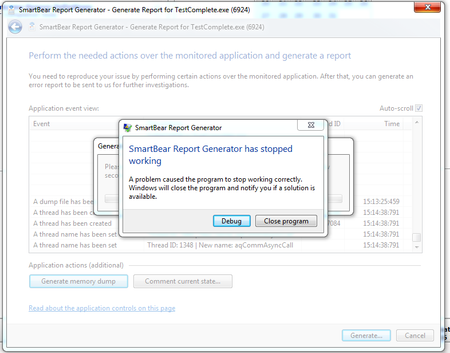
ContributionsMost RecentMost LikesSolutionsRe: Test Complete Freezes, Crashes, Degugger Freezes That is really bad news. Two of my co-workers are complaining about the same thing. I normally report these issues using the automatic crash report tool but it is broken. Grrrrrrrrrrrrrrr. Guess I'll have to suck it up and do some manual QA for SmartBear ;-) Test Complete Freezes, Crashes, Degugger Freezes Test Complete has been freezing on me fairly regularly since the last update. The tests that I have run successfully now stop functioning. Often, I get the message saying TestComplete can't find the object. This often requires that I exit TestComplete, close the browser (IE11) and reopen. If that doesn't work, I have to reboot and then the tests run fine. Today it got worse. After several reboots it now just freezes during the first attempt of playback. Sometimes that makes it crash. I tried to use the diagnostic tools and they crashed (see the screen capture). Anyone else? Is there a video or webinar that shows how to use project variables? I am trying to figure out a way to easily use a project variable that sets my test enironment to a different URL and remaps my pages. Is there a video or webinar that demonstrates this? I already know how to use variables in my keyword tests... just trying to figure out how to do it to change from QA to User Acceptance environments on the fly. Thanks! SolvedRe: TestComplete 11 keeps freezing I had the same problem. SmartBear gave me a patch to try today. You might want to consider contacting support. FireFox 33.1.1 Freezes after "Append to Test" in TestComplete V10.40.2015.7FireFox 33.1.1 TestComplete V10.40.2015.7 FireFox Patch tcFF33Hook.dll 1. Record a simple one line test using the Navigate in FireFox. 2. Play back the test. 3. Use the Append to Test and select "End". 4. Notice that FireFox is frozen with a "Not Responding" message. FireFox 32 does not have this problem. FireFox 33 was working with the previous version of TestComplete.Javaserver Faces (JSF) and TestCompleteI am experiencing difficulty in automating tests where PrimeFaces is used. Our development team plans to implement this JSF framework more and more throughout our application. I've searched the forums for TestComplete, PrimeFaces and various JavaServer forums but can't find much on the subject. Can anyone point me to useful links/tips? Currently, it seems as if TestComplete is able to recognize objects about 10% of the time. But when we use something like a popup calendar I can almost always expect it to fail. I checked my project settings for JavaServer Faces (see attached). Re: Find/Replace changes not being savedHi Tanya, I have screen captures that I would post here, however they show content that I cannot share with a public forum. I entered a support ticket and would be more than happy to share the steps to replicate in the latest version of TC, however I do not have the ability to add to ticket M0122275. Is there an email where I can forward the captures showing the global Find/Replace results then what happens when I close the project, reopen and the original string is still present? -HeatherRe: Find/Replace changes not being savedHi Tanya, Can we report this as an issue through your support team? This bug causes me a lot of lost productivity as I am making about 96 changes using Find/Replace that won't save after the project closes or TC crashes. I'd also like to request an enhancement to this feature to allow for Find/Replace to work for changing Parameters. As it is now, it can Find within a Parameter, but it cannot Replace. I am in the latest version (V10.10 Build 752). I first noticed the problem in V9.3.1. Please let me know how I can submit this request within your process. Thanks, -HeatherRe: Find/Replace changes not being savedI have experienced the same issue in both V9.31 and now with the latest version of 10. I have about 30 changes that are listed in the Search/Replace Results. If I Save All, the changes are not saved. If I close and reopen the project it is as if I never did the Searc/Replace.Re: Is there a way to do a global Search/Replace within a test parameter?They are keyword tests. I have a parameter that I've set that I'd like to change using the 'Search/Replace" in the Edit menu. It will do a global search/replace within the Worspace, but it will not pick up parameters. If I switch to the "Organize Tests" viiew where I really use and exercise those paramters, the Search will work and it can pull up the instances where I have a parameter that needs to be changed, but it cannot "Replace." So, does anyone know how to globally search/replace within parameters?