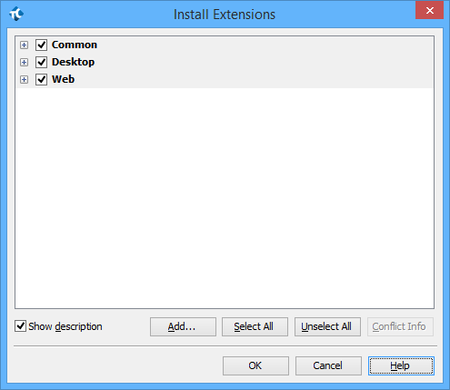
ContributionsMost RecentMost LikesSolutionsRe: Objects / Record and playback are not getting recognized with Windows 8.1 Metro app testing Hi Tanya, Yes, both desktop & web modules are installed. Refer below for the image, As told earlier, we have also enabled 'Enable support for testing windows store applications (requires restart)' under test complete options and added 'DirectUIHWND and Windows.UI.Core.CoreWindow' to the UI Automation of current project properties. We get process listed as in the below image. Objects / Record and playback are not getting recognized with Windows 8.1 Metro app testing Hi, We are about to start testing with metro app against windows8.1 environment. Testcomplete is installed with web and desktop modules earlier. Objects recognization or record playback for metro app is not working even after performing below pre-requsites, - 'Enable support for testing windows store applications (requires restart)' is enabled. - Added 'DirectUIHWND' and 'Windows.UI.Core.CoreWindow' to the Current project properties -> UI Automation. - Extension related to UI Automation is available at test complete extensions. - Restarted testcomplete after above changes. Kindly let us know how to make objects get exposed for metro apps. Re: Testing Video Files with test completeHi Tanya, Thanks for your code details to read the video file details. The requirement is little tweaky like. - Download the video - Check that video plays as source video without any noise or any - Check for all other parmeters like quality, pixel, etc.. is same as source video.Re: Testing Video Files with test completeThanks for your suggestion. But my requirement is to test videos through automation scripts, so could you please suggest if test complete tool supports it.Testing Video Files with test completeHi, Do test complete provides solution to test video files for its quality, pixel ratio, etc.. of video files. Thanks, Deva Veluchamy.Access ViolationHi, While executing scripts we faced Access Violation at address 3038B2BA in module 'aqReporter.dll'. write of address00053984. It is stopping the execution of the scripts. Please suggest us on this.Event log time differs in logsHi, We are reading the event log information in our application from using query in windows management service and Java script. The required event log is based on the current system time that we send through the query to fetch the details. We face a problem while fetching a event log of Windows xp and Windows-7 as the actual time the error message logs differs from the system time. Also the time difference is not same in all the machines of same configuration. Example : Conider an error is logged in windows event log at 05.00 AM but the time logged as 02.00 AM (which can also 07.00 AM or any difference of time) in the event log. Now I was unable to decide the exact time of an error log. We made a workaround in Windows-7 by fetching it using Record ID which is increasing for every event log but the same does not work in Windows-XP as the record id is not increasing and does not look to have a standard format. Kindly provide us some solution to fetch the error log information of the particular time.Order of function dislpayed are not same as in editor in TC9.10Hi, In testcomplete 9.10 the order of function test function dislpayed is not in the order of the function written but in the ascending order of the function names. Is there any way to change the sorting order to get displayed as same as in the order of functions in the editor. Refer attached screenshot for better understanding.Re: Getting the attachment in outlook.Hi Tanya Gorbunova, Thanks for you reply. I have tried using com object by which I was unable to get the name of the file attached in the attachment field. Kindly let me know to retrieve the name of the attachment.Getting the attachment in outlook.Hi, We use outlook 2007 we need to get the attachments in attachment field, Please let us know how to get the attachment in the outlook. Instance of outlook attachment field : "Sys.Process("OUTLOOK").Window("rctrl_renwnd32", "Invoice #656 - UPP Consulting - Message (HTML) ", 1).Window("AfxWndW", "", 1).Window("AfxWndW", "", 1).Window("#32770", "", 1).Window("RichEdit20WPT", "", 6)" Attached the screenshot of the object spy of attachment field.