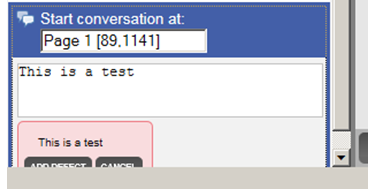
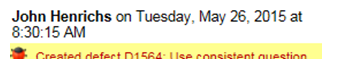
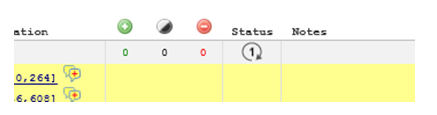
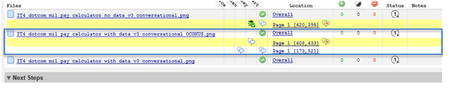
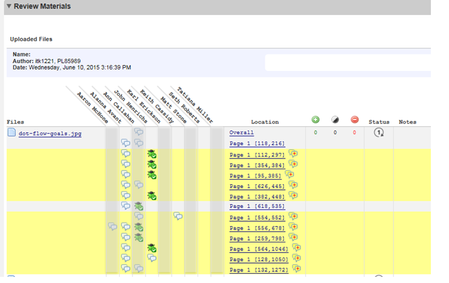
ContributionsMost RecentMost LikesSolutionsRe: Review Defects: Re-position screen when adding defect so Add Defect box doesn't get clipped Occurs in IE 9 or higher on Windows 7 client Review Defects: Re-position screen when adding defect so Add Defect box doesn't get clipped Edit Defect / Comment box falls off the bottom of the screen when the item you are entering is near the bottom of the page. This could be easily missed and if not missed requires user to scroll down the page in order to take required action. Change the window scroll point to ensure the comment/drop downs are specified when creating the defect (not the best screenshot below but close enough). Review Defects: Highlight more clearly the current, active comment/action The comments are not easily distinguished from each other. Create a space or highlight more clearly the comment/action that is currently active. Can we add some sort of delimiter/space to separate bug comments? Review Defects: Can we modify the roles so that this option is set automatically or "hidden" Only show me the "Mark as Read" if my role requires me to take action. Template rules can change the action required on this button. An observer may not have to read. The Mark as Read just indicates that you have read the comments. Can we modify the roles so that this option is set automatically or "hidden" to the end user when they are in a review and their role doesn't require them to review the comments. Review Defects: Shorten text removing day of week or shorten date to xx/xx, today, 2 mins ago, etc. Could we shorten the text in the UI defect to possibly remove day of the week or shorten date to xx/xx? Or like 2 hrs ago or today, yesterday, 2 mins ago. If we shorten the date, it might make this pane more readable, particularly when it carries over to a new line due to a long name, etc. Review Materials: Ability to "hide"/not display the added, changed, deleted metrics columns To save real estate on the Review Materials screen, it would be nice to be able to hide these metrics, particularly if the counters are not updated if files are added via the Web UI. In some cases, the metric is not relevant/helpful to the team using the tool. Re: Differentiate the columns of partipants by color in Review Materials section of Review When many changes are implemented, it would be helpful not to have to scan up to the top of the column to determine who commented, etc.: Differentiate the columns of partipants by color in Review Materials section of Review Provide a means to color code the participant data in the Review Materials section of review. Improve the color coding in the Review Materials section Review: Review Materials In the Review Materials section, the color coding is confusing. Draw a box around all the lines that belong together. YELLOW shows you what you haven't marked as read but if you have many files with many separate comments, it's easy to get lost when reviewing. Some sort of grouping would be helpful. See MOCK UP below (with a blue grouping outline). Re: Test Set Assignment This sounds like an excellent enhancement request tlabl. You should post this in the feature request forum so product management can take a look! Thanks, Michael

 StaffStaff