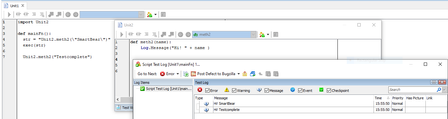
ContributionsMost RecentMost LikesSolutionsRe: How to execute a Python routine in Testcomplete Thank you for your response. As you said, we have created a new Python project and implemented your suggestions as 2 files, Unit1 and Unit2 and it works without any issue, as shown in the below Screenshot. As mentioned above, we tried that exec(str) approach, like how you send parameters from Unit1 to Unit2 in your example. we are sending the parameters from PyDriverScript to PyFun but it is failed. If you look into my code, which I shared you yesterday then you can come to know how we are sending the parameters to another function in Python. The same error which I mentioned earlier only occurred again. Thanks. Re: How to execute a Python routine in Testcomplete Thank you for your response. Sure, to insert the code, I use that option in future. Yes, that is correct, in the line no 11, if the condition is true then we are calling def DataSheet function. def RunOrderSheet and DataSheet are available in the PyDriverScript Script unit. def MTE_Textbox_One_level is available in the PyFn Script unit. In the line number 25 and 26 we send the parameters to the PyFn Script unit. As you said, using this exec() function, we are trying to send it to PyFun Script unit, like how we execute in VBScript. Thanks. Re: How to execute a Python routine in Testcomplete Thank you for your response. As you suggested, we tried to implement your solution, but we are not able to run the Testcomplete as we do in VBScript. Please find below for the actual code: PyDriverScript Script Unit - i.e., File 1 starts, import PyFun def RunOrderSheet(): TC_NO_Runorder = RunOrderSheetCelVal.Value["Tc No"] Execution = RunOrderSheetCelVal.Value["Execute"] Datasheet_Flag = RunOrderSheetCelVal.Value["Datasheet_Flag"] ModuleName_runorder = RunOrderSheetCelVal.Value["ModuleName"] TestcaseDesr = RunOrderSheetCelVal.Value["Descirption"] if Execution == "YES": import PyDriverScript PyDriverScript.DataSheet(TC_NO_Runorder,ModuleName_runorder,Datasheet_Flag,TestcaseDesr) #----------------------------------------------- def DataSheet(TC_NO_Runorder,ModuleName_runorder,Datasheet_Flag,TestcaseDesr): TC_NO_Datasheet = DBVar1.value["Tc No"] TC_Description_Datasheet = DBVar1.value["Tc Descirption"] ModuleName_Datasheet = DBVar1.value["ModuleName"] if TC_NO_Datasheet == TC_NO_Runorder and ModuleName_Datasheet == ModuleName_runorder: Property_Name = DBVar1.value["Propertyname"] Property_Value = DBVar1.value["Propertyvalue"] Data = DBVar1.value["Data"] ModuleName_Datasheet = DBVar1.value["ModuleName"] Testcaseno = DBVar1.Value["Tc No"] Process_Name = DBVar1.value["Processname"] Testlink_Id = DBVar1.value["Testlinkid"] str = "toSmartBear2.MTE_Textbox_One_level(\"TC_Description_Datasheet\Property_Name\Processname\")" exec(str) DBVar1.Next() PyDriverScript Script Unit - i.e., File 1 Ends. #----------------------------------------------- Actual PyFun Script unit - i.e. File 2 starts, import PyDriverScript #def MTE_Textbox_One_level():(Property_Name,Property_Value,Data,ModuleName_Datasheet,TestcaseDesr,Testcaseno,Process_Name,Testlink_Id) #Log.Message(Process_Name) #Code = Sys.Process(Process_Name).Find(Property_Name,Property_Value,500) #Code.Keys(Data) #Log.Message (Data) #PyFun Script unit-i.e., File 2 ends. #-------------------- If we run the PyDriverScript i.e. File-1, without commenting the PyFun i.e. File-2, then We got a NameError, it says, name 'Process_Name' is not defined in MTE_Textbox_One_level function. Then if we run file-1 again with File-2 commented, then in the line: exec(str) Python Run time error occurred; Error details from Testcomplete log: AttributeError 'module' object has no attribute 'MTE_Textbox_One_level'. We just followed your suggestion but could not run the test. Thanks. Re: How to execute a Python routine in Testcomplete Thanks for your response. In VBScript, we use that Execute keyword to send these parameters to another script units. In our framework, events / actions (like Click, keys, Rclick, Dblclick and so on) related routines are maintained in Functions Script Unit and validations / checkpoints related routines are maintained in Checkpoints Script Unit. while running the Testcomplete, these function's and checkpoint's routines are required these parameters and In VBScript, we send these parameters to Functions and Checkpoints Script Units as mentioned below where the Execute line starts, and all the script units (Driverscript, Functions and Checkpoints) are referred to each other using Add Unit References option under Script ((it is a Group of Script Unit and under this only all Script Units are available). Execute TC_Des_Datasheet&""""&PName&""""&","&""""&PValue&""""&","&""""&Data&""""&","&""""&TestcaseDesr&""""&","&""""&Testcaseno&""""&","&""""&ProcessNam&""""&","&"""" In Python, we are trying to do it in the same way of how we send the parameters to another script units in VBScript. That is, we use that Execute keyword as we use in VBScript, but we don't know how to achieve it in Python we just give a try with this Execute keyword, whether the same keyword works. We are not calling a functions, we have to send the parameters to another script units. is there any specific keyword to achieve it in Python. is there a way to send the parameters to another script units, how we pass the parameters in VBScript. Please inform us, if you are not clear with the above-mentioned clarification. Thanks. Re: How to execute a Python routine in Testcomplete Thanks for your response. Yes, we are converting the existing VBScript code into Python. Please find below for the Python routine: here we are just replacing the VBScript keyword into python keyword. def RunOrderSheet(): TC_NO_Runorder = RunOrderSheetCelVal.Value["Tc No"] Execution = RunOrderSheetCelVal.Value["Execute"] Datasheet_Flag = RunOrderSheetCelVal.Value["Datasheet_Flag"] ModuleName_runorder = RunOrderSheetCelVal.Value["ModuleName"] TestcaseDesr = RunOrderSheetCelVal.Value["Descirption"] if Execution == "YES": import PyDriverScript PyDriverScript.DataSheet(TC_NO_Runorder,ModuleName_runorder,Datasheet_Flag,TestcaseDesr) #----------------------------------------------- def DataSheet(TC_NO_Runorder,ModuleName_runorder,Datasheet_Flag,TestcaseDesr): TC_NO_Datasheet = DBVar1.value["Tc No"] TC_Description_Datasheet = DBVar1.value["Tc Descirption"] ModuleName_Datasheet = DBVar1.value["ModuleName"] if TC_NO_Datasheet == TC_NO_Runorder and ModuleName_Datasheet == ModuleName_runorder: Property_Name = DBVar1.value["Propertyname"] Property_Value = DBVar1.value["Propertyvalue"] Data = DBVar1.value["Data"] ModuleName_Datasheet = DBVar1.value["ModuleName"] Testcaseno = DBVar1.Value["Tc No"] Process_Name = DBVar1.value["Processname"] Testlink_Id = DBVar1.value["Testlinkid"] Execute(TC_Description_Datasheet)&""""&Property_Name&""""&","&""""&Property_Value&""""&","&""""&Data&""""&","&""""&ModuleName_Datasheet&""""&","&""""&TestcaseDesr&""""&","&""""&Testcaseno&""""&","&""""&Process_Name&""""&","&""""&Testlink_Id&"""" #----------------------------------- If we run the above-mentioned python code with log.message method, we get all the required values from the Excel and successfully posted the messages in the test log for the RunOrderSheet() and DataSheet() routines. But as we said already, when it reaches Execute line, we got that run time error. Please inform us, if you are not clear. Thanks. Re: How to execute a Python routine in Testcomplete Hi, Thanks for the response. Every routine mentioned above is created with VBScript and works without any issues. And we are trying to convert these into Python. In the VBScript routine of Runorder_Sheet, we converted them into Python and finely, it works. That is, when converted the Runorder_Sheet routine into Python, we get all the parameters from excel, and as mentioned in the condition, if Runorder_Sheet routine works without any issue, then it should go to Data_sheet routine and this Data_sheet routine also works well, when debugged this Data_sheet routine, we get all the parameters from excel but when it reaches to the Execute keyword line, we are getting an run time error (for run time error please refer below). Actually, in the Data_sheet routine of VBScript, if condtion is true it then goes to Execute line and it takes all the parameters with it and then go to the MTE_Textbox_Two_level routine of Function Script unit, in this Script unit, we defined events like, clicking (Click method used) buttons, handling (Keys method used) textboxes all the required events are defiend in it. Here the query is: In the VBScript, we use Execute keyword to collectively send all the required parameters but how we can use in Python? is there any keyword in Python to collectively send all the required parameters as we do in VBScript. Tried with different options: Run Time Error: Option 1) Exec() (TC_Description_Datasheet) - NameError name 'Exec' is not defined Option 2) Execute (TC_Description_Datasheet) - NameError 'Execute' is not defined Option 3) Execute() (TC_Description_Datasheet) - NameError 'Execute' is not defined but non worked and all ended with error, NameError run time error: We understood, Python looks for a function named: Exec or Execute and it is not defined in the routine, that's why we got this run time error. Kindly help how we can fix this issue. I hope this give you the clear picture of our issue. Please tell us, if it does not give you the clear picture. Thanks. How to execute a Python routine in Testcomplete We use VBScript for Automating a Desktop or window application. And now, we have to change the scripting language into Python. In the VBScript framework: Driverscript is the main script unit, in this only everything is given. Overview of the framework: We get the object values of the application from Excel sheet. How the values are being processed is defined in the Driverscript. In the Driverscript, there are 2 routines, namely: Runordersheet and Datasheet Runordersheet is responsible for which test case or script needs to be run, like value is given as Yes or No Datasheet has the actual actual Test cases, where the steps and expected results are developed. So, once we Run the Testcomplete, it starts from Driverscript then goes to Runordersheet routine in that if Execution values is Yes then it goes to the Datasheet routine, here if the condition is true then it goes to the Execute line with collective data (Execute TC_Des_Datasheet&""""&PName&""""&","&""""&PValue&""""&","&""""&Data&""""&","&""""&TestcaseDesr&""""&","&""""&Testcaseno&""""&","&""""&ProcessNam&""""&","&"""") and actual Automation event starts in: function Script Unit where the Automation events are developed as an individual routine. In this function script unit: handling the textbox as Keys method, button as click method and whichever actions need to be performed is available as a routine. Sample Driverscript code: Sub Runorder_Sheet TcNo_Runorder = Runorder_Sh.Value("TCNo") ExState = Runorder_Sh.Value("ExeState") DSNam = runorder_Sh.Value("Datasheet_Nam") TestcaseDesr = runorder_Sh.Value("Des") If Execution = "YES" Then call Data_sheet(TcNo_Runorder,ModuleName_runorder,DSNam,TestcaseDesr) end if End sub Sub Data_sheet(TcNo_Runorder,ModuleName_runorder,DSNam,TestcaseDesr) TCNO_Datasheet = Datasheet.value("TCNo") TC_Des_Datasheet = Datasheet.value("TCDes") If TCNO_Datasheet = TcNo_Runorder and ModNam_Datasheet = ModuleName_runorder Then PName = Datasheet.value("Pname") PValue = Datasheet.value("Pval") Data = Datasheet.value("Data") Testcaseno = Datasheet.Value("TcNo") ProcessNam = Datasheet.value("Processname") Execute TC_Des_Datasheet&""""&PName&""""&","&""""&PValue&""""&","&""""&Data&""""&","&""""&TestcaseDesr&""""&","&""""&Testcaseno&""""&","&""""&ProcessNam&""""&","&"""" End if End sub Sample Function code: Sub MTE_Textbox_Two_level(Property_Name,Property_Value,Data,ModuleName_Datasheet,TestcaseDesr,Testcaseno,Process_Name,Testlink_Id) arr=split(Property_Value,",") arr1=split(Property_Name,",") Set checkpoint=Sys.Process(Process_Name).Find(arr1(0),arr(0)) Set child = checkpoint.Find(arr1(1),arr(1)) child.Keys(Data) End sub Sub MTE_Button_Two(Property_Name,Property_Value,Data,ModuleName_Datasheet,TestcaseDesr,Testcaseno,Process_Name,Testlink_Id) arr=split(Property_Value,",") arr1=split(Property_Name,",") Set checkpoint=Sys.Process(Process_Name).Find(arr1(0),arr(0)) Set child=checkpoint.Find(arr1(1),arr(1)) child.click End sub '------------------- Above mentioned every line of code is developed with VBScript, and the same code we have to change into PythonScript. Almost we are completed but in the Execute line of Datasheet routine of Driverscript Script Unit, we are stopped, don't know how to proceed further. As in the below execute code of VBScript, how we can execute and pass the code in Python. Execute TC_Des_Datasheet&""""&PName&""""&","&""""&PValue&""""&","&""""&Data&""""&","&""""&TestcaseDesr&""""&","&""""&Testcaseno&""""&","&""""&ProcessNam&""""&","&"""" or any better idea to proceed further with Python script. Please let me know if you have any query. Thanks. Re: Run Time Error - Object Not a Collection Thanks for the reply. Sure, I use your suggestion and run the test. Yes, we use 8 parameters but only 4 required for functions and rest of the parameters we use for reports. Once the execution is completed, then its status (pass, fail) result will be posted into the report, that's why we pass 8 parameters. Re: Run Time Error - Object Not a Collection Thanks for the reply. We already debugged the code, and all parameters are getting their respective values from the excel. Everything was worked fine 2 weeks before but suddenly we are facing this issue. Please refer the attached document for the clear understanding of the issue. I hope this may help you when we are facing the issue. If still not getting, please let us know. Re: Run Time Error - Object Not a Collection Hi, Can you please help me with the below query, As mentioned in your last solution: VBScript version may of changed in TestComplete. In that solution have query, You are saying that VBScript version may change in the Testcomplete. am I right. If I understoodcorrectly then, How can we verify the VBScript version changes in the Testcomplete. Currently, we are using Testcomplete version - 11.20.1491.7. since the first installation of Testcomplete, We have not updated the Testcomplete. If no update is done to Testcomlete, then how the VBScript version will get changed.