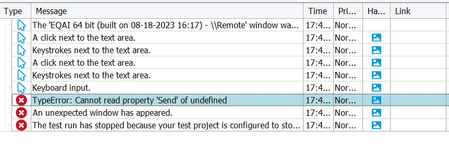
ContributionsMost RecentMost LikesSolutionsEmail notification for failed testcases in Testcomplete Hi, I'm attempting to send email notifications to the client regarding the failed test cases, along with the corresponding error logs. Unfortunately, I haven't been able to find suitable scripts for this task. I experimented with a JavaScript function as shown below and incorporated it into the Event Logger, but it hasn't yielded the desired results. If anyone with experience in implementing email notification functionality could provide some guidance or solutions, I would greatly appreciate it. function OnLogError(Sender, LogParams) { // Check if the error is related to a test case failure if ( LogParams.MessageText = "An unexpected window has appeared.") { // Prepare email parameters var recipient = "recipient@example.com"; var subject = "Test Case Failed!"; var body = "The following test case failed: " + LogParams.LogMessage; // Send the email using Office 365 SMTP server settings aqUtils.Email.Send("smtp.office365.com", 587, "your_office365_username", "your_office365_password", recipient, subject, body); } } Problem with sending an email using the aqUtils.Email.Send() method. Hi, I attempted to send an email using aqUtils.Email.Send(). Below I have mentioned that the code function OnLogError(Sender, LogParams) { // Check if the error is related to a test case failure if ( LogParams.MessageText = "An unexpected window has appeared.") { // Prepare email parameters var recipient = "recipient@example.com"; var subject = "Test Case Failed!"; var body = "The following test case failed: " + LogParams.LogMessage; // Send the email using Office 365 SMTP server settings aqUtils.Email.Send("smtp.office365.com", 587, "your_office365_username", "your_office365_password", recipient, subject, body); } } I get an error as "cannot read property 'send' of undefined." Can somebody assist me in resolving the problem I'm having?