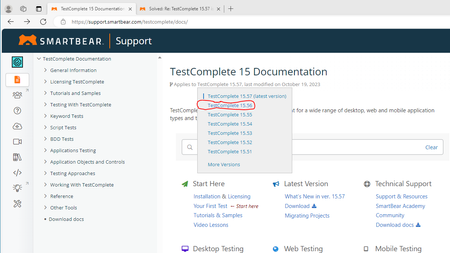
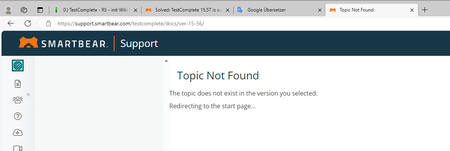
ContributionsMost RecentMost LikesSolutionsRe: Scripting Name Mapping Definitions We created a Utility script which we can use to automatically create the name mapping of our dialogs. To use the script, only the window needs to be created manually in NameMapping as a starting point. Our script then recursively reads out the children of the relevant elements and inserts them into the name mapping using AddNamedChild. Elements that are relevant to us are given a special prefix. We then save the whole thing. In a second step, the XML file is actually processed directly and the corresponding aliases are created for the elements with a prefix. It would of course be nicer if you didn't have to edit the XML file directly, but instead had appropriate commands for this. We created a feature request for this: Extended Scripting Support for Name Mapping | SmartBear Community In my opinion, this topic here would be another use case for our feature request. But I also agree with the previous commentator that the logic behind selecting the right GUI elements for name mapping and aliases is actually where the most work and value is. Re: Suppress Security Warning when running Tested Apps We have UAC turned off, but the security message still comes up when the batch file is opened normally on the network. However, the following approach works for us: We create a local batch file that directly calls the batch file located in the network. The call is then made using the following sequence: // 1. Change to the directory of the batch file on the network WshShell.CurrentDirectory = comVariableStorage.getVariable("Dir"); // 2. Call the local batch file WshShell.Run(fwConstants.BatchDir + "\\start_appl_xxx.bat"); Result: no security message appears anymore Re: Add suport for Python's match-case statement I would even like to go further and wish that all the corresponding language syntax improvements would also be made available when updating to new language versions. TestComplete version 15.56/15.58 included an update to Phyton version 3.11.5, but unfortunately it doesn't seem to have any effect on the language syntax in TestComplete. The only reference to another Phyton version, namely 3.8.10, can be found here: https://support.smartbear.com/testcomplete/docs/reference/language/python/index.html. As it appears to me, the language syntax that I have with Phyton as part of TestComplete are based on this old phyton version. Re: Confusing version information (15.55 to 15.58) Hello Pawel, this at least provides an explanation for this, but still leaves questions unanswered: 1.) In 15.56 the improvement "Updated CEF Library to version 116. " was listed, in 15.58 no longer. According to your statement, it should be included. 2.) I would have expected your explanation directly in the version information, so that it is clear to us users which version we can use and which we should not use. There are certainly users who do not always update to the latest version, but to the last or penultimate version, and if no advice is given not to use this version, this only leads to unnecessary effort on the part of the manufacturer and customer. Best regards Matthias Confusing version information (15.55 to 15.58) Hi, in the last few weeks, a relatively large number of versions have been released at short intervals, the version information of which was, in my opinion, relatively confusing. For example, version 15.58 contains parts from 15.56, but one improvement is missing, but it contains a few additional fixes. In version 15.57 there is only one sentence in it that says version 15.55 will be continued (what does that mean to version 15.56?). Best regards Matthias PS: Here is the version information I mean, as of 11/24/23, 8:30am: What's New in TestComplete 15.58 Applies to TestComplete 15.58, last modified on November 16, 2023 Below are the changes made to TestComplete 15.58 relative to the previous version of the product, TestComplete 15.57. For information on the changes made to other versions, see Version History. Improvements Added support for Mozilla Firefox ESR up to version 102.15.0. Extended support for Mozilla Firefox up to version 116. Upgraded Python to version 3.11.5. Bug fixes Fixed the issue where devices would disconnect at the beginning of test execution. Resolved the Appium server error occurring when adding or updating orders in iOS applications during playback. Addressed the issue causing incorrect log content. Fixed the problem preventing users from logging out when using an on-prem license. Resolved the issue that prevented recording and running tests when multiple screens were connected. Fixed the issue where tests worked locally but not in BitBar. Fixed the problem causing TestComplete crashes during test recording on iOS applications. Addressed issues with TestComplete Adapter. Fixed the problem with OCR Checkpoint and Action not working. Addressed the issue where Object Browser would not refresh, and the item tree would not populate when a URL was opened multiple times or navigated using the browser's back or forward buttons. Fixed the issue where Spy Object and Add Object in Name Mapping would not work on multiple screens. Resolved the issue with string value being encrypted in MDS and tcKDTest files. ------------------------------------------ What's New in TestComplete 15.57 Applies to TestComplete 15.57, last modified on November 15, 2023 Below are the changes made to TestComplete 15.57 relative to the previous version of the product, TestComplete 15.56. For information on the changes made to other versions, see Version History. About TestComplete 15.57 TestComplete version 15.57 is now released, continuing the progress from version 15.55. Check out the release notes for updates. ------------------------------------------ What's New in TestComplete 15.56 Applies to TestComplete 15.56, last modified on November 15, 2023 Below are the changes made to TestComplete 15.56 relative to the previous version of the product, TestComplete 15.55. For information on the changes made to other versions, see Version History. Improvements Added support for Mozilla Firefox ESR up to version 102.15.0. Extended support for Mozilla Firefox up to version 116. Updated CEF Library to version 116. Upgraded Python to version 3.11.5. Bug fixes Fixed the issue where devices would disconnect at the beginning of test execution. Resolved the Appium server error occurring when adding or updating orders in iOS applications during playback. Addressed the issue causing incorrect log content. Fixed the problem preventing users from logging out when using an on-prem license. Resolved the issue that prevented recording and running tests when multiple screens were connected. Fixed the issue where tests worked locally but not in BitBar. Fixed the problem causing TestComplete crashes during test recording on iOS applications. Addressed issues with TestComplete Adapter. Other improvements Updated information about licensing and migrating to SLM. ------------------------------------------ What's New in TestComplete 15.55 Applies to TestComplete 15.55, last modified on October 05, 2023 Below are the changes made to TestComplete 15.55 relative to the previous version of the product, TestComplete 15.54. For information on the changes made to other versions, see Version History. Improvements Support for Mozilla Firefox version 114. Bug fixes We resolved an issue related to error handling during parallel testing, ensuring a smoother testing experience. In versions 15.53 and 15.54, we fixed an issue concerning the ClickItem() method to ensure it functions as expected. We addressed the issue with Mobile Browser tests starting different machines. We fixed the problem related to connecting to local Appium 1.0 instances for more seamless integration. We resolved the issue with connecting to Android/iOS from TestComplete. We addressed and resolved the issue affecting the SendMail() function, ensuring that it works as intended. We resolved various issues associated with license conversion processes. Re: What exactly does “NodeJS upgrade to version 14.21.3.” mean in the 15.54 release notes Thanks for the link, but this is only a general explanaition and doesn' answer one of our product related questions ... Re: TestComplete 15.57 is out - What's New ? Hi James, thanks for the link. If I choose 15.56 from here: I come to this website: https://support.smartbear.com/testcomplete/docs/ver-15-56/ The links to all other versions are ok! Best regards Matthias What exactly does “NodeJS upgrade to version 14.21.3.” mean in the 15.54 release notes Hi, we recently updated our TestComplete versions from 15.51 and 15.52 to 15.56. In 15.54 there was the following improvement in the release notes: "NodeJS upgrade to version 14.21.3.". We use Javascript as the scripting language in TestComplete and were wondering if this update would have any positive impact on us. If so, what would they be? (we had hoped that this update would make the use of some new language elements available for classes, such as "static"). The statements about using node.js that I found here are "TestComplete does not use node.js" and "TestComplete does not use node.js like the browsers" (=> https://community.smartbear.com/t5/TestComplete-Questions/import-nodejs-modules/td-p/197402), which statement is true? The use of Javascript and Phyton is advertised because updates are carried out regularly (after it was previously advertised that no one would have to learn a new programming language specifically for test automation due to the huge number of supported scripting languages). Last point: We actually wanted to look into TestLeft because we could work in a "real" IDE with the programming language most commonly used in our company - but when we looked at the version history we noticed that the last release 15.40 was from March 2022 - the product plays no longer a role at smartbear? We would be happy to provide answers and explanations... Re: TestComplete 15.57 is out - What's New ? Why is this topic marked as solved? I don't see any relevant release information for 15.57 yet. Also, there is no longer any release information for 15.56. Was it perhaps a bad idea to update to 15.56? Re: Error Message when running QT Sample application Thank you, this works! Anonymous: Maybe an update to the documentation that adds the requirements for the QT example application makes sense. Best regards Matthias