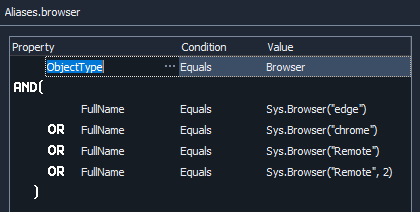
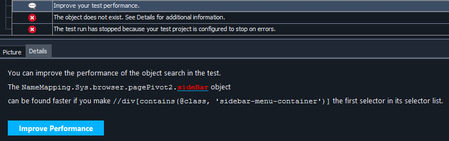
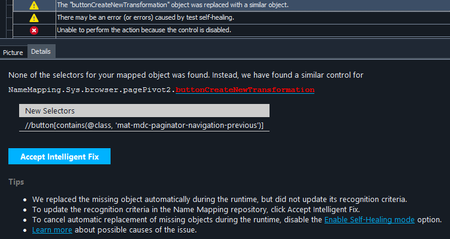
ContributionsMost RecentMost LikesSolutionsName Mapping not working on remote browser The name mapping and test cases work fine on local browsers, but would complain about page or object not found when running headless remote browsers and in parallel testing. I have the following setup for browser name mapping: For headless setup I have: server = "localhost" capabilities = { "browserName": "chrome", "headless" : "true", "screenResolution": "1920x1080", "platform" : "Headless", "record_video": "true" } Browsers.RemoteItem[server, capabilities].Run(url) Is this the correct way to work with name mapping on headless browser? Re: Name Mapping not working on remote browser On headless mode the page redirects us to authentication first, which works fine. Once we're on our website, the test begins to fail. 1. page.contentDocument and page.contentDocument.documentElement are both empty, the following line fails with "RuntimeError: Type mismatch" aqObject.CheckProperty(page.contentDocument.documentElement, "innerText", cmpContains, "Table Types") 2. FindChild method doesn't work: "You are trying to call the "Click" method or property of an object that does not exist." page.sideBar.FindChild("Id", VarToStr(featureNum)).Click() The selector it mentioned is already the first and the only one in the list, the "Improve Performance" only adds an empty selector to the head of that list. 3. When trying to click a mapped button: page.buttonCreateNewTransformation.ClickButton() Also, the new selector it suggests is wrong Re: Name Mapping not working on remote browser When running on headless mode, our website redirects us to authentication page first, which works fine. After authentication and when we're on the website for testing, it begins to fail on this line: aqObject.CheckProperty(page.contentDocument.documentElement, "innerText", cmpContains, "Table Types") saying RuntimeError: Type mismatch. The following line fails with "You are trying to call the "Click" method or property of an object that does not exist." page.sideBar.FindChild("Id", VarToStr(featureNum)).Click() It also prompts me with: "The NameMapping.Sys.browser.pagePivot2.sideBar object can be found faster if you make //div[contains(@class, 'sidebar-menu-container')] the first selector in its selector list." (This is already the first and the only selector in list, and clicking on the 'Improve Performance' only adds an empty selector before this one.) And when I tried to click on a mapped button, it shows: For which the "New Selectors" it's suggesting is wrong. On headed browsers the tests execute fine without any problem. Re: Name Mapping not working on remote browser No I'm not, currently I'm running it on local machine. Eventually we want to integrate to Jenkins and trigger the tests from there so I'm trying to set it up. I found the headless setup on this link: Creating and Running Web Tests in Headless Web Browsers With TestComplete Re: Name Mapping not working on remote browser No I'm not, currently I'm running it on local machine. Eventually we want to integrate to Jenkins and trigger the tests from there so I'm trying to set it up. I found the headless setup on this link: Creating and Running Web Tests in Headless Web Browsers With TestComplete Using Page Object as return type Trying to write a function like: def foo() -> Page: #does something return page It returns a variable of type Page in TestComplete. However, it gives me a runtime error: NameError: name 'Page' is not defined. How should I change my code?