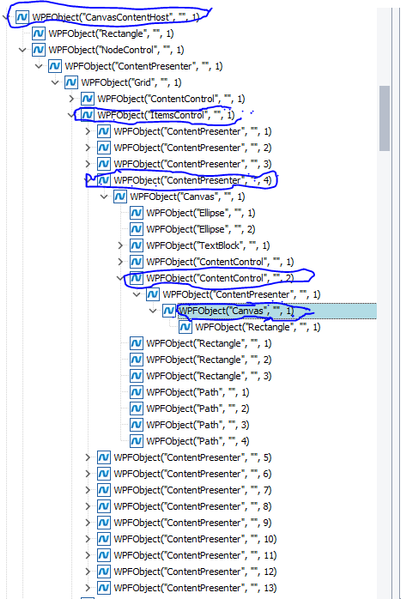
ContributionsMost RecentMost LikesSolutionsRe: Finding children of children rraghvani thank you for you answer. I have given more clarity to the question now. I have already used findAll and FindAllChildren Methods but it is not working. Seems as if it is not selecting everything Finding children of children Hello. So I have a root(Called CanvasContentHost, see the image, i highlighted it). Under this root there many children with the same name and same properties, I want the child called ItemsControl and its highlighted in the image. Under ItemsControl there many children with same properties(These Children are WPFObject("ContentPresenter", "", x) where x= 0, 1, ..., 13). Under each child(WPFObject("ContentPresenter", "", x)), I want to select a child called WPFObject("ContentControl", "", 2), see the image for clarity. Under each of these children, i want to select a child WPFObject("Canvas", "", ), see image.I want to count the number of Children Under each of these children. For some there is 1 child and others there is 3. NB in the properties Name is the only thing that make these objects unique and the Name : CanvasContentHost, Name: WPFObject("ContentPresenter", "", x), Name: WPFObject("ContentControl", "", 2), etc below is my code: var canvas = Aliases.AutomationExpert.Root.root.SplitPane.MiddleWnd.PhysicalView.PartDiagramControl.CanvasContentHost; var rack_inrackViewer = canvas.FindChild(['ClrClassName', 'ClrFullClassName', 'WPFControlOrdinalNo'], ['ItemsControl', 'System.Windows.Controls.ItemsControl', 1], 5); var allSlots = rack_inrackViewer.FindAllChildren("Name", 'WPFObject("ContentControl", "", 2)', 5); var canvasTwo = allSlots.FindAllChildren("Name", 'WPFObject("Canvas", "", 1)', 5); for (let i in canvasTwo; i < canvasTwo.length; i++){ if (i.ChildrenCount=== 3){ Log.Message("slot" +" " + i +" " + "is an ethernet slot"); } else { Log.Message("slot" +" " + i +" " + "is not an ethernet slot"); } }