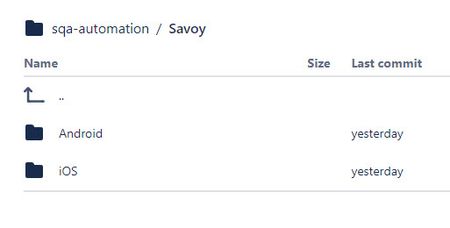
ContributionsMost RecentMost LikesSolutionsTC running on Windows within Parallels VM on MackBook Pro M1 Is anyone else running TestComplete on a MacBook M1 with the Parallels VM with Windows running in it? I have loaded the Appium Server on the MacOS cmd-line and tried the Appium Server GUI via Windows, that actually runs on the MacOS. I am not able to connect to my iPad that is running and attached via USB to the MacBook but linked to the Windows instance. I have followed the SmartBear with Appium Server documents and procedures a couple of times and with the Support people with no change. I am running a Local BitBar link instance to the remote device via the base IP 127.0.0.1 and MacBook IP. I have tried both the Appium level 1.x and 2.x with no difference. The parameters I have used within the JSON part are 'automationName-UICTest driver', 'deviceName-Apple iPad' and 'platformName- iOS'. Tried using the UDID, what showed up as the serial number on MacBook devices and the properties of the iPad, which was different. Neither worked. We (SmartBear Support and I) are researching and checking setup along with the errors experienced. As a side note: I have been running this way on my Windows laptop with TestComplete to a USB attached Android tablet for months. I thank anyone and everyone that has experience or suggestions. Thank you. Re: TC Single Repo with 2 folders - 1 for Android and 1 for iOS Exactly the easiest way to do that. I'm doing that now and it works so far. Thank you, Marsha_R. Best Regards, Michael TC Single Repo with 2 folders - 1 for Android and 1 for iOS I have one repository created then a folder for project name then 2 folders for each platform, Android and iOS. <main repo> / <project name folder> / then 2 folders for each platform 'Android' and 'iOS': I have been using and updating the Android part of the repository via Windows laptop and able to create and work 125 keyword tests. It updates and loads all its work within the Android folder. For the iOS part = I'm using a MacBook with a Parallels VM with a licensed Windows inside. I have the repository referenced, TC and everything I need installed, etc. per Smartbear documentation. I want to create a Project-Suite and Project that will work within the iOS folder or platform. BUT I want to copy or clone the same 125 keyword tests from the Android folder to the iOS folder so I can use them in iOS with an update to the JSON parameters. I tried to perform the above within the local repository on each laptop, native Windows and VM of Windows, with conflicts and not the results I want. I have reverted back to a good snapshot of the repository, checked out. I'm trying to either delete or stash the branches that caused the conflicts and start fresh. I am using Sourcetree local to our Bitbucket Repository site. Does anyone else have this setup or knowledge of the above? Any guidance and help would be appreciated very much. Thank you, Michael Solved