rstellyOccasional ContributorJoined 2 years ago9 Posts3 LikesLikes received2 SolutionsView All Badges
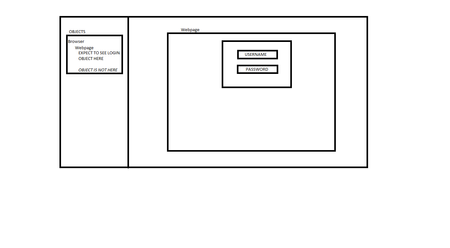
ContributionsMost RecentMost LikesSolutionsRe: Login popup not mapped or detected Rolling back to 15.46.9.7 resolved this problem Re: Login popup not mapped or detected I am not able to share a screenshot but here is a diagram summarizing the issue Re: Login popup not mapped or detected Sorry, version is 15.49.6.7 Read through that page several times. Login popup not mapped or detected Using version 49.6.7 of Testcomplete Login popup from chrome is not mapped and cannot be detected by the page mapping tool when I try to add a new object. If I pass the login manually and then go to leave the page, the "Are you sure you want to leave" popup is detected and mapped as expected. SolvedRe: UI (browser) testing via Gitlab runner Thank you. It seems that the potential solution is that my session creator command was using the /UseActiveSession flag. I think if I get rid of it, my problem should be solved Re: UI (browser) testing via Gitlab runner So is there a workaround? Having to start a new remote desktop session everytime I want to run a gitlab pipeline is not a viable solution. Re: UI (browser) testing via Gitlab runner Ok, that makes sense. Will that ruin the ability to access the UI and if it does how can I prevent this? Re: UI (browser) testing via Gitlab runner I am running the test using Sessioncreator. I want to know if there is a way to run tests using the session that was created in a previous test execution. UI (browser) testing via Gitlab runner I am able to run UI tests from a Gitlab runner, but it disconnects from the remote desktop - which is expected (https://support.smartbear.com/testcomplete/docs/testing-with/running/via-rdp/keeping-computer-unlocked.html) I am wondering if there is anyway to re-target that session that was created and continue to run tests from that session. Solved