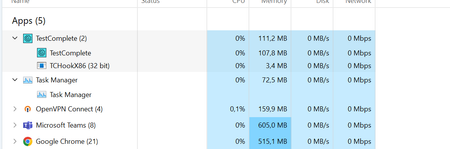
ContributionsMost RecentMost LikesSolutionsRe: TestComplete won't recognize objects. I've enabled the extension in the browser however in regards to the other extensions that appear underneath the app on task manager, I've no clue how to ensure they're installed and working. But they don't show Re: TestComplete won't recognize objects. Not sure about all four processes. Yes I am using TestComplete x64. How do I confirm I have admin permissions? Re: TestComplete won't recognize objects. I appreciate the references to the documentation. I've been over it all of it. TWICE. With regards to what browser I'm using and Devices. I'm using a MSI with a 64-bit operating system, x64-based processor with a 11th Gen Intel(R) Core(TM) i7-1195G7 @ 2.90GHz 2.92 GHz processor with Windows 11 Enterprise TestComplete version 15.50.7 Chrome Version 112.0.5615.137 (Official Build) (64-bit) Microsoft Edge Version 112.0.1722.48 (Official build) (64-bit) Sorry I missed that question. (yes it is installed) Re: TestComplete won't recognize objects. Nothing, which is the weird thing. Like we'll go for lunch having recorded simple tests. Login tests for example and make it loop through 5 profiles, and come back to an error, whereby the test wont even do the first step of clicking a button. We've used call object functions, tried if statements. Nothing seems to work. I've checked the patches and downloads for different browsers and Devices. I just don't know what to look for since I've not had that much experience with the application. Re: TestComplete won't recognize objects. No I cannot I've tried to use the object finder, it also doesn't work nothing works after the application starts Bugg. Even old test don't work as the Keyword tests don't recognize objects. Re: Smartbear Extention.Yes we do have it. We’ve used it on multiple occasions. We’ve installed and uninstalled it, multiple times. We encountered problems with uninstalling it. It doesn’t let you uninstall it without uninstalling TestComplete as well so we have lost progress as a consequence. It works for a couple of tests after reinstallation. Then after 4-5 tests/projects it just Crashes and glitches then just doesn’t work at all. We’ve used it on different devices and Laptops, PCs and the same problems pop up. Sent from Mail<> for Windows Disclaimer Any views or opinions in this message are those of the author and do not necessarily represent Rain (Pty) Ltd (Rain). No reliance may be placed on this message without written confirmation of its contents from an authorised representative. The information contained in this communication from the sender is confidential and privileged. It is intended solely for use by the recipient and others authorized to receive it. If you are not the recipient, you are hereby notified that any disclosure, copying, distribution or taking action in relation of the contents of this information is strictly prohibited and may be unlawful. If you receive this email in error, please notify the sender immediately.Re: Smartbear Extention. We're using version 15.50.3.7 it's currently the latest and its buggy. Could it be a device issue or....? We have tried that but it does not recognize the object it just highlights the entire Browser not individual objects. Smartbear Extention. TestComplete won't recognize Objects in the the browser for Keyword tests, someone said to use the repair tool and have the Application fix any problems, which I did and it worked for like 2 hours I then it gave the same problem when recording tests, even my colleague at work has had the same problem with the application. We've uninstalled it and reinstalled it 4 times each times losing progress, cause apparently the issue is the extension and you can't delete the extension with the Application still installed on your device. What is the problem and how can we fix it. TestComplete won't recognize objects. When recording keyword test TestComplete wont recognize the object I'm hovering over. It'll just highlight the entire perimeter of the screen and press nothing. Just wondering what could be cause this, is it a Hardware issue, cause most times when I run my tests my Laptop does stutter and Jam up. I did a follow up with our IT department to see if I need mora RAM or a better CPU, I then found out that I have 32 Gs of RAM, with a very capable CPU. I have exhausted all solutions I could think of. Any ideas as to how I can resolve this issue. Events on TestComplete We use Keywords tests for automation on Website testing. Is it possible to use events when using Keyword testing or do you need to script all the tests. For example we have a test whereby we have a pop up that is generated randomly on SIT we'd like to use the events functionality to deal with that pop up. If we can't use Event handling is there any other tool that might help with the pop up?