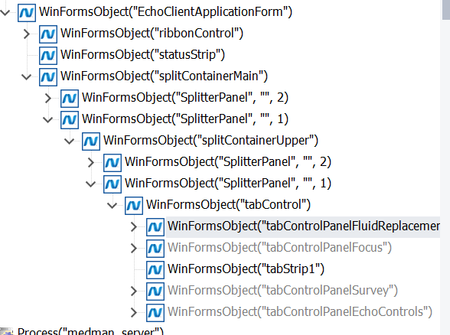
ContributionsMost RecentMost LikesSolutionsRe: Click on the selected item of a tabstrip control in WinForms. Sure thanks for the clarification. I think they are being added dynamically. Re: Click on the selected item of a tabstrip control in WinForms. For the first question, for some reason the tab is not highlighted but the whole container below the tab control highlighted. For the second, If I am on an other tab other than Survey, it complains "Unable to find object tabControl("tabControlPanelSurvey")." Re: Click on the selected item of a tabstrip control in WinForms. Thanks I tried something like this but nothing works.. It says "Unable to find the object ClickItem("tabControlPanelSurvey", 2)" Sys.Process("EchoClientUtility").WinFormsObject("EchoClientApplicationForm").WinFormsObject("splitContainerMain").WinFormsObject("SplitterPanel", "", 1).WinFormsObject("splitContainerUpper").WinFormsObject("SplitterPanel", "", 1).WinFormsObject("tabControl").ClickItem("tabControlPanelSurvey",2); I am having to use not a good approach (like the default script it generates after keyword test), Aliases.EchoClientUtility.EchoClientApplicationForm.splitContainerMain.SplitterPanel.splitContainerUpper.SplitterPanel2.tabControl.tabStrip1.Click(85, 18); Re: Click on the selected item of a tabstrip control in WinForms. Yes it shows the Name is WindFormsObject("tabstrip1") Re: Click on the selected item of a tabstrip control in WinForms. I recorded a keyword test and tried all the options. When I say "Aliases.EchoClientUtility.EchoClientApplicationForm.splitContainerMain.SplitterPanel.splitContainerUpper.SplitterPanel2.tabControl.tabControlPanelSurvey.Click();" "Aliases.EchoClientUtility.EchoClientApplicationForm.splitContainerMain.SplitterPanel.splitContainerUpper.SplitterPanel2.tabControl.Click("tabControlPanelSurvey"); It says the object tabControlPanelSurvey does not exist. Re: Click on the selected item of a tabstrip control in WinForms. Hi its correct until tabStrip1. "tabControlPanelSurvey" is the name of one of the tabs that I want to click on the tabStrip1. Click on the selected item of a tabstrip control in WinForms. I am trying to automate a winforms application and when I use the object spy, it says its a tab strip control name is tabstrip1. How do I click/select the different tabs based on the name? I try something like this but it doesn't work //Aliases.EchoClientUtility.EchoClientApplicationForm.splitContainerMain.SplitterPanel.splitContainerUpper.SplitterPanel2.tabControl.tabStrip1.Click(178, 14); I don't want 178,14, I want to click based on the name. //Aliases.EchoClientUtility.EchoClientApplicationForm.splitContainerMain.SplitterPanel.splitContainerUpper.SplitterPanel2.tabControl.WinFormsObject("tabControlPanelSurvey") Aliases.EchoClientUtility.EchoClientApplicationForm.splitContainerMain.SplitterPanel.splitContainerUpper.SplitterPanel2.tabControl.tabStrip1.Click("tabControlPanelSurvey");