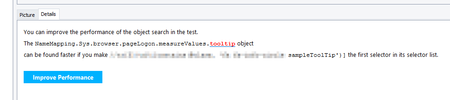
ContributionsMost RecentMost LikesSolutionsRe: Issue Report – Browser Restarts After Each Action See this topic : https://community.smartbear.com/discussions/testcomplete-questions/chrome-minimizes-and-reopens-every-on-screen-action/277173 Re: Chrome minimizes and reopens every on screen action Don't get too excited too soon :D I also opened a ticket and received a response today (08-28) saying : “A permanent fix is included in the upcoming 15.77 release, which is planned for early next week". Re: Chrome minimizes and reopens every on screen action We are experiencing the same issue with TestComplete 15.76 and Chrome 139. Is there an earlier version of TestComplete where the problem won’t occur despite using Chrome 139? Re: TestExecute 15.73 not working: 'Parent object not found' Also the same problem from the 15.72 version Still not fixed in the 15.75 Has a support request been created? Re: How to speed up checking for non-existence of objects in TestComplete? I got round this problem by using the "WaitAliasChild" method. (There is a optional waitTime as parameter) Check the documentation : https://support.smartbear.com/testcomplete/docs/reference/test-objects/members/common-for-all/waitaliaschild-method.html if(Aliases.yourAliasesName.WaitAliasChild("yourElement").Exists){ doSomething(); } Regards Re: Selecting item from drop down list Any news about this ? Since a couple of day, TC has been iterating over the list, finding the right one but not selecting it. Fortunately, I workaround by using the "keys" action. Regards Bug with the "improve performance" message ? Hello, In the test logs, I always get a message : It's strange because this selector is already the only one in the nameMapping. When I click on the "Improve Performance" button, An "empty" line is added on the nameMapping But when I replay the test, the same "improve performance" message will be again displayed. Is-it normal ? Thank you. Regards How to manually fire an event Hello, For a web application, I need to set specific dates in multiple "Date Picker" components. Unfortunately, the datePicker doesn't allow to directly set the date So I need to write a logic to click on the date picker, then select the year, then select the month, select the day.... I would like to avoid this logic by manually set the value on the object and then manually fire the Event using the method "dispatchEvent' For example in a javascript script : Aliases.browser.mainPage.PlannerFrame.textboxDatenavDatepickerInput.value = '01/10/2022'; Aliases.browser.mainPage.PlannerFrame.textboxDatenavDatepickerInput.dispatchEvent(new Event('change')); But the script doesn't know the "Event". How can create en Event ? Is there another way to do it ? Thank you in advance Regards