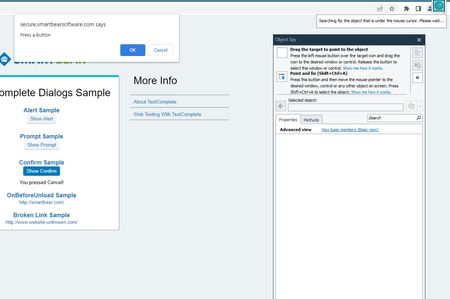
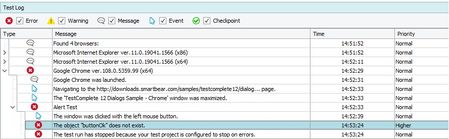
ContributionsMost RecentMost LikesSolutionsRe: Problem with the webdialogs example. I'd like to check for known issues. Is there a page where I can check the details of known issues? For example, processing status, expected end date, etc. Thanks for your help. Re: How to run more than 1 project suite with test execute Hi TK6666 Want to run multiple projects in one project suite? If so, see /run in the link below. https://support.smartbear.com/testexecute/docs/running/automating/command-line/command-line.html "No other arguments specified" Want to run multiple project suites? Batch files allow you to run multiple project suites sequentially. ex) test.bat cd C:\Program Files (x86)\SmartBear\TestExecute 15\x64\Bin call TestExecute.exe C:\work\test1.pjs /run /project:project_name /exit call TestExecute.exe C:\work\test2.pjs /run /project:project_name /exit call TestExecute.exe C:\work\test3.pjs /run /project:project_name /exit Hope this helps. Re: Problem with the webdialogs example. Thank you for your help Of course, the extension is already installed. Normally, Testcomplete has no problem recognizing the object, but it does not recognize it in the presence of a dialog. When there is a dialog, the chrome node in the object browser does not expand and is stuck. By the way, if there is no dialog, the object browser is fine. iexplore doesn't have this problem. Version TestComplete : 15.46.9.7 x64 Chrome : 108.0.5359.99 (Official Build) (64-bit) Edge : 108.0.1462.42 (Official build) (64-bit) SmartBear Test Extension : 14.0.0 Thanks Problem with the webdialogs example. Hello everyone I downloaded the official example for the dialog test and ran the test. "TestComplete1546_Samples.exe" However, in the official example, an error occurred as shown in the screenshot below. The dialog was not recognized in Chrome and Edge. What should I do to solve this problem? please help Thanks!