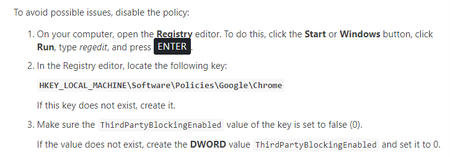
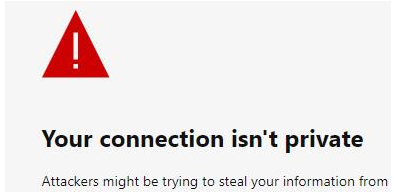
ContributionsMost RecentMost LikesSolutionsRe: How to access elements at "Your connection is not private" Chrome page? Hi Kitt I have tried below solutions as per link shared by you: For the issue of bypassing the "connection is not private" page, you can try one of the following: Click a blank section of the denial page. Using your keyboard, type "thisisunsafe". This will add the website to a safe list, where you should not be prompted again OR This option will only work for requests to localhost over HTTP. In the Chrome address bar, type “chrome://flags/#allow-insecure-localhost“ Select the “Enable” link. The first option works temporary , if I clear cache , it starts showing up again The second option does not work for me , I enabled the below option : but noting happened. Is there any other way to by pass your connection is not private Thanks, Re: How to handle the SSL certificate issue in test complete Hi rraghvani I have tried below solutions as per link shared by you: For the issue of bypassing the "connection is not private" page, you can try one of the following: Click a blank section of the denial page. Using your keyboard, type "thisisunsafe". This will add the website to a safe list, where you should not be prompted again OR This option will only work for requests to localhost over HTTP. In the Chrome address bar, type “chrome://flags/#allow-insecure-localhost“ Select the “Enable” link. The first option works temporary , if I clear cache , it starts showing up again The second option does not work for me , I enabled the below option : but noting happened. Thanks, Neelam Re: How to handle the SSL certificate issue in test complete Hi rraghvani , Is there any solution which I can handle via code? Thanks, Neelam Re: How to handle the SSL certificate issue in test complete Hi DWalsh As Intelligent Quality is quite vast. Could you please explain me in detail as how to install this and how it will work? Yes I am using paid version. Thanks, Neelam Re: How to handle the SSL certificate issue in test complete Hi rraghvani I tried with chrome option under Possible Issues with web Testing but i am not able to find below option on my machine : There is not option of ThirdPartyBlockingEnabled. It would be great if you can help me out? Thanks, Neelam Rajput Re: How to handle the SSL certificate issue in test complete Hi rraghvani , Is there any solution to it? I will be referring Possible Issues of With Web Testing. Thanks, Neelam How to handle the SSL certificate issue in test complete Hi Team, I am facing below issue : Whenever I run my URL , I get below error and not able to understand as how to handle below error. Test complete is not able to handle below error. Is there any way to handle below error? After clicking on advanced only I can navigate to expected URL. Thanks in Advance I have integrated TestComplete with Azure devops and while running pipeline job getting below error I have integrated TestComplete with Azure devops and while running pipeline job getting below error : Failed to get a list of tests from the "C:\agent\_work\5\s\Aware\AWARE.pjs" file due to the following error: Unable to open the project "C:\agent\_work\5\s\Aware\AWARE.pjs": The 'C:\agent\_work\5\s\Aware\Stores\Stores.tcStores' file does not exist. Copyright (c) Microsoft Corporation. All rights reserved. vstest.console.exe "C:\agent\_work\5\s\Aware\AWARE.pjs" /TestCaseFilter:"Name=AWARE" /Settings:"C:\agent\_work\_temp\isfx5xnf2oe.tmp.runsettings" /Logger:"trx" /TestAdapterPath:"C:\agent\_work\5\s" Starting test execution, please wait... A total of 1 test files matched the specified pattern. ##[error]Failed to get a list of tests from the "C:\agent\_work\5\s\Aware\AWARE.pjs" file due to the following error: Unable to open the project "C:\agent\_work\5\s\Aware\AWARE.pjs": The 'C:\agent\_work\5\s\Aware\Stores\Stores.tcStores' file does not exist. ##[error]You can also see the silent mode log at "C:\Users\nicholassaulinoEUA\AppData\Roaming\SmartBear\TestExecute\15.0\Silent.log" which may contain more details. No test matches the given testcase filter `Name=AWARE` in C:\agent\_work\5\s\Aware\AWARE.pjs Results File: C:\agent\_work\_temp\TestResults\nicholassaulinoEUA_AWS-TSTEXEP02_2023-03-08_10_45_53.trx ##[error]Test Run Failed. Vstest.console.exe exited with code 1. **************** Completed test execution ********************* Test results files: C:\agent\_work\_temp\TestResults\-TSTEXEP02_2023-03-08_10_45_53.trx No Result Found to Publish 'C:\agent\_work\_temp\TestResults\test-TSTEXEP02_2023-03-08_10_45_53.trx'. Created test run: 1493891 Publishing test results: 0 Publishing test results to test run '1493891'. TestResults To Publish 0, Test run id:1493891 Published test results: 0 Publishing Attachments: 1 Execution Result Code 1 is non zero, checking for failed results Completed TestExecution Model... ##[warning]Vstest failed with error. Check logs for failures. There might be failed tests. ##[error]Error: The process 'C:\agent\_work\_tasks\VSTest_ef087383-ee5e-42c7-9a53-ab56c98420f9\2.215.0\Modules\DTAExecutionHost.exe' failed with exit code 1 ##[error]Vstest failed with error. Check logs for failures. There might be failed tests. Finishing: SmokeTest I tried it when my test complete was closed. POM Implementation Re: POM Implementation Kitt : I have been using below approach but I have observed that most of times it becomes cumbersome in script when we have so many object identifiers and it is bit difficult for someone to read the object as pageAware NameMapping.Sys.browser.pageAware2.imageAmdawaaaach5baeaaaaalaaaaaa.Click(); and for I am using BDD approach where I will use these small functions and call them in step definitions.