DBowermanOccasional ContributorJoined 3 years ago18 Posts5 LikesLikes received2 SolutionsView All Badges
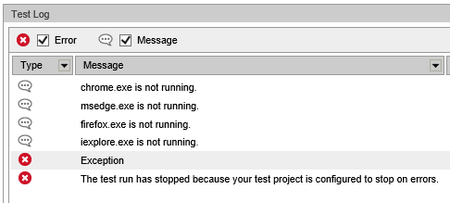
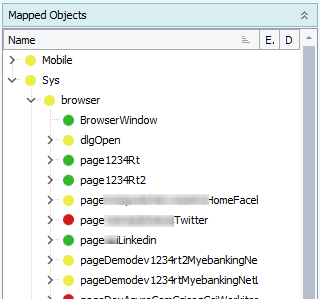
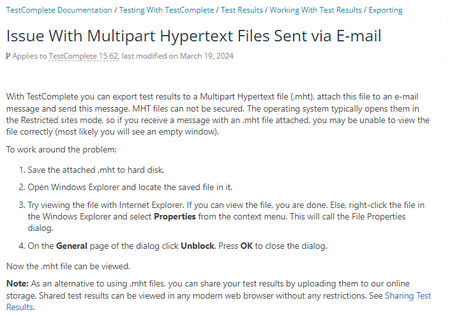
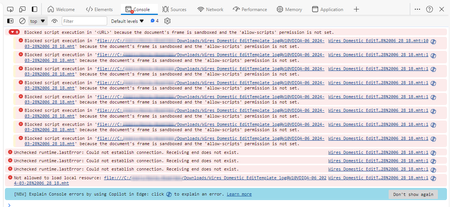
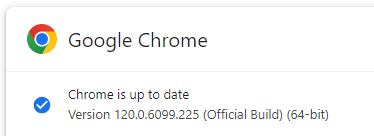
ContributionsMost RecentMost LikesSolutionsRe: General Exception raised within Run Browser action I have been dealing with this same issue for quite some time with our Web-based pipelines. With each new TC/TE release, the issue gets worse. I currently have a case open with SmartBear/TestComplete and they cannot figure it out. I have suggested that they look into the Run Browser process for a bug. Here is my process for launching my site using Chrome. I had to separate out the process of launching the browser from entering my URL because of the Exception error. It worked for a while, but now I keep getting more and more random Exception errors. We run TE on a VM. I have noticed that when the exception errors occur, there is aways a "TestComplete Chrome Host (32 bit)" process hung in the Task Manager so that's why I think it's related to the Run Browser process. I've reported this as well, but again they have not found a solution. We are running TE version 15.68 and Chrome version 129.0.6668.101 (our IT dept controls Chrome updates so we cannot downgrade) Re: Edge browser compatibility Have a similar issue with Chrome. Started with the latest TestComplete release of version 15.63. Downgraded to version 15.62, but still having issues with "Exception" error when the Run Browser option is used to launch browser. Chrome version is 124.0.x. We don't have the ability to downgrade version on Chrome so we are just stuck. Re: Test case randomly fails with "parent object was not found" All objects within NameMapping have been added automatically by the recording process. Until we started experiencing the random failures, I spent very little time reviewing/updating information in NameMapping. I have a case already opened with SmartBear trying to figure out why NameMapping is creating all these different paths and how to correct. It's a mess for sure. I'll review the information you provide and see if I can get things cleaned up. Thank you for responding. Test case randomly fails with "parent object was not found" The same automation process can be run repeatedly with several runs completing successfully, but then the same process randomly fails with a "Parent object was not found". I need to understand why this is happening and how to correct. I'm currently on version 15.62.2.7, but it seems to happen regardless of what version I'm using. I have tried editing, deleting, and re-recording the object. I have also tried adding, deleting, and modifiy the XPath information of the object and the parent. None of the changes have corrected the random failure. I've submit a case on this, but if anyone has any suggestions on how to fix/correct it would be greatly appreciated. Thank you. Re: mht files opening in blank Edge browser page after Edge updated to version 123.0.2420.65 How would I check or know that? Re: mht files opening in blank Edge browser page after Edge updated to version 123.0.2420.65 We can view logs generated locally. However, we cannot view logs generated through an Azure pipeline with automation run against a VM. We have to "unblock" each report once it's downloaded. Re: mht files opening in blank Edge browser page after Edge updated to version 123.0.2420.65 My co-worker (dhundley found this information. Very annoying that this must be done for every log reviewed. Permament work around would require a security change that our company is probably not going to allow. https://support.smartbear.com/testcomplete/docs/testing-with/log/working-with/exporting/issue-with-mht.html mht files opening in blank Edge browser page after Edge updated to version 123.0.2420.65 After Edge updated to version 123 (123.0.2420.65) today, mht file opens in a blank Edge browser page. Error that reads "Blocked script execution in '<URL>' because the document's frame is sandboxed and the 'allow-scripts' permission is not set." is received (developer tools) Prior edge version (122.0.2365.92) was used moments before Edge was updated and mht opened as expected so this seems like a new issue with that latest Edge reversion. We have tried various combinations with the "Disable opening mhtml in IE mode from web" setting and a few others trying to find a work around, but had no success is resolving the issue. SolvedRe: The tested window (or control) has been deleted I have been using mutiple monitors for years. Have not had an issue until now. I have a case opened with TC regarding this issue. I'll ask. Re: The tested window (or control) has been deleted I had upgraded to 15.59 on Tuesday (1/16) and it was working great! I had no issue with my Web-based test cases running on this version, until today. Today, I'm not getting "The tested window (or control) has been deleted " error. Nothing changed except that I shut down my PC over night. I'm thinking this might be a "Chrome/TestComplete compatibility issue when using multiple monitor" issue. Today, Chrome version is 120.0.6099.225 (not sure what it was yesteday, because we have no control over when a new version is released/downloaded, but based on the above post the latest version was release yesterday). I'm assuming Chrome was updated when I shut down my PC overnight. Here is what I seeing: Using TC version 15.59, Chrome version 120.0.6099.225, and having mulitiple monitors enabled, I get the "tested window (or control) has been deleted) error. However, if configure my PC to only use one monitor the test case complete successfully.