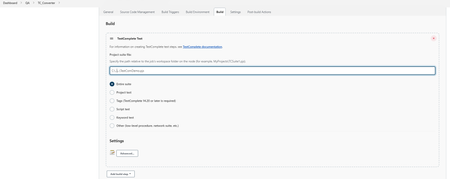
ContributionsMost RecentMost LikesSolutionsRunning TC web tests on linux & mac Are there any clear steps for running testcomplete web tests on linux & mac using jenkins? I know we need to use crossbrowsertest & tests could only be run & not created. But no clear steps or info on how to do that in documentation. Re: Not able to run tests on jenkins I tried updating login at active session step but it didnt resolve the issue. FYI, I am providing user login for node under which jenkins is running. Also I am downloading repo(SCM) in this jenkins job & that is working fine. Re: Not able to run tests on jenkins Ok. I did try running the following command in cmdline (TestComplete.exe "C:\..\..\TestComDemo.pjs" /run /SilentMode /ForceConversion /ns /exit) & it ran the tests without issue. I think the issue is in jenkins setup. Here are some screenshots of jenkins freestyle job. Re: Not able to run tests on jenkins I did not marked it as resolved, Issue is still there. Re: Not able to run tests on jenkins Hi Nick, I am not seeing any error code. it keeps running for hours without doing anything. Here is the console output [TestComplete] The test execution started (TestComDemo). [TestComplete] Found TestComplete/TestExecute installations: Type: TC, Version: 15.20.341.7, Path: "C..\bin\TestComplete.exe" Type: TE, Version: 15.31.374.11, Path: "C..\bin\TestExecute.exe" Type: TELite, Version: 15.31.374.50, Path: "C..\bin\TestExecuteLite.exe" [TestComplete] Selected TestComplete/TestExecute installation: Type: TC, Version: 15.20.341.7, Path: "C..\bin\TestComplete.exe" [TestComplete] [WARNING] The node is connected via Java Web Start (JNLP). In this mode, the "Run interactive user session" property of the TestComplete Test step is ignored. TestComplete (or TestExecute) will work in the current user session. [TestComplete] Launching the test runner. $ '"C..\bin\SessionCreator.exe"' ExecuteProcess '/c:""C..\bin\TestComplete.exe"" "C..\testComplete\Converter\TestComDemo.pjs" /run /SilentMode /ForceConversion /ns /exit "/ExportLog:C..\TC_Converter\1649740744075.tclogx" "/ExportLog:C..\TC_Converter\1649740744075.htmlx" "/ErrorLog:C..\TC_Converter\1649740744075.txt" /JenkinsTCPluginVersion:2.8.1' [TestComplete] [WARNING] Unable to publish test results (xml data is empty). Build was aborted Not able to run tests on jenkins Created a new jenkins job & tried to run testcomplete tests, but it keeps getting stuck at launching stage [TestComplete] Launching the test runner. $ '"C:\..\15\x64\bin\SessionCreator.exe"' ExecuteProcess '/c:""C:\..\\bin\TestComplete.exe"" "C:...\...\..\testComplete\Converter\TestComDemo.pjs" /run /SilentMode /ForceConversion /ns /exit "/ExportLog:C:\..\\1649716890761.tclogx" "/ExportLog:C:\..\1649716890761.htmlx" "/ErrorLog:C:\..\\1649716890761.txt" /JenkinsTCPluginVersion:2.8.1' couple of things i am seeing in console output - its able to locate version of testcomplete & testexecute - getting warning-[TestComplete] [WARNING] The node is connected via Java Web Start (JNLP). In this mode, the "Run interactive user session" property of the TestComplete Test step is ignored. Solved