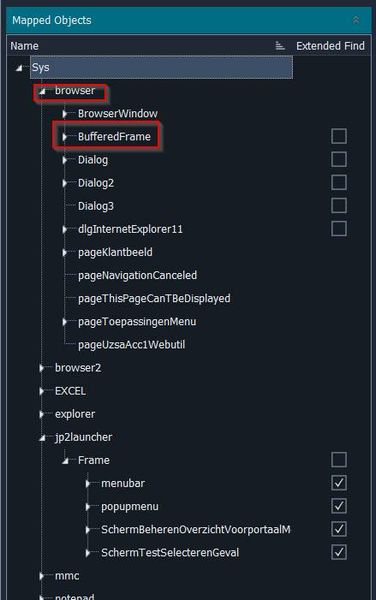
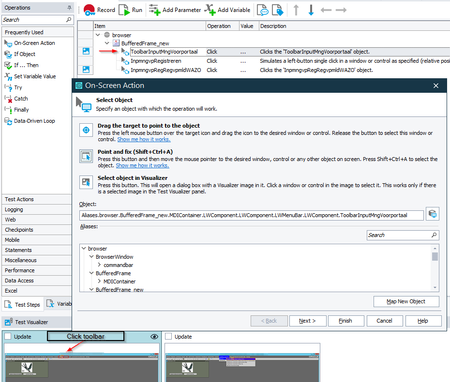
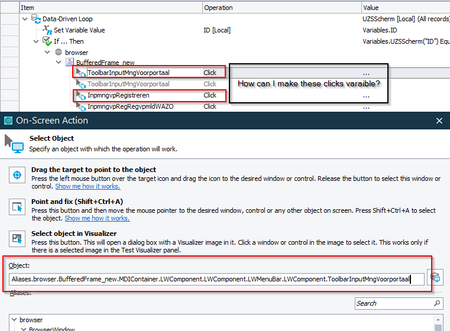
ContributionsMost RecentMost LikesSolutionsRe: NameMapping issue with Java application started from Internet explorer. Yes, I've tried and did not get it to work properly. And in the old situation we have made a lot of changes to the names of the object, we've renamed the most NameMapping objects to meaning fulnames. Re: NameMapping issue with Java application started from Internet explorer. Thank you for your help, but this is not a sullotion for us. Re: NameMapping issue with Java application started from Internet explorer. Hi Rraghvani, Thank you for your input, but that is not a solution for us. This will be the same amount of work or maybe more than record all our testscripts again. NameMapping issue with Java application started from Internet explorer. My organization will decommision Internet Explorer at the end of this year. Our TestComplete scripts are configured to test a Java application started from Internet explorer (= current situation). So the new situation, the Java application will be started using JavaWebStart. Currently we start/run our test object (which is a Java client GUI) from Internet Explorer and all the NameMapping objects are recorded under /Sys/Browser/BufferFrame/.. When we use Java Web Start to start/run the Java client GUI, then all the NameMapping objects are recorded under /Sys/jp2Launcher/Frame/.. So when we open the Java client GUI with Java Web Start, all our tests previously recorded are now useless. SmartBear support don't knows how to solve this and recommends to record all our tests again. Does someone in this community has an idea how we can solve this? Re: Send Test Results to Azure DevOps W/O pipeline setup? I do not understand this solution and I have a similar issue. My company does not want to use Azure Devops to automatically start the TestComplete test scripts, we use another tool to start the TestComplete test scripts using several Execution plans. But I want to know if it’s possible to show the TestComplete logs in an Azure Devops Dashboard and how do I do this? Re: Data-driven Keyword testing, Selecting dropdown menu in fat client Thank you very much for your help, this solved the issue. I've created a Keyword test 'Run code snippet' with the eval(variable) command And this code snippet, now executes the Object click. Re: Data-driven Keyword testing, Selecting dropdown menu in fat client Hi Marsha, Thank you for your help so far, I hope that the information provided below, will show you what I want to make datadriven. A Keyword test example how to open a screen in the application: Step 1 Object: Aliases.browser.BufferedFrame_new.MDIContainer.LWComponent.LWComponent.LWMenuBar.LWComponent.ToolbarInputMngVoorportaal Snapshot click toolbar: Step 2 Object: Aliases.browser.BufferedFrame_new.LWPopupMenu.LWComponent.InpmngvpRegistreren Snapshot click first dropdown menu item: Step 3 Object: Aliases.browser.BufferedFrame_new.LWPopupMenu.LWComponent.InpmngvpRegRegvpmldWAZO Snapshot click second dropdown menu item to open screen: Re: Data-driven Keyword testing, Selecting dropdown menu in fat client I want to click on the dropdown menu items, while reading the menu items from a list (= Excel file). This should be done in order, because every menu item can contain a new dropdown list, before the menu item will open a screen. It works when I record the test and execute this test, but I want to use Datadriven test to open all screens of the application. Hopefully this is possible in Testcomplete... Data-driven Keyword testing, Selecting dropdown menu in fat client Is it possible to make a Data-driven Keyword test, that will go through my fat client dropdown menu with clicks to open the client Windows? I've recorded the clicks and I have a name mapping for the dropdown menu items, but I don't know how I can make these Object clicks variable? Solved